Pull requests
The Pull requests page shows every checked pull request, across your repositories: whether it passed, which rules blocked it, and where. The results come from groundrule check --upload in your CI, and your code stays there. They can also come from Groundrule itself, for repositories an admin turned on for hosted checks.
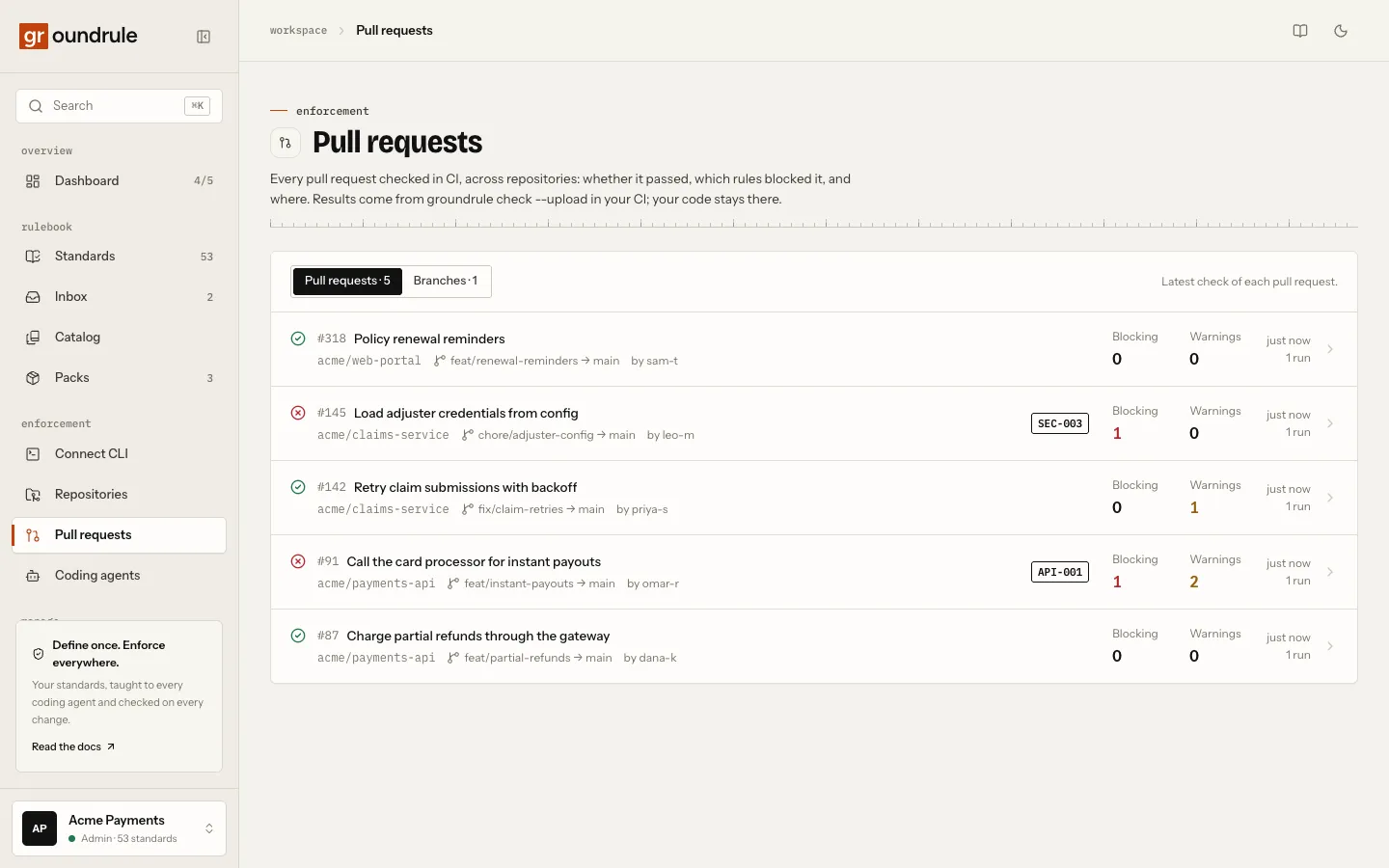
By default, Groundrule doesn’t run these checks itself. Your CI runs groundrule check as before, and uploads the result. This page explains how to set that up, what you see, and what is sent and kept.
Set it up with the GitHub Action
Section titled “Set it up with the GitHub Action”You need a token, a repository secret, and one workflow.
-
Create a token. Open Settings → API tokens, choose New token, and keep Upload scans and check results checked. Choose Create token and copy it. See API tokens.
-
Save it as a secret. In GitHub, open the repository’s Settings → Secrets and variables → Actions → New repository secret, and name it
GROUNDRULE_TOKEN. An organization secret works for many repositories. -
Add the workflow. Create
.github/workflows/groundrule.yml:name: Groundruleon:pull_request:push:branches: [main]permissions:contents: readsecurity-events: writejobs:groundrule:runs-on: ubuntu-lateststeps:- uses: actions/checkout@v5with:fetch-depth: 0- uses: Metricall-AI-Lab/groundrule-action@v1with:token: ${{ secrets.GROUNDRULE_TOKEN }} -
Open a pull request, or push to it.
You should see the job log end with “✓ Uploaded to Acme Payments:” followed by a link to the run. The pull request then appears under Pull requests in the dashboard.
Pin the Action to a commit SHA (@<sha>) instead of @main, so every run uses the same code. fetch-depth: 0 is needed to compare against the base branch. Every input of the Action is in Run Groundrule in CI.
Set it up in any other CI
Section titled “Set it up in any other CI”Add --upload to the check step, and set GROUNDRULE_TOKEN from a secret:
npx --yes @groundrule/cli check --base origin/main --uploadThe CLI reads the repository name from the git remote, and the commit and branch from git. Use --repository <name> to set the name yourself. The pull request’s number, title and author are filled in only in GitHub Actions; elsewhere, the run is listed under Branches. All options: Check your changes.
What you see
Section titled “What you see”Open Pull requests in the sidebar.
The page has two tabs:
| Tab | What it lists |
|---|---|
| Pull requests · N | The latest check of each pull request. |
| Branches · N | The latest check of each branch, outside pull requests, such as pushes to main. |
Each row shows:
- a passed or failed icon;
- the pull request’s number and title, or the branch;
- the repository, the head and base branches (head → base), and the author;
- the IDs of the rules that failed;
- the Blocking and Warnings counts;
- when it was checked, and how many runs there were.
Until a pull request is checked, the page says “No pull requests checked yet”. Choose a repository on GitHub turns a repository on so Groundrule checks its pull requests; Check in your own CI instead opens the GitHub Actions step to add.
Choose a row to open its run. The breadcrumb says Check. The page title is the pull request, such as “#42 Add refunds”, under the eyebrow Pull request check (or Branch check). The line under it shows the repository, head → base, the commit, the author, “Checked … · CLI” and the CLI version, and View on GitHub.
The strip across the top:
| Item | What it shows |
|---|---|
| Result | Passed or Failed, and what fails the check, such as “Fails on blockers”. |
| Blocking | How many findings fail the check. |
| Warnings | How many standards warned. |
| Standards | How many standards applied, and how many passed. |
| Files changed | How many files the change touched, and the base it was compared against. For a full audit (--all), Files. |
Below it:
- Findings: “Blocking first, then by severity.” Each finding shows the rule ID and title, the pills Blocks, Concern (a possible finding) and Legacy (it was there before the change) where they apply, the severity, the message, and the file and line with the offending line. The source is Deterministic, Static analysis, AI or External. If more findings were found than were sent, the panel says how many “more weren’t sent” (for a check by Groundrule, “aren’t shown”). Without snippets, the panel says “Uploaded without code snippets.” for a run from CI, and “No code snippets were kept.” for a run checked by Groundrule.
- Standards: how every standard that applied came out, in the tabs Failed, Warned, Passed and Other. For runs from CLI 0.9.0 and later, each standard also shows its rollout stage (Teach, Advise or Enforce) when it comes from the workspace, and whether it could fail the change: Checked, AI review or Guidance.
- Run it locally: the same check as a command, such as
npx @groundrule/cli check --base origin/main, ornpx @groundrule/cli check --allfor a full audit. - Runs of this pull request (or Runs of this branch): the earlier runs, each with its result.
- How it was checked: where the check ran, and what Groundrule received; under it, whether the run is signed and by whom, with Download the signed run (see Signing keys).
| Checked | What How it was checked says |
|---|---|
| In your CI | “Checked in your CI. Groundrule received only the results, not your code.” When the upload included snippets: “…received only the results, with one-line snippets.” |
| By Groundrule (hosted checks) | “Checked by Groundrule. Code read at 18:30:44 in a sealed sandbox and deleted at 18:30:50. No code was kept.” With snippets on: “Only one-line snippets were kept.” |
- Compliance record: what the run shows, for audits. See The compliance record.
Any member of the workspace can see the page and every run.
The compliance record
Section titled “The compliance record”Runs from CLI 0.9.0 and later, and every hosted check, carry a compliance record (open format: RFC 0007). The Compliance record panel has three parts:
| Part | What it shows |
|---|---|
| Rules in effect | How many rules were in effect, and where they came from: the workspace’s rulebook, with when it was generated, or the repository’s own files. Then the rulebook digest, such as sha256:73616fc95b25…; choose it to copy all of it. The same rules always give the same digest, and any change to a rule’s wording, checks, stage or severity changes it, so two runs with the same digest used exactly the same rules. Rules at Teach count; rules at Observe and rules turned off don’t. |
| Exceptions used | Each exception that hid a finding in this run: its ID, the rule, how many findings it hid, when it expires, and who approved it, as written in .groundrule/exceptions.yaml. “None: no exception hid a finding.” when none did. |
| Coding agents | The coding agents the change’s commits declare, with how many commits each, such as “Claude Code · 5 of 7 commits”. |
Coding agents are read from commit metadata only, never from the code: Co-Authored-By trailers and bot authors. Groundrule recognizes Claude Code, Cursor, the GitHub Copilot coding agent, Codex and Aider. This is a declaration, not proof: a developer can remove a trailer, and an agent can be used without one, so the panel says “As declared in commits”. Commits without a marker aren’t attributed to anyone.
When a part isn’t there, the panel says why:
| What the panel says | Why |
|---|---|
| “Not recorded: this run came from CLI 0.8.0. …” | The run came from a CLI before 0.9.0. Update the CLI, or use @main in the Action. |
| “Left out on purpose (–no-authorship).” | The upload used --no-authorship. |
| “Not recorded: a full audit has no change to attribute.” | The run checked every file (--all). |
| “Not recorded: the commits weren’t available.” | The check ran without --base, the base wasn’t in the git history (use fetch-depth: 0), or, for a hosted check, GitHub didn’t list the commits (pull requests with 250 or more commits). |
On the pull request
Section titled “On the pull request”When the Groundrule GitHub App is connected and can see the repository, every uploaded pull-request run also appears on the pull request itself, as a check named Groundrule on the pull request’s latest commit:
- The conclusion is a failure when the run failed, and a success otherwise.
- The summary fits on one screen: the result and counts, a table of the blocking findings (the first 20), the warnings in one line, a link to the run in Groundrule, and the commands to reproduce and explain it.
- Blocking findings are marked inline on the lines in Files changed (up to 200). Warnings stay in the summary, so the diff stays quiet.
- Every push gets a fresh check; GitHub shows the latest one. Nothing is posted twice, and there are no comments to clean up.
- Re-run on the Groundrule check, or Re-run all checks, posts the stored result again. It doesn’t check the code again: the check runs in your CI, so re-run the CI job to check again. For a repository turned on for hosted checks, Re-run checks the pull request again.
The run’s page in Groundrule shows the same under On GitHub: View the check on GitHub, or why it wasn’t posted:
| What you see under On GitHub | Why |
|---|---|
| “No GitHub App installation posts results for this workspace. …” | The app isn’t connected, or an admin turned Post results on pull requests off. See Connections. |
| “The GitHub App can’t see owner/name. …” | The repository isn’t in the app’s selection. Add it with Change repositories on GitHub. |
| “Couldn’t post it on GitHub: The GitHub App isn’t allowed to post check results. …” | The installation hasn’t approved the app’s Checks permission. Approve it on GitHub. |
Runs outside a pull request (the Branches tab) aren’t posted. Posting never changes the CI job or its exit code.
Block merges on a failing check
Section titled “Block merges on a failing check”A failing check doesn’t stop a merge by itself: GitHub still shows Squash and merge (or Merge pull request). To block merges while Groundrule finds a blocking finding, make the check required on GitHub. Groundrule doesn’t change your repository’s settings itself.
- In the repository on GitHub, open Settings → Rules → Rulesets, then New ruleset → New branch ruleset.
- Name the ruleset, for example “Groundrule”, and set Enforcement status to Active.
- Under Target branches, choose Add target → Include default branch.
- Turn on Require status checks to pass. Choose Add checks, search for “Groundrule”, and choose the one from Groundrule for GitHub. For a repository turned on for hosted checks, choose the one from Groundrule Code Checks instead: that app posts the check there.
- Choose Create.
You should see the merge button disabled on a pull request whose Groundrule check failed, with “Required status check “Groundrule” has failed”. When a new push passes, the button comes back.
Require the app’s Groundrule check rather than the CI job:
- It follows the workspace’s settings, so warnings and fail on decide whether it passes.
- Choosing it from the app that posts it (Groundrule for GitHub, or Groundrule Code Checks on hosted repositories) means only that app can satisfy it, not another workflow that posts a check with the same name.
- If CI didn’t run or didn’t upload, the check never arrives and the pull request waits instead of merging unchecked.
Things to know:
- GitHub plan: rulesets on private repositories need GitHub Team, Pro or Enterprise. On GitHub Free, GitHub saves a ruleset on a private repository but doesn’t enforce it.
- Bypass: people on the ruleset’s Bypass list can still merge. Leave it empty for no exceptions.
- Turning posting off: if an admin turns Post results on pull requests off, the required check never arrives and every pull request waits. Remove the requirement first.
What is sent
Section titled “What is sent”check --upload sends a check result in the open CheckRun format (RFC 0005), never file contents or diffs:
| Part | What is in it |
|---|---|
| Repository | Its name, the commit, and the branch. |
| Pull request | In GitHub Actions, on pull_request and pull_request_target events: its number, title, link, head and base branch, and the author’s login, read from GitHub’s event data. |
| The run | Whether it checked all files or the changes, and the base; how many files were checked and changed; passed or failed, and the threshold (failOn); summary counts; the CLI version. |
| Standards | Each applicable standard’s outcome; from CLI 0.9.0, also its version, a digest of the rule as applied, its rollout stage, and whether it could fail the change. |
| Signature | From CLI 0.10.0, with a signing key in CI: an Ed25519 signature of the run (minus snippets) and the public key’s ID. Never the private key. See Signing keys. |
| Compliance record | From CLI 0.9.0: the rulebook digest and how many rules were in effect; the exceptions that hid findings (ID, rule, expiry, approvedBy if set, and a count, never the reason); and per coding agent the commits declare, its name and a count. Never commit messages, commit SHAs, names or email addresses. |
| Findings | At most 500. Each has the standard, severity, violation or concern, source, whether it blocks, whether it’s new, the file and line, a message of at most 300 characters, and a one-line snippet of at most 200 characters. |
Snippets have credential-shaped values redacted on your runner, and again on the server. Rules in the security category never send a snippet. --no-snippets, or snippets: "false" in the Action, sends none at all. --no-authorship leaves out the coding agents.
What is kept
Section titled “What is kept”| What | How long |
|---|---|
| Check results | The latest 300 per repository. Older ones are removed when a new one arrives. |
| Who can see them | Every member of the workspace. |
See What we store.
Limits
Section titled “Limits”| What | Limit |
|---|---|
| Size of one upload | 2 MB |
| Uploads per token | 300 an hour (“Too many check results uploaded. Try again later.”) |
| Uploads per workspace | 10,000 a day |
| Findings sent per run | 500; the rest are counted as “more weren’t sent” |
| Check results kept per repository | The latest 300 |
If something goes wrong
Section titled “If something goes wrong”A failed upload never changes the check’s exit code: the check’s own result stands.
| Message | Fix |
|---|---|
✕ Not signed in to acme-payments on https://app.groundrule.dev. Run `groundrule login` (or set GROUNDRULE_TOKEN in CI). |
Set GROUNDRULE_TOKEN in this step, or pass token: to the Action. The check stops before it runs, with exit code 2. |
! Upload failed: this token can't upload results. Run `groundrule login` again, or create a token with “Upload scans and check results” in Settings → API tokens. The check result above still stands. |
Create a token with Upload scans and check results and update the secret. |
! Upload failed: Too many check results uploaded. Try again later. The check result above still stands. |
More than 300 uploads an hour from one token, or 10,000 a day in the workspace. |
| A pull request is listed under Branches | The check didn’t run on a pull_request event, or not in GitHub Actions. |
Related
Section titled “Related”- Compliance report: the runs of a period as one report, per rule, exception and coding agent
- Signing keys: prove a run wasn’t altered
- Run Groundrule in CI
- Check your changes
- API tokens
- What we store