Run Groundrule in CI
In CI, Groundrule does three jobs:
sync --checkfails when the agent files are out of date;check --basefails when a pull request adds a finding that fails the check;scan --upload, on a schedule, keeps your workspace’s evidence current.
This page shows a complete GitHub Actions setup, then GitLab CI and any other runner, and how to create the token CI uses.
Today, checks run where you run the CLI, so a failing CI step is what blocks a merge. A GitHub App that checks pull requests directly is not yet available.
1. Create a token
Section titled “1. Create a token”Repositories connected to the platform need a token in CI. (Offline repositories need none: skip to step 3.)
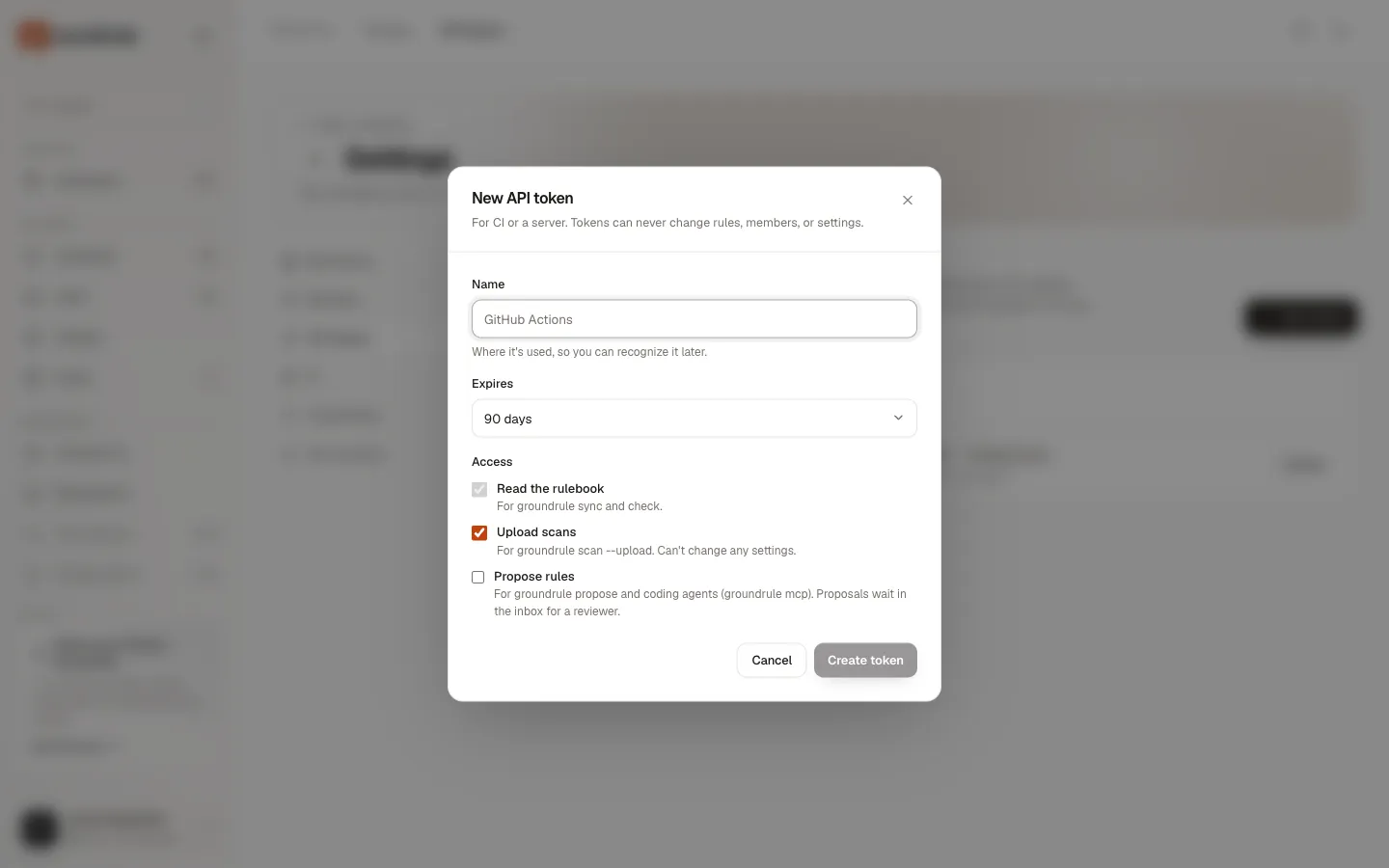
- In the dashboard, open Settings → API tokens and choose New token.
- In Name, say where it’s used, such as
GitHub Actions · checkout-api. - In Expires, choose 30 days, 90 days, 1 year, or No expiry.
- Under Access, check what the jobs need (see the table below). Read the rulebook is always included.
- Choose Create token. Copy the token: “This is the only time it’s shown.”
| CI job | Access it needs |
|---|---|
sync --check, check, standards, explain |
Read the rulebook (always included) |
scan --upload |
Upload scans |
propose |
Propose rules |
A token acts as the person who created it, in that workspace. It can’t change the rulebook, members, or settings. You can have up to 25 active tokens per workspace; revoke unused ones in the same page.
2. Store it as GROUNDRULE_TOKEN
Section titled “2. Store it as GROUNDRULE_TOKEN”Save the token as a secret in your CI system, and expose it to the job as the environment variable GROUNDRULE_TOKEN. The CLI uses it instead of any saved sign-in.
In GitHub: Settings → Secrets and variables → Actions → New repository secret, named GROUNDRULE_TOKEN. An organization secret works for many repositories.
3. GitHub Actions
Section titled “3. GitHub Actions”Pull requests
Section titled “Pull requests”.github/workflows/groundrule.yml:
name: Groundrule
on:  pull_request:
permissions:  contents: read
jobs:  groundrule:    runs-on: ubuntu-latest    timeout-minutes: 10    env:      GROUNDRULE_TOKEN: ${{ secrets.GROUNDRULE_TOKEN }}    steps:      - uses: actions/checkout@v5        with:          fetch-depth: 0   # needed to compare against the base branch          persist-credentials: false
      - uses: actions/setup-node@v5        with:          node-version: 22
      - name: Agent instructions are up to date        run: npx --yes @groundrule/cli sync --check
      - name: Check the pull request        run: npx --yes @groundrule/cli check --base "origin/${{ github.base_ref }}" --summary "$GITHUB_STEP_SUMMARY"
What each part does:
| Part | Why |
|---|---|
fetch-depth: 0 |
check --base needs the base branch and the history since your branch left it. With the default shallow clone, the check stops with Cannot compare against "origin/main". Fetch it first (e.g. git fetch origin main). |
node-version: 22 |
The CLI needs Node.js 22 or later. |
npx --yes |
Downloads the CLI without asking. |
sync --check |
Fails (exit 1) when AGENTS.md and the other agent files don’t match the rulebook. Fix it by running sync and committing. |
check --base origin/<base> |
Checks only what the pull request changed. It fails on blockers at Enforce by default. |
--summary "$GITHUB_STEP_SUMMARY" |
Adds a Markdown table of findings to the run’s summary page. |
You should see each step pass or fail. On failure, the step log shows the findings, as in Check your changes, and the job summary shows a table headed, for example, “Groundrule · ✕ 1 standard failed”. The table lists up to 50 findings.
Findings in code scanning (optional)
Section titled “Findings in code scanning (optional)”To see findings inline on the pull request’s diff in GitHub code scanning, write a SARIF file and upload it. Replace the check step with:
      - name: Check the pull request        run: npx --yes @groundrule/cli check --base "origin/${{ github.base_ref }}" -f sarif -o groundrule.sarif --summary "$GITHUB_STEP_SUMMARY"
      - name: Upload findings to code scanning        if: always()        uses: github/codeql-action/upload-sarif@v3        with:          sarif_file: groundrule.sarif          category: groundrule
and add the permission:
permissions: contents: read security-events: writeThe SARIF file is written even when the check fails, and if: always() uploads it anyway. Code scanning must be available for the repository on GitHub.
Nightly scans
Section titled “Nightly scans”Scans feed the workspace’s evidence and promotions, which need at least 2 scans per repository. Run one on a schedule, on your default branch. The token needs Upload scans.
.github/workflows/groundrule-scan.yml:
name: Groundrule scan
on:  schedule:    - cron: "17 3 * * *"   # every night at 03:17 UTC  workflow_dispatch:
permissions:  contents: read
jobs:  scan:    runs-on: ubuntu-latest    timeout-minutes: 15    steps:      - uses: actions/checkout@v5        with:          persist-credentials: false      - uses: actions/setup-node@v5        with:          node-version: 22      - run: npx --yes @groundrule/cli scan --upload        env:          GROUNDRULE_TOKEN: ${{ secrets.GROUNDRULE_TOKEN }}
You should see the log end with “✓ Uploaded to Acme Payments: https://app.groundrule.dev/acme-payments/scans/…”. Add --no-snippets to send no code, or --no-import to leave out instructions, tool settings, and owners. See Scan a repository.
A packaged action
Section titled “A packaged action”A packaged Groundrule GitHub Action is not yet published. Use the npx steps above.
GitLab CI
Section titled “GitLab CI”Add a masked CI/CD variable GROUNDRULE_TOKEN (Settings → CI/CD → Variables in GitLab), then in .gitlab-ci.yml:
groundrule:  image: node:22  rules:    - if: $CI_PIPELINE_SOURCE == "merge_request_event"  variables:    GIT_DEPTH: 0  script:    - git fetch origin "$CI_MERGE_REQUEST_TARGET_BRANCH_NAME"    - npx --yes @groundrule/cli sync --check    - npx --yes @groundrule/cli check --base "origin/$CI_MERGE_REQUEST_TARGET_BRANCH_NAME" -f markdown -o groundrule.md  artifacts:    when: always    paths:      - groundrule.md
groundrule-scan:  image: node:22  rules:    - if: $CI_PIPELINE_SOURCE == "schedule"  script:    - npx --yes @groundrule/cli scan --upload
Create a pipeline schedule in Build → Pipeline schedules for the scan job.
Writing a Markdown report with -o keeps it as an artifact, but hides the findings from the job log. To see them in the log as well, run check a second time without -f, or drop -f markdown -o groundrule.md.
Any other CI system
Section titled “Any other CI system”Every CI system needs the same four things:
-
Node.js 22 or later.
-
A clone with the base branch and its history. Fetch the base branch explicitly if the runner clones shallowly:
git fetch origin main. -
GROUNDRULE_TOKENset from a secret (platform repositories only). -
The commands, which exit with a non-zero code on failure:
Terminal window npx --yes @groundrule/cli sync --checknpx --yes @groundrule/cli check --base origin/main
Exit codes are the same everywhere:
| Code | sync --check |
check |
scan |
|---|---|---|---|
0 |
Up to date | Passed | Ran (and uploaded) |
1 |
Out of date | Failed | Not used |
2 |
Configuration or sign-in problem | Configuration, git, or sign-in problem | Couldn’t run or upload |
The CLI turns colors off when output isn’t a terminal, and never opens a browser when the CI variable is set.
If your runner doesn’t use the default Groundrule address, set GROUNDRULE_URL as well.
Speed up installs
Section titled “Speed up installs”npx downloads the CLI on every fresh runner. To make that faster and reproducible:
-
Pin the version:
npx --yes @groundrule/cli@0.1.0 check …. Every run uses the same CLI and the same bundled packs. -
Cache npm’s download folder. In GitHub Actions:
- uses: actions/cache@v4with:path: ~/.npmkey: npm-groundrule-0.1.0 -
Or make it a devDependency (see Install the CLI), install with
npm ciand your usual npm cache, then runnpx groundrule check ….
Change what fails
Section titled “Change what fails”Decide in .groundrule/config.yaml (enforcement.failOn), or for one job with --fail-on:
# Report everything, never fail (for a trial period)npx --yes @groundrule/cli check --base origin/main --fail-on none
# Fail on warnings toonpx --yes @groundrule/cli check --base origin/main --fail-on warning
In a platform repository, the rule’s stage decides first: only Advise and Enforce rules are checked, and Advise blockers count as warnings. See Check your changes.
If something goes wrong
Section titled “If something goes wrong”| Message | Fix |
|---|---|
Cannot compare against "origin/main". Fetch it first (e.g. git fetch origin main). |
Use fetch-depth: 0, or fetch the base branch before check. |
Not signed in to acme-payments on https://app.groundrule.dev. Run groundrule login (or set GROUNDRULE_TOKEN in CI). |
GROUNDRULE_TOKEN isn’t set in this step, or is empty. |
GROUNDRULE_TOKEN isn't valid. It may have expired or been revoked; create a new one in Groundrule → Settings → API tokens. |
Create a new token and update the secret. |
This token is for …, but this repository uses …. |
The token belongs to another workspace. |
✕ Agent instructions are out of date: |
Run npx @groundrule/cli sync locally and commit. In a platform repository, this also happens after someone changes the rulebook. |
Upload failed: this token can't upload scans. |
Create a token with Upload scans. |