Command reference
Every command of the groundrule CLI, with every option, its default, an example, and its exit codes. Run any command with npx @groundrule/cli <command>. If you installed the CLI, groundrule <command> is the same. See Install the CLI.
Summary
Section titled “Summary”| Command | What it does | Needs a sign-in |
|---|---|---|
init |
Create .groundrule/config.yaml for this repository. |
With --org, to read your workspace’s coding agents (optional) |
login |
Sign in to your workspace on Groundrule (opens your browser). | No |
logout |
Sign out and revoke the saved token. | No |
whoami |
Show which workspace and account you’re signed in as. | Yes |
sync |
Write coding-agent instructions (AGENTS.md, CLAUDE.md, Cursor, Copilot). | In a connected repository |
check |
Check your changes, or everything with --all, against the standards. |
In a connected repository |
standards |
List the standards in effect for this repository. | In a connected repository |
explain |
Explain a standard: why it exists, examples, how to comply. | In a connected repository |
scan |
Observe this repository against the whole catalog; changes nothing. | Only with --upload |
propose |
Propose a rule for your team to review on Groundrule. | Yes |
mcp |
Serve your standards to coding agents over MCP, and let them propose rules. | For proposals, and in a connected repository |
doctor |
Check configuration, tools and agent files. | In a connected repository |
packs |
List the bundled standard packs. | No |
A connected repository is one whose config has platform:. Offline, everything except login, logout, whoami, propose and scan --upload works with no account.
Global options
Section titled “Global options”These go before the command.
| Option | Description |
|---|---|
-C, --cwd <dir> |
Run as if started in <dir>. |
-v, --version |
Print the CLI version. |
-h, --help |
Print help. After a command, --help prints that command’s options. |
npx @groundrule/cli -C ../checkout-api checknpx @groundrule/cli --versionnpx @groundrule/cli check --helpCommands look for .groundrule/config.yaml in the current folder and its parents, up to the root of the git repository.
Create .groundrule/config.yaml for this repository.
npx @groundrule/cli init [options]| Option | Default | Description |
|---|---|---|
--org <slug> |
Take standards from your workspace on Groundrule. Use its URL name, for example acme-payments. |
|
--url <url> |
https://app.groundrule.dev |
The Groundrule address. Only needed with --org for another address. |
--packs <list> |
security-baseline, plus typescript-node for TypeScript or JavaScript and java-spring for Java |
Bundled packs to extend, comma-separated, for example security-baseline,typescript-node. Offline only. |
--targets <list> |
Detected (see below) | Agent formats, comma-separated: agents-md, claude-code, cursor, copilot. |
--force |
Overwrite an existing config. |
What it does:
- Writes
.groundrule/config.yamlat the root of the git repository (or the current folder outside git). - Creates
.groundrule/standards/withEXAMPLE-001.yaml.sample, unless that file already exists. - With
--org, writes aplatform:section. Without it, writesextends:with the packs. - Chooses targets when you don’t pass
--targets:agents-md, plus every agent it finds signs of (CLAUDE.mdor.claude;.cursoror.cursorrules; Copilot instruction files), plus, with--organd a sign-in, the coding agents your workspace listed. If it finds none, it addsclaude-code.
npx @groundrule/cli init --org acme-paymentsnpx @groundrule/cli init --packs security-baseline,react --targets agents-md,cursor ✓ Created .groundrule/config.yaml Platform acme-payments on https://app.groundrule.dev Agents AGENTS.md, CLAUDE.md, .cursor/rules/ Detected typescript, javascript
Next 1. groundrule sync write instructions for your coding agents 2. groundrule check check your current changes 3. Add your own rules in .groundrule/standards/ (see EXAMPLE-001.yaml.sample)With --org and no sign-in, the list starts with 0. groundrule login sign in to acme-payments (CI: set GROUNDRULE_TOKEN).
| Error | Cause |
|---|---|
✕ .groundrule/config.yaml already exists. Use --force to overwrite it. |
A config exists. |
✕ Use --org or --packs, not both: with --org, your organization decides the packs. |
Both options given. |
✕ Unknown target <name>. Use agents-md, claude-code, cursor, copilot. |
A typo in --targets. |
✕ "<value>" isn't an organization URL name. Use the part after groundrule.dev/, e.g. acme. |
--org isn’t lowercase letters, digits and dashes. |
Each of these exits with 2. See Configuration for the file it writes.
Sign in to your workspace on Groundrule. It opens your browser.
npx @groundrule/cli login [options]| Option | Default | Description |
|---|---|---|
--url <url> |
GROUNDRULE_URL, then platform.url from the repository’s config, then https://app.groundrule.dev |
The Groundrule address. |
--no-browser |
Print the link instead of opening a browser. |
How it works:
- The CLI prints a one-time code and a link, and opens the link in your browser. It doesn’t open a browser when the output isn’t a terminal or the
CIvariable is set. - On the Approve this CLI? page, check that the code matches your terminal, pick the workspace under Workspace, and choose Approve.
- The CLI saves a token for that workspace and prints who you are.
 groundrule login · https://app.groundrule.dev
   Your one-time code:  ZKRW-QJHD   Approve it at:       https://app.groundrule.dev/cli/activate?code=ZKRW-QJHD   Opened your browser. Check the code matches, then approve.
   Waiting for approval…
 ✓ Signed in to Acme Payments (acme-payments) as maya@acme-payments.test   Saved to /Users/maya/.config/groundrule/credentials.json (only you can read it).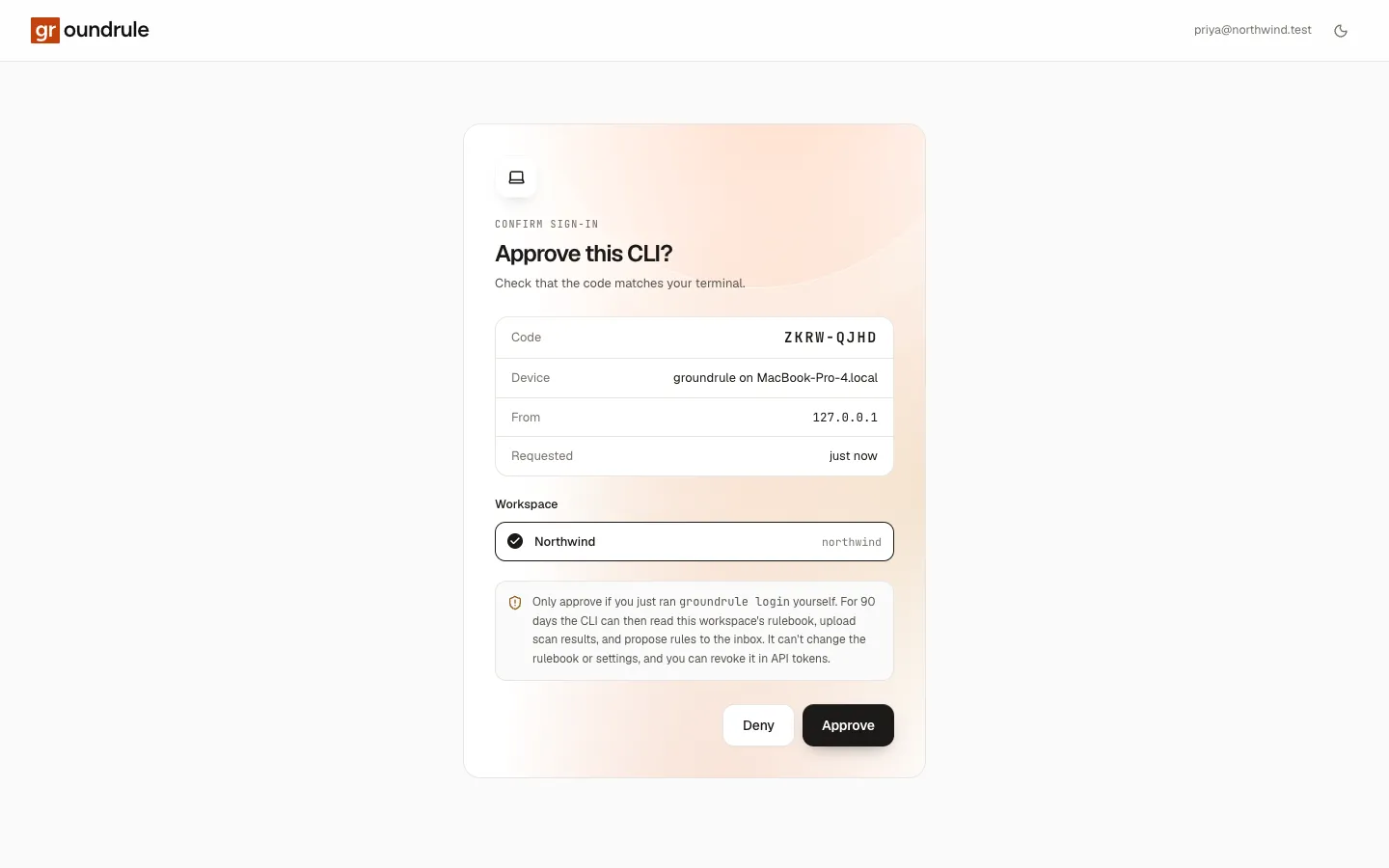
The token is named CLI login · groundrule on <computer name>. It can read the rulebook, upload scans and propose rules, and lasts 90 days. Signing in again to the same workspace revokes the previous token. Where it is saved: Environment and files.
| Error | Cause |
|---|---|
✕ The code expired. Run `groundrule login` again. |
Nobody approved in time. |
✕ The sign-in was declined in the browser. Nothing was saved. |
Someone chose Deny. |
✕ Refusing to send credentials to http://…: use https (plain http is only allowed for localhost). |
An http:// address that isn’t localhost. |
✕ Couldn't reach Groundrule at <url> (<reason>). Check your connection or GROUNDRULE_URL. |
No network, or a wrong address. |
Each exits with 2.
logout
Section titled “logout”Sign out: revoke the saved token on the server and delete it from this computer.
npx @groundrule/cli logout [options]| Option | Default | Description |
|---|---|---|
--org <slug> |
Every workspace | Only this workspace. |
--url <url> |
As for login |
The Groundrule address. |
✓ Signed out of Acme Payments (acme-payments)If the server can’t be reached, the token is still deleted locally, and the line adds couldn't reach the server to revoke the token; revoke it in Settings → API tokens. With nothing saved, it prints Not signed in to any organization on <url>. and exits with 0. logout doesn’t affect GROUNDRULE_TOKEN.
whoami
Section titled “whoami”Show which workspace and account each saved sign-in acts as, and check that it still works.
npx @groundrule/cli whoami [options]| Option | Default | Description |
|---|---|---|
--url <url> |
Only sign-ins for this address. | |
--json |
Machine-readable output: { "url": …, "logins": [ … ] }. |
With no address named anywhere (no --url, no GROUNDRULE_URL, no platform.url in the repository’s config), it lists every saved sign-in on every address. With GROUNDRULE_TOKEN set, it shows only that token.
 ✓ Acme Payments (acme-payments) as maya@acme-payments.test   grt_…… · CLI login · groundrule on maya-laptop · expires 2027-01-07 · saved login · https://app.groundrule.dev
This repository uses acme-payments.| Exit | When |
|---|---|
0 |
Every sign-in works. |
1 |
Not signed in (Not signed in. Run groundrule login.), or a token is no longer valid (✕ grt_…… is no longer valid (saved login). Run groundrule login.). |
Write coding-agent instructions: AGENTS.md, CLAUDE.md, Cursor rules and Copilot instructions.
npx @groundrule/cli sync [options]| Option | Description |
|---|---|
--check |
Write nothing. Exit 1 if any file is out of date. |
--refresh |
Fetch packs from GitHub again, even when cached. |
 groundrule sync · 79 standards → agents-md, claude-code, cursor   From Acme Payments on Groundrule (organization rules): rules at Teach, Advise, and Enforce
   + .cursor/rules/groundrule.mdc created   ~ AGENTS.md updated   ~ CLAUDE.md updated
 ✓ Done. Commit these files so every agent gets the same rules.
With --check: ✓ Agent instructions are up to date (79 standards)., or a list of files with would be created, would be updated or would be removed. What goes into each file, and what is never touched: Agent instruction files.
| Exit | When |
|---|---|
0 |
Files written, or up to date. |
1 |
--check found files out of date. |
2 |
The configuration or a standard has errors, or the rulebook couldn’t be loaded. |
Check your changes, or everything with --all, against the standards.
npx @groundrule/cli check [options]| Option | Default | Description |
|---|---|---|
--base <ref> |
Compare against a branch or commit, for example origin/main. Checks everything since the branch left it, plus uncommitted work. |
|
--all |
Check every file, not only changes. | |
-f, --format <format> |
terminal |
terminal, json, sarif or markdown. |
-o, --output <file> |
Write the report to a file instead of the screen. For json, sarif and markdown. |
|
--summary <file> |
Also append a Markdown summary to a file, for example $GITHUB_STEP_SUMMARY. |
|
--fail-on <severity> |
enforcement.failOn from the config (blocker) |
The lowest severity that fails: blocker, warning or none. |
--only <ids> |
Only these standard IDs, comma-separated. Case doesn’t matter. | |
--verbose |
Also show legacy findings and findings covered by exceptions, and every location. |
Without --base or --all, check looks at your uncommitted changes (staged and unstaged) and untracked files, compared with the last commit. If the config sets enforcement.scope: all, it checks every file. Outside a git repository, it checks every file and warns Not a git repository, so there is no change to compare. Checking every file instead.
In a connected repository, rules at Enforce count at their severity, rules at Advise report findings as warnings, and rules at Teach and Observe aren’t checked.
npx @groundrule/cli checknpx @groundrule/cli check --base origin/main --format sarif --output groundrule.sarif --summary "$GITHUB_STEP_SUMMARY"npx @groundrule/cli check --all --only SEC-001,SEC-003 --fail-on warning groundrule check · 43 standards · 14 files (full audit)
✕ GHA-003 Do not interpolate untrusted event data into scripts BLOCKER · deterministic (regex) .github/workflows/ci.yml:8 Untrusted event data interpolated into a script 8: - run: echo "${{ github.event.pull_request.title }}" → Move the expression into the step's env: block (e.g. TITLE: ${{ github.event.issue.title }}) and use "$TITLE" in the script, always double-quoted. → groundrule explain GHA-003
Failed ✓ 31 passed ✕ 1 failed ⚠ 5 warnings 6 not applicable · 0.0s| Exit | When |
|---|---|
0 |
Passed. Warnings and legacy findings don’t fail. |
1 |
At least one finding fails: a new violation at or above failOn, not covered by an exception. |
2 |
A configuration or check error, a --base ref that can’t be compared (Cannot compare against "origin/main". Fetch it first (e.g. git fetch origin main).), or the rulebook couldn’t be loaded. |
The reports and their fields: Output formats. Day-to-day use: Check your changes. In CI: Run it in CI.
standards
Section titled “standards”List the standards in effect for this repository.
npx @groundrule/cli standards [options]| Option | Description |
|---|---|
--json |
Machine-readable output. |
 Standards · 79 in effect of 91
 AGENT-005   blocker   Never weaken tests or checks to get a green build                       agent guidance · platform:groundrule:packs/agent-hygiene · teach GHA-003     blocker   Do not interpolate untrusted event data into scripts                       regex · platform:groundrule:packs/github-actions · enforce REACT-008   blocker   No secrets in client-exposed environment variables (not applicable here)                       regex · platform:groundrule:packs/react · enforce
Each standard shows its ID, severity and title, then its checks (or agent guidance), its paths, where it comes from, and, in a connected repository, its stage. Standards that don’t apply are dimmed and marked (not applicable here), (disabled), (draft), (deprecated) or (retired). The list is sorted by severity, then ID.
--json prints an array. Each entry has id, title, severity, status (active, draft, deprecated, retired or disabled), applies, checks (evaluator names), paths, origin, stage (connected repositories only), and file.
explain
Section titled “explain”Explain a standard: why it exists, examples, and how to comply.
npx @groundrule/cli explain <id>| Argument | Description |
|---|---|
<id> |
A standard ID, for example AUTH-017. Case doesn’t matter. |
It prints the ID, title, severity, type, version, status and owner, then these sections when the standard has them: Requirement, Why, Applies to, Examples, How to fix, How it’s checked, Exceptions, Adopting it, Supports compliance controls, References, and where it is defined.
npx @groundrule/cli explain DOCKER-001An unknown ID exits with 2: ✕ No standard DOCKER-099. Did you mean DOCKER-001, DOCKER-002, DOCKER-003?, or Run `groundrule standards` to list them. when nothing is close.
Observe this repository against the whole catalog. It changes nothing in the repository and enforces nothing.
npx @groundrule/cli scan [options]| Option | Default | Description |
|---|---|---|
--json |
Print the report as JSON instead of a summary. | |
-o, --output <file> |
Also write the JSON report to a file. | |
--upload |
Share the report with your workspace on Groundrule. | |
--no-snippets |
Snippets included | Leave code snippets out of the report. |
--no-import |
Imports included | Leave out instructions, tool settings and owners found in the repository. |
--repository <name> |
platform.repository from the config, then the origin remote, then the folder name |
The repository name, for example acme/checkout-api. |
--org <slug> |
platform.org from the config |
The workspace to upload to. |
--url <url> |
As for login |
The Groundrule address. |
scan runs every catalog rule, at every stage, against the repository. It detects the stack, the agent files, the tools (such as ESLint, tsconfig, Ruff and CODEOWNERS), and what each rule would find today. Without --upload, nothing leaves your computer. With --upload, it also tests your workspace’s own rules that have checks, drafts included, and sends the report: counts, at most a few one-line snippets per rule with secrets redacted, and, unless --no-import, the instructions, tool settings and owners it found.
npx @groundrule/cli scannpx @groundrule/cli scan --uploadnpx @groundrule/cli scan --json --no-snippets --no-import > report.jsonThe upload ends with ✓ Uploaded to Acme Payments: <url>. Not signed in: ✕ Not signed in to acme-payments on https://app.groundrule.dev. Run `groundrule login` (or set GROUNDRULE_TOKEN in CI)., exit 2. A token without the upload permission: ✕ Upload failed: this token can't upload scans. …, exit 2.
More: Scan repositories.
propose
Section titled “propose”Propose a rule for your team to review on Groundrule.
npx @groundrule/cli propose <rule...> [options]| Argument or option | Description |
|---|---|
<rule...> |
The rule, for example "Never call Stripe directly; use PaymentsGateway". 10 to 1,000 characters. Words after the command are joined with spaces. |
--why <reason> |
Why the team should follow it. Up to 1,000 characters. |
--example <code> |
A short example of the right or wrong way. Up to 2,000 characters. |
--file <path[:line]> |
Where it came up, relative to the repository, for example src/pay.ts:42. |
--org <slug> |
The workspace. Default: platform.org from the config. |
--url <url> |
The Groundrule address. |
--json |
Machine-readable output. |
npx @groundrule/cli propose "Never log full card numbers; mask all but the last four digits." --why "PCI DSS" --file src/http/refunds.ts:4 ✓ Proposed to Acme Payments. Reviewers will see it in the inbox: https://app.groundrule.dev/acme-payments/inboxIf the same rule was proposed before, your proposal counts as a vote: ✓ Already proposed in Acme Payments; your vote is added. If a reviewer rejected it, ! A reviewer already rejected this rule in Acme Payments. Ask them to reopen it if things have changed. Similar existing rules are listed after the result.
| Error | Cause |
|---|---|
✕ Say the rule in a sentence. |
Fewer than 10 characters. |
✕ Use a path relative to the repository. |
--file is absolute or contains ... |
✕ This repository isn't connected to Groundrule. Run `groundrule init --org <your-org>`, or pass --org. |
No platform: and no --org. |
✕ Not signed in to acme-payments on https://app.groundrule.dev. Run `groundrule login` first. |
No sign-in. |
✕ This sign-in can't propose rules yet. Run `groundrule login` again to refresh it. |
The token can’t propose rules. |
✕ Too many proposals. Wait a while and try again. |
Over 30 proposals per person per hour, or 500 per workspace per day. |
Errors exit with 2.
Serve your standards to coding agents over MCP (stdio), and let them propose rules.
npx @groundrule/cli mcpNo options. Your coding agent starts it, from the repository folder. It offers two tools, list_standards and propose_rule. Setup for each agent, and both tools in full: The MCP server.
doctor
Section titled “doctor”Check configuration, tools and agent files.
npx @groundrule/cli doctor groundrule doctor
✓ Node.js 26.9.0 ✓ Inside a git repository ✓ Connected to Acme Payments on https://app.groundrule.dev ✓ Configuration is valid: 79 of 91 standards apply to this repository ✓ Evaluator dependencies is ready ✓ Evaluator files is ready ✓ Evaluator regex is ready ✓ Agent instructions are up to date (agents-md, claude-code, cursor)
Everything looks good.| Check | Fails when |
|---|---|
| Node.js | Older than 22. |
| Git repository | (A warning only) Not in a git repository: check will audit every file. |
| Platform | (Connected repositories) The rulebook can’t be loaded. |
| Configuration | The config or a standard has errors. Warnings are counted, not failed. |
| Evaluators | (A warning only) An evaluator your standards use can’t run here, with the reason, such as how to install Semgrep. An unknown evaluator fails. |
| Agent instructions | Files are out of date. Hint: Run `groundrule sync`. |
It exits with 0 when everything passes (warnings allowed) and 1 with N problem(s) found.
List the standard packs bundled with the CLI.
npx @groundrule/cli packs Bundled packs · add to extends in .groundrule/config.yaml
groundrule:packs/agent-hygiene · 10 standards How AI coding agents should work in a repository - scoped changes, honest verification, no weakened tests, and no surprises.Every pack and standard: Packs reference.
Exit codes
Section titled “Exit codes”Every command exits with one of three codes:
| Code | Name | Meaning |
|---|---|---|
0 |
OK | The command did what it should. For check, the change passed. |
1 |
Failed | The command ran, and the answer is “no”: check found failing findings, sync --check found stale files, doctor found problems, or whoami found no valid sign-in. |
2 |
Usage | The command couldn’t run as asked: a wrong option, a configuration or standard with errors, a check with invalid options, a git ref that can’t be compared, an http address refused, a sign-in missing or rejected, or a failed upload or proposal. |
--help and --version exit with 0. An unknown command or option prints the error and (run groundrule --help for usage), and exits with 2. Set GROUNDRULE_DEBUG=1 to print the stack trace of an unexpected error.
In CI, treat 1 as “the change breaks a rule” and 2 as “Groundrule is misconfigured”. See Run it in CI.