Environment and files
This page lists every environment variable the CLI reads, every file it reads or writes outside your source code, and what each one is for. Use it to set up CI, to find or remove a saved sign-in, or to understand what a repository’s .groundrule/ folder holds.
Environment variables
Section titled “Environment variables”| Variable | Default | What it does |
|---|---|---|
GROUNDRULE_TOKEN |
An API token to use instead of saved sign-ins. Use it in CI. | |
GROUNDRULE_URL |
The Groundrule address, such as https://app.groundrule.dev. An empty value counts as unset. |
|
GROUNDRULE_DEBUG |
Any value prints the stack trace of an unexpected error. | |
GROUNDRULE_GITHUB_BASE_URL |
https://github.com |
Where github: references in extends are cloned from, for example a GitHub Enterprise address. |
XDG_CONFIG_HOME |
~/.config |
Where the credentials folder lives: $XDG_CONFIG_HOME/groundrule/. |
APPDATA |
On Windows, when XDG_CONFIG_HOME isn’t set, credentials go in %APPDATA%\groundrule\. |
|
XDG_CACHE_HOME |
~/.cache |
Where remote packs are cached: $XDG_CACHE_HOME/groundrule/sources/. |
NO_COLOR |
Any non-empty value turns colors off. | |
FORCE_COLOR |
Turns colors on even when the output isn’t a terminal. FORCE_COLOR=0 turns them off. NO_COLOR wins over it. |
|
TERM |
TERM=dumb turns colors off. |
|
CI |
When set, login prints the approval link instead of opening a browser. |
Colors are on only when the output is a terminal, unless FORCE_COLOR says otherwise. Reports written with --format json, sarif or markdown never contain colors.
GROUNDRULE_TOKEN
Section titled “GROUNDRULE_TOKEN”When GROUNDRULE_TOKEN is set, it wins over every saved sign-in, for every command that talks to Groundrule. Create a token in Settings → API tokens → New token, and give it the access the job needs:
| Job | Access to tick |
|---|---|
sync --check and check in CI |
Read the rulebook (always included) |
scan --upload on a schedule |
Upload scans |
propose from a script |
Propose rules |
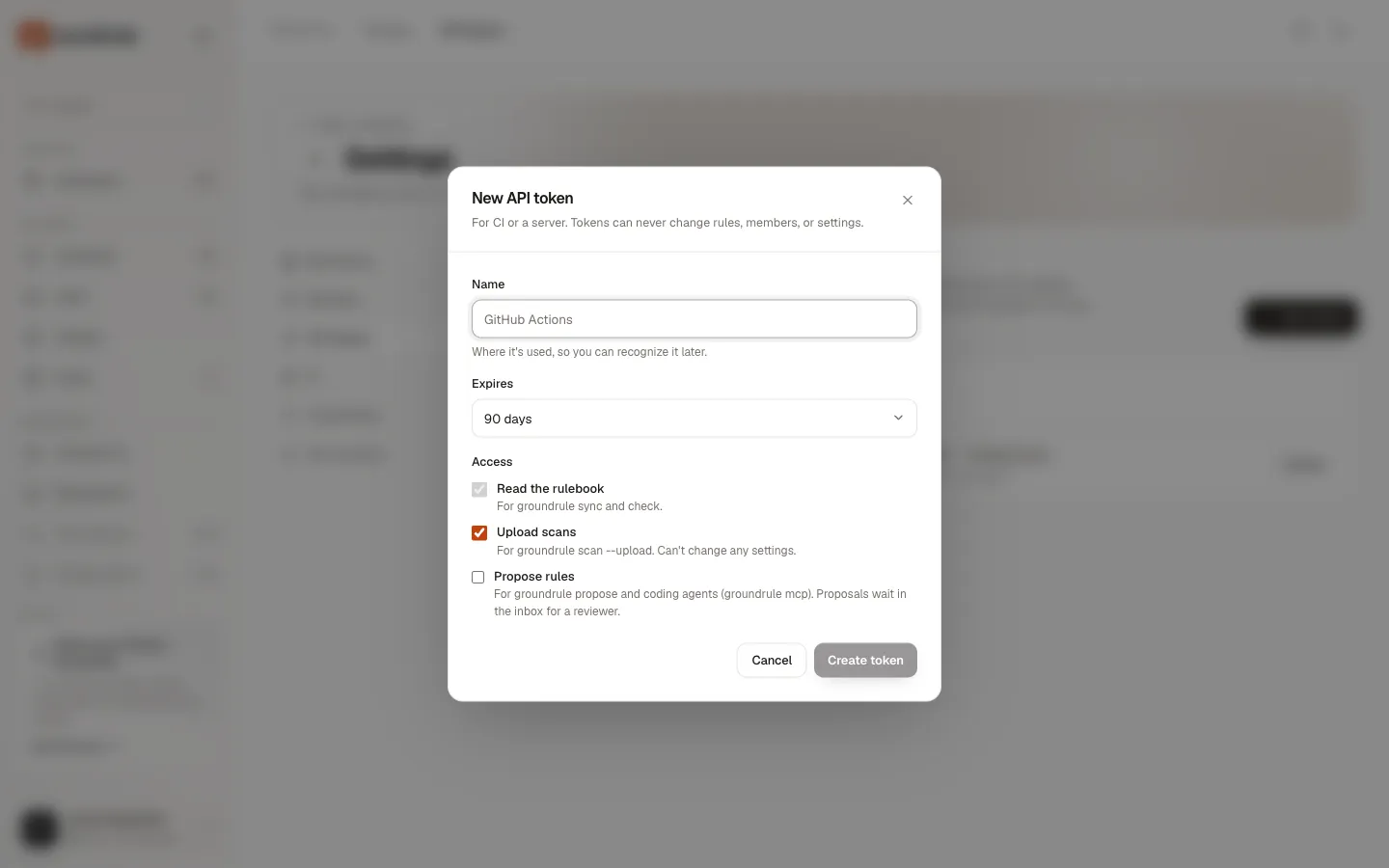
A token acts as the person who created it, in one workspace. It can’t change the rulebook or settings. Store it as a CI secret, never in the repository:
# GitHub Actions- run: npx @groundrule/cli check --base origin/${{ github.base_ref }} env: GROUNDRULE_TOKEN: ${{ secrets.GROUNDRULE_TOKEN }}If the token is wrong, expired or revoked, commands stop with GROUNDRULE_TOKEN isn't valid. It may have expired or been revoked; create a new one in Groundrule → Settings → API tokens. and exit with 2. A token for another workspace than the config’s platform.org stops with This token is for <other>, but this repository uses acme-payments. Run `groundrule login` and approve it for acme-payments.
See Run it in CI.
GROUNDRULE_URL
Section titled “GROUNDRULE_URL”The address of Groundrule. You only need it for an address other than https://app.groundrule.dev. The CLI chooses the address in this order:
- the command’s
--urloption; GROUNDRULE_URL, if not empty;platform.urlin.groundrule/config.yaml;https://app.groundrule.dev.
The CLI only sends credentials over https. Plain http is allowed for localhost, 127.0.0.1 and [::1] only; anything else stops with Refusing to send credentials to http://…: use https (plain http is only allowed for localhost). and exit code 2.
Credentials file
Section titled “Credentials file”groundrule login saves one token per workspace in credentials.json:
| System | Path |
|---|---|
| macOS and Linux | ~/.config/groundrule/credentials.json, or $XDG_CONFIG_HOME/groundrule/credentials.json |
| Windows | %APPDATA%\groundrule\credentials.json, unless XDG_CONFIG_HOME is set |
The file is readable only by you (mode 600, in a folder with mode 700). It is written in one step, so an interrupted login never leaves half a file.
{ "version": 1, "hosts": { "https://app.groundrule.dev": { "orgs": { "acme-payments": { "token": "grt_…", "org": "acme-payments", "orgName": "Acme Payments", "user": "maya@acme-payments.test", "savedAt": "2026-10-09T10:12:31.000Z" } } } }}| Field | Description |
|---|---|
version |
The file format, 1. |
hosts |
One entry per Groundrule address. |
orgs |
One entry per workspace, keyed by its URL name. |
token |
The API token. |
org, orgName |
The workspace’s URL name and display name. |
user |
The email of the person who signed in. |
savedAt |
When the token was saved. |
How the CLI picks a token: GROUNDRULE_TOKEN if set; otherwise the saved token for the config’s platform.org at that address; otherwise, for commands that don’t name a workspace, the only token saved for that address.
logout revokes tokens on the server and removes them from the file. The file is deleted when the last one goes.
The .groundrule folder
Section titled “The .groundrule folder”Each repository’s Groundrule files live in .groundrule/ at its root. Commit all of it.
.groundrule/├── config.yaml the configuration (required)├── standards/ this repository's own standards│ ├── ACME-004.yaml│ └── EXAMPLE-001.yaml.sample written by init; not loaded├── exceptions.yaml time-boxed exceptions (optional)└── rules/ other files your standards use, such as Semgrep rules (optional)| Path | Written by | Description |
|---|---|---|
config.yaml |
init, then you |
See Configuration. Commands find it by looking in the current folder and its parents, up to the git root. |
standards/*.yaml |
You, or copied from the dashboard’s YAML view | One standard per file. See The rule format. The folder and pattern can be changed with standards in the config. |
standards/EXAMPLE-001.yaml.sample |
init |
An example to copy. Rename it to .yaml and change the ID to use it. |
exceptions.yaml |
You | See Overrides and exceptions. |
rules/ |
You | A convention for Semgrep rules files, which must stay outside standards/. |
Checks never read the .groundrule/ folder, so standards can quote forbidden code in their examples.
Files sync writes outside .groundrule
Section titled “Files sync writes outside .groundrule”| File | Owned by Groundrule |
|---|---|
AGENTS.md, CLAUDE.md, .github/copilot-instructions.md |
Only the block between <!-- groundrule:begin --> and <!-- groundrule:end -->. |
.cursor/rules/groundrule.mdc, .cursor/rules/groundrule-*.mdc |
The whole file. |
.github/instructions/groundrule-*.instructions.md |
The whole file. |
Commit these too, so every agent and every teammate gets the same rules. See Agent instruction files.
Cache for remote packs
Section titled “Cache for remote packs”Packs referenced as github:owner/repo//path are cloned into a cache:
~/.cache/groundrule/sources/github/<owner>/<repo>/<ref>/<ref> is the tag, branch or commit you pinned, or _default for the default branch. With XDG_CACHE_HOME set, the cache is under $XDG_CACHE_HOME/groundrule/sources/.
| Reference | When it is fetched |
|---|---|
Pinned (…@v1) |
The first time, then reused. sync --refresh fetches it again. |
| Unpinned | On every command that loads standards. |
The CLI runs git clone --depth 1 over https://github.com/<owner>/<repo>.git (or GROUNDRULE_GITHUB_BASE_URL), and never prompts for a password. For a private repository, git on that machine must already be able to clone it, for example with a credential helper. If it can’t, the command stops with Cannot fetch github:<owner>/<repo>@<ref>. Check the name, the ref, and your git access.
You can delete the cache at any time. Bundled packs (groundrule:packs/…) aren’t cached: they ship inside the CLI.
What the CLI sends over the network
Section titled “What the CLI sends over the network”Offline, the CLI sends nothing. With a connected repository, or when you run login, whoami, logout, propose or scan --upload, it calls <address>/api/v1/cli/… with your token, with a 30-second timeout. It sends:
| Command | Sends |
|---|---|
login |
The computer’s name, for the token’s name. |
sync, check, standards, explain, doctor, mcp |
The repository name, to get its rulebook. |
scan --upload |
The scan report: counts, a few one-line snippets with secrets redacted (none with --no-snippets), and found instructions, tool settings and owners (none with --no-import). Never whole files. |
propose, MCP propose_rule |
The rule and its optional reason, example, file and line, plus the repository name. |
git itself fetches github: packs from GitHub.