Connect a repository
groundrule init creates .groundrule/config.yaml, the one file that tells the CLI where a repository’s rules come from and how to check them. This page explains each option of init, every line of the file it writes, and how to register the repository in a team so it gets that team’s settings.
Run init
Section titled “Run init”To take the rules from your workspace on Groundrule (sign in first with npx @groundrule/cli login):
npx @groundrule/cli init --org acme-payments ✓ Created .groundrule/config.yaml Platform acme-payments on https://app.groundrule.dev Agents AGENTS.md, CLAUDE.md, .cursor/rules/ Detected typescript, javascript
Next 1. groundrule sync write instructions for your coding agents 2. groundrule check check your current changes 3. Add your own rules in .groundrule/standards/ (see EXAMPLE-001.yaml.sample)If you aren’t signed in to that workspace yet, the list starts with 0. groundrule login sign in to acme-payments (CI: set GROUNDRULE_TOKEN). init still writes the file.
To work offline with bundled packs instead, use --packs. See Use Groundrule without the platform.
init writes at the root of the git repository, even when you run it in a subfolder. It creates:
| Path | What it is |
|---|---|
.groundrule/config.yaml |
The configuration. |
.groundrule/standards/ |
A folder for the repository’s own standards. |
.groundrule/standards/EXAMPLE-001.yaml.sample |
A sample standard. It does nothing until you rename it to .yaml. |
Commit all of them.
Options
Section titled “Options”| Option | What it does |
|---|---|
--org <slug> |
Take standards from this workspace on Groundrule. Use the URL name, the part after app.groundrule.dev/, such as acme-payments. |
--url <url> |
The Groundrule address, when it isn’t https://app.groundrule.dev. It’s written to the config. |
--packs <list> |
Offline only: bundled packs to extend, comma-separated, such as security-baseline,typescript-node. Can’t be combined with --org. |
--targets <list> |
The agent files to keep up to date, comma-separated: agents-md, claude-code, cursor, copilot. |
--force |
Overwrite an existing .groundrule/config.yaml. The sample standard is never overwritten. |
Errors
Section titled “Errors”| Message | Fix |
|---|---|
.groundrule/config.yaml already exists. Use --force to overwrite it. |
Edit the file, or add --force. |
Use --org or --packs, not both: with --org, your organization decides the packs. |
Packs are adopted in the dashboard for platform repositories. Drop --packs. |
"…" isn't an organization URL name. Use the part after groundrule.dev/, e.g. acme. |
Use lowercase letters, numbers and dashes, such as acme-payments. |
Unknown target …. Use agents-md, claude-code, cursor, copilot. |
Fix the name in --targets. |
Refusing to send credentials to …: use https |
--url must be https (plain http works only for localhost). |
All of these exit with code 2.
Which agent files init picks
Section titled “Which agent files init picks”Without --targets, init chooses:
-
agents-md(AGENTS.md), always. Most coding agents read it. -
Each agent whose files already exist in the repository:
Target Detected from syncwritesagents-mdAGENTS.mdAGENTS.mdclaude-codeCLAUDE.mdor.claude/CLAUDE.mdcursor.cursor/or.cursorrules.cursor/rules/copilot.github/copilot-instructions.mdor.github/instructions/.github/copilot-instructions.mdand.github/instructions/ -
With
--org, and when you’re signed in: the coding agents your workspace chose during onboarding (“Which coding agents does your team use?”) among Claude Code, Cursor, and Copilot. -
If neither 2 nor 3 found anything,
claude-codeas well.
You can change the list later in targets:.
Languages it detects
Section titled “Languages it detects”init counts file extensions among the files git tracks (or every file outside git) and prints the four most common programming languages on the Detected line. Configuration and documentation formats such as YAML, JSON, Markdown, CSS, HTML, shell, and SQL don’t count.
Offline, the languages decide the default packs: security-baseline always, typescript-node for TypeScript or JavaScript, and java-spring for Java. With --org, your workspace decides the packs, and the languages are only shown.
Languages and frameworks also decide which rules apply. A rule scoped to React is “not applicable here” in a repository without React, and sync leaves it out of the agent files.
The config file, platform mode
Section titled “The config file, platform mode”init --org acme-payments writes:
# yaml-language-server: $schema=https://groundrule.dev/schemas/v1alpha1/config.schema.jsonapiVersion: groundrule.dev/v1alpha1kind: Config
# Standards come from your organization on Groundrule: the packs it adopted,# its own rules, and every customization, at each rule's rollout stage.platform:  org: acme-payments
# Tags that standards can target with scope.tags, e.g. backend, multi-tenant.tags: []
# Coding-agent instruction files that `groundrule sync` keeps up to date.targets:  - agents-md  - claude-code  - cursor
enforcement:  scope: changed-lines   # check what a change touches: changed-lines | changed-files | all  legacy: report         # existing violations: report | ignore | enforce  failOn: blocker        # lowest severity that fails a check: blocker | warning | none
Line by line:
| Line | Meaning |
|---|---|
# yaml-language-server: $schema=… |
Lets editors with YAML support validate the file and complete field names. |
apiVersion: groundrule.dev/v1alpha1 |
The version of the file format. |
kind: Config |
Says this file is a repository configuration. |
platform.org |
The workspace whose rulebook this repository uses. |
platform.url |
Written only when you passed --url with an address other than the default. |
platform.repository |
Not written by init. Optional: the name this repository has in Groundrule, such as acme/checkout-api. By default, the CLI reads it from the origin git remote. Set it when the remote doesn’t match the name registered in Teams → Repositories. |
tags |
Labels for this repository, such as backend or multi-tenant. Standards can target them with scope.tags. |
targets |
The agent files groundrule sync writes. |
enforcement.scope |
What check looks at by default. changed-lines: findings on the lines you changed. changed-files: findings anywhere in the files you changed. all: every file. |
enforcement.legacy |
What to do with findings that were there before your change. report: count them, but never fail. ignore: drop them. enforce: treat them like new ones. |
enforcement.failOn |
The lowest severity that fails check: blocker, warning, or none. |
With platform:, the rules come from your workspace, at each rule’s stage:
syncwrites rules at Teach, Advise, and Enforce;checkruns rules at Enforce as set, and rules at Advise as warnings;- rules at Observe, drafts, and rules turned off stay on the platform.
Standards in .groundrule/standards/ still apply. If one has the same ID as a workspace rule, the workspace’s version wins and the CLI warns.
Two fields are ignored when platform: is set, with a warning:
extends: “Ignored becauseplatformis set: your organization’s rulebook decides the packs.”overridesfor a workspace rule: change the rule in Groundrule, for the repository or its team.
Check your changes explains enforcement in detail. Every field is in the configuration reference.
The config file, offline mode
Section titled “The config file, offline mode”init --packs security-baseline,react writes the same file, with extends in place of platform:
# Shared standards this repository inherits. Add your organization's pack, e.g.# - github:your-org/engineering-standards//packs/backend@v1extends: - groundrule:packs/security-baseline - groundrule:packs/react| Line | Meaning |
|---|---|
extends |
Where standards come from: bundled packs (groundrule:packs/<name>), a folder in a GitHub repository (github:owner/repo//path@ref), or a local folder (./path). |
Offline, every standard runs at its own severity; there are no stages. Two more fields work offline:
standards: where the repository’s own standards live, relative to.groundrule/. The default isstandards/**/*.yaml.overrides: change a pack rule’s severity or turn it off, with a reason. See Overrides and exceptions.
The sample standard
Section titled “The sample standard”.groundrule/standards/EXAMPLE-001.yaml.sample:
# Rename to EXAMPLE-001.yaml (and change the ID) to activate.# yaml-language-server: $schema=https://groundrule.dev/schemas/v1alpha1/standard.schema.jsonapiVersion: groundrule.dev/v1alpha1kind: Standardmetadata: id: EXAMPLE-001 title: Use the shared HTTP client type: forbidden-tech owner: team:platformspec: severity: warning intent: One HTTP client means one place for retries, timeouts, and tracing. requirement: > Use our shared HTTP client for outbound calls. Do not add axios or got. remediation: Replace the dependency with the shared client. checks: - evaluator: dependencies forbid: [axios, got]It shows a standard that forbids two npm packages. To use it, rename it to .yaml, give it your own ID and text, and run sync. Every field is in The rule format.
In a platform repository, write rules your whole workspace should follow in the dashboard instead, so they reach every repository. Keep .groundrule/standards/ for rules that belong to this one repository.
Register the repository in a team
Section titled “Register the repository in a team”When the CLI fetches the rulebook, it sends the repository’s name (from platform.repository, or the origin remote, such as acme/checkout-api). If that name isn’t registered in the workspace, every command warns:
! .groundrule/config.yaml acme/checkout-api isn't registered in acme-payments, so the organization's rules apply. Add it under Teams → Repositories to use its team's settings.The warning is harmless: the repository gets the organization’s rules. To give it its team’s stricter settings, an Admin or Platform admin registers it:
- Open Teams in the dashboard.
- In Repositories, type the name exactly as the CLI printed it, such as
acme/checkout-api. - Choose its team, or No team, then choose Add.
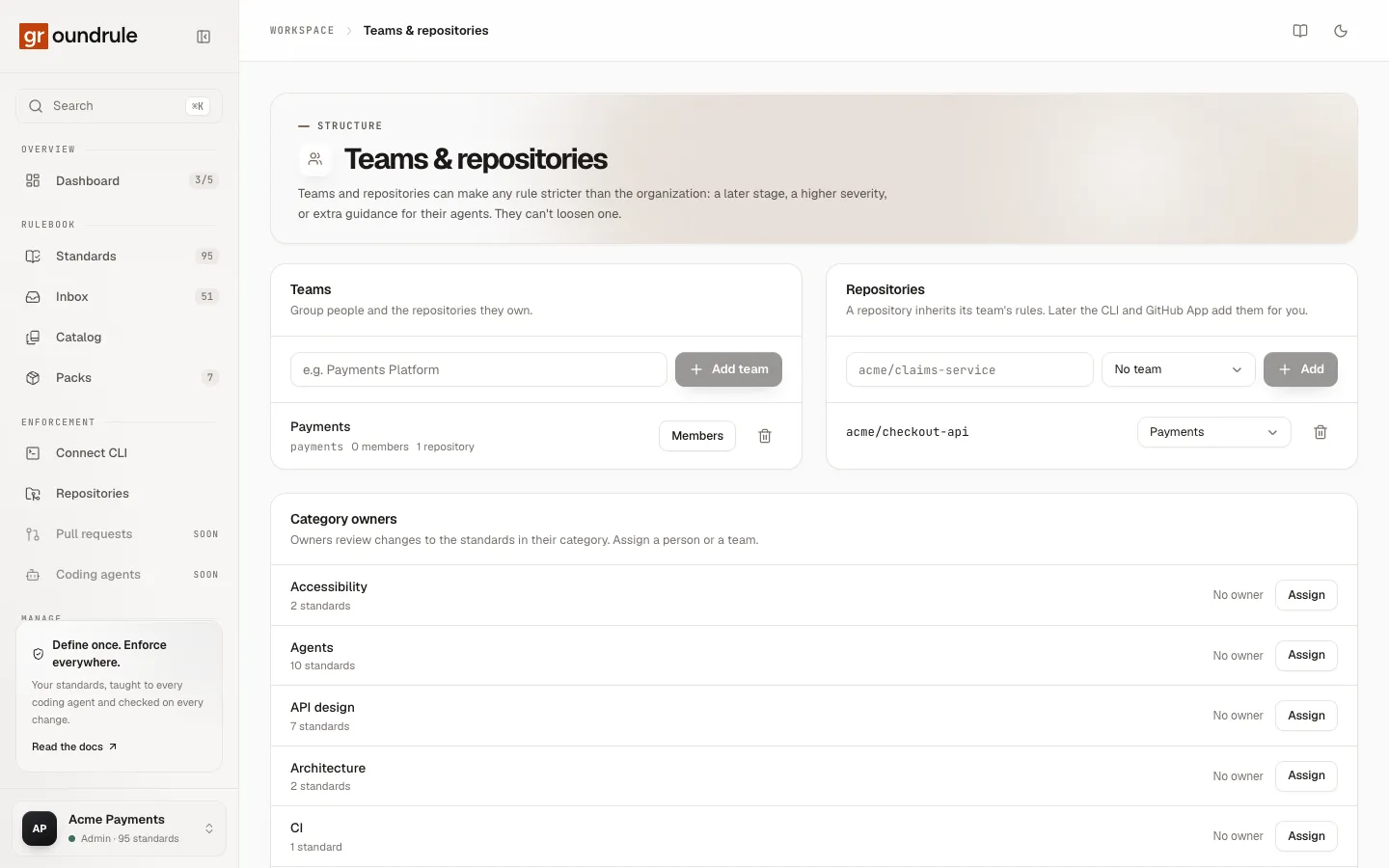
Run npx @groundrule/cli sync again. The warning is gone, and the second line names the repository and team, for example “From Acme Payments on Groundrule (acme/checkout-api, team Payments)”.
If the name doesn’t match (for example because the remote is a fork), set platform.repository in the config to the registered name.