Scan repositories
A scan looks at one repository without changing or enforcing anything. It detects the stack, runs every rule in the catalog against the code, and finds the rules the repository already has: instructions in agent files, settings in your linters, and owners in CODEOWNERS. With --upload, the results go to your workspace, and what it found arrives in the inbox as proposals.
Scans are also where evidence comes from. Each uploaded scan records how every rule does, which feeds the evidence panels and promotions.
Run a scan
Section titled “Run a scan”You need Node.js 22 or later, and a repository on your computer. Uploading also needs a sign-in to your workspace.
-
Sign in, if you haven’t on this computer.
Terminal window npx @groundrule/cli loginSee CLI quickstart.
-
Go to the repository and scan it, without uploading.
Terminal window npx @groundrule/cli scanNothing leaves your computer. Read the summary first.
-
Upload it to your workspace.
Terminal window npx @groundrule/cli scan --upload
You should see a summary like this one, from a real run:
 groundrule scan · acme/checkout-api · 14 files · 0.1s
 Stack       TypeScript, JavaScript, fastify Agent files AGENTS.md (495 lines, from sync), CLAUDE.md (10 lines, from sync) Tools       codeowners (2 rules), docker, eslint, github-actions, typescript (strict)
 Rules       171 in the catalog · 90 apply here             ✓ 35 already pass   ! 6 with findings (6)   ◇ 49 guidance only
 Already passing · safe to adopt at Enforce today   ✓ AGENT-010  agent-hygiene   ✓ DOCKER-003 docker   …   … and 27 more
 Most findings · start these at Observe or Teach, or clean up first   ! DOCKER-001 1 finding in 1 file, e.g. Dockerfile:1   ! GHA-003    1 finding in 1 file, e.g. .github/workflows/ci.yml:8   ! TS-001     1 finding in 1 file, e.g. src/http/refunds.ts:4   …
 Packs       agent-hygiene, docker, github-actions, http-api, security-baseline, testing, typescript-node apply to this repository Imports     4 instructions from agent files · 3 tool settings that match catalog rules · 2 CODEOWNERS entries             Already enforced by your tools: TS-001, TS-007
 ✓ Uploaded to Acme Payments: https://app.groundrule.dev/acme-payments/scans/38208a34-…
Without --upload, the last line instead reads: “Nothing left this computer. Run groundrule scan –upload to share it with your organization, or –json to see exactly what would be sent.”
If it goes wrong:
- “✕ Not signed in to org on url. Run
groundrule login(or set GROUNDRULE_TOKEN in CI).”: sign in, or set a token. - “✕ Upload failed: this token can’t upload scans.”: the token lacks the Upload scans permission. Run
loginagain, or create a token with it in Settings → API tokens. - “This token is for x, but the upload is for y.”: the token belongs to another workspace than
--orgor.groundrule/config.yamlnames. - “Too many scans uploaded. Try again later.”: see the limits below.
A scan exits with 0 when it ran, whatever it found. It exits with 2 when an upload fails.
How to read the summary
Section titled “How to read the summary”| Line | What it means |
|---|---|
| Stack | Languages and frameworks detected from the files |
| Agent files | Instruction files coding agents read, with line counts. “from sync” means Groundrule wrote part of it |
| Tools | Linter, compiler, CI and infrastructure configurations found |
| Rules | Catalog rules, and how many apply to this repository. ✓ already pass, ! have findings, ◇ are guidance only (no check) |
| Already passing | Rules with a check that found nothing. Safe to adopt at Enforce today |
| Most findings | Rules that would flag existing code. Start them at Observe or Teach, or clean up first |
| Packs | Packs whose checks found something to look at here |
| Imports | What will become proposals, and rules your tools already enforce |
A rule “applies” when its checks found files to look at here. A rule that passed only because there was nothing to check counts as not applicable (“Nothing in this repository for it to check.”).
When you upload, the scan also runs your workspace’s own standards that have checks, including drafts, and adds a Your rules line. That is how a draft gets evidence before you publish it. See Evidence.
What a scan detects
Section titled “What a scan detects”Agent instruction files
Section titled “Agent instruction files”| File | Agent |
|---|---|
AGENTS.md (anywhere) |
AGENTS.md |
CLAUDE.md, CLAUDE.local.md; .claude/rules/, .claude/agents/, .claude/commands/ (.md) |
Claude Code |
.cursor/rules/*.mdc or .md; .cursorrules |
Cursor |
.github/copilot-instructions.md; .github/instructions/*.instructions.md |
Copilot |
GEMINI.md |
Gemini |
.windsurfrules; .windsurf/rules/*.md |
Windsurf |
CONVENTIONS.md |
Aider |
Folders named node_modules, vendor, dist, build and .git are skipped.
Tool configurations
Section titled “Tool configurations”ESLint, Prettier, Biome, TypeScript (tsconfig*.json, with strict and related options), Ruff, Black, mypy, flake8, Pylint, Checkstyle, SpotBugs, PMD, golangci-lint, rustfmt, Clippy, EditorConfig, CODEOWNERS, Semgrep, pre-commit, Dependabot, Renovate, GitHub Actions workflows, GitLab CI, Dockerfiles, Docker Compose, Terraform, Helm and Kustomize.
Configuration files are read as text. They are never executed.
What a scan imports
Section titled “What a scan imports”Unless you pass --no-import, a scan finds three kinds of proposals.
Instructions from agent files
Section titled “Instructions from agent files”Each agent file is split into candidate rules:
- each top-level list item, with its nested points;
- each standalone paragraph that starts a sentence with a directive (such as must, never, always, use, avoid), up to 400 characters.
It skips:
- code blocks and tables;
- the block
groundrule syncwrites; @fileimports;- sections that describe the repository rather than how to work in it: headings with words like Commands, Layout, Structure, Setup, Installation, Getting started, Overview, Links, References, or Contents.
Each instruction keeps its file, its lines, its section heading, and a Must, Should or Note strength from its wording. A Cursor rule’s globs, or a Copilot file’s applyTo, becomes the instruction’s paths. The same instruction in several files or repositories is one proposal. Secrets are redacted from the text before upload.
Line by line, instructions can be fragments. Refine with AI in the inbox turns them into real rules. See The review inbox.
Tool settings that map to catalog rules
Section titled “Tool settings that map to catalog rules”When a linter or compiler setting checks the same thing as a catalog rule, the scan proposes adopting that rule. A setting at error counts as Enforced by your tools, warn as Warns in your tools, and off as Turned off in your tools.
| Tool | Setting → rule |
|---|---|
| ESLint | no-console → TS-001; no-eval, no-implied-eval, no-new-func, @typescript-eslint/no-implied-eval → TS-003; @typescript-eslint/ban-ts-comment, @typescript-eslint/prefer-ts-expect-error → TS-004; @typescript-eslint/no-explicit-any → TS-005; @typescript-eslint/no-floating-promises, @typescript-eslint/no-misused-promises → TS-006; @typescript-eslint/no-non-null-assertion → TS-008; unicorn/prefer-node-protocol, n/prefer-node-protocol → TS-009; no-process-exit, n/no-process-exit, unicorn/no-process-exit → TS-010; no-buffer-constructor, n/no-deprecated-api → TS-011; no-sync, n/no-sync → TS-012; @typescript-eslint/use-unknown-in-catch-callback-variable → TS-013; no-debugger → TS-014; react/no-danger → REACT-001; react/no-array-index-key → REACT-002; react/jsx-no-target-blank → REACT-003; react-hooks/rules-of-hooks → REACT-005; jsx-a11y/alt-text → REACT-006; jsx-a11y/click-events-have-key-events, jsx-a11y/no-static-element-interactions → REACT-007; react/prefer-stateless-function → REACT-009; jest/no-focused-tests, vitest/no-focused-tests, mocha/no-exclusive-tests → TEST-001; jest/no-disabled-tests, vitest/no-disabled-tests → TEST-002; playwright/no-wait-for-timeout → TEST-005 |
| Biome | noConsole → TS-001; noGlobalEval → TS-003; noExplicitAny → TS-005; noFloatingPromises → TS-006; noNonNullAssertion → TS-008; useNodejsImportProtocol → TS-009; noProcessExit → TS-010; noDebugger → TS-014; noDangerouslySetInnerHtml → REACT-001; noArrayIndexKey → REACT-002; noBlankTarget → REACT-003; useHookAtTopLevel → REACT-005; useAltText → REACT-006; useKeyWithClickEvents, noStaticElementInteractions → REACT-007; noFocusedTests → TEST-001; noSkippedTests → TEST-002 |
| Ruff | E722 → PY-001; B006 → PY-002; T201 → PY-003; S301 → PY-004; S506 → PY-005; S602, S604 → PY-006; S307 → PY-007; F403 → PY-008; S113 → PY-009; DTZ003 → PY-010; S201 → PY-011; S101 → PY-012; ANN201 → PY-013; G004 → PY-015; S311 → PY-016; S105, S106 → SEC-012; S501 → SEC-004; S608 → SEC-015 |
| golangci-lint | errcheck → GO-001; errorlint → GO-002; contextcheck → GO-004; noctx → GO-006; gosec → GO-009; forbidigo → GO-010; bodyclose, sqlclosecheck → GO-012 |
| Checkstyle | IllegalCatch, EmptyCatchBlock → JAVA-016 |
| PMD | SystemPrintln, AvoidPrintStackTrace → JAVA-002; EmptyCatchBlock, AvoidCatchingGenericException → JAVA-016 |
TypeScript (tsconfig.json at the root) |
strict → TS-007 |
Ruff codes count when your select, extend-select, ignore or extend-ignore lists name them or a prefix of them (such as T20 or ALL). For golangci-lint, linters.enable counts as enforced and linters.disable as turned off.
Owners from CODEOWNERS
Section titled “Owners from CODEOWNERS”The scan reads CODEOWNERS, .github/CODEOWNERS, or docs/CODEOWNERS. Each line becomes an ownership proposal with its pattern and owners. Groundrule guesses a category from the path:
| Path looks like | Category |
|---|---|
.github/workflows, .gitlab-ci, ci/ |
CI |
terraform, infra, k8s, helm, deploy, charts, .tf, Dockerfiles, Compose files |
Infrastructure |
security, auth, crypto, secrets |
Security |
test, tests, spec, __tests__, e2e, .test., .spec. |
Testing |
package.json, lock files, requirements, go.mod, pom.xml, build.gradle, Dependabot, Renovate |
Supply chain |
api, openapi, proto, graphql |
API design |
migrations, db, database, schema |
Data |
A * line proposes an owner for the whole repository. Accepting it registers the repository under a team. See The review inbox.
What is uploaded, and what isn’t
Section titled “What is uploaded, and what isn’t”| Uploaded | Not uploaded |
|---|---|
| Repository name, branch, commit, file count | Your source code |
| Detected languages, frameworks and tools, with each tool’s config path | Whole files of any kind |
| Agent files’ paths, line counts, and a hash of their contents | The full contents of agent files |
| For each rule: its outcome, finding count, files checked and affected | Findings beyond the first 3 per rule |
| Up to 3 examples per rule: file, line, message, and a one-line snippet of at most 200 characters | Snippets for rules in the security category, ever |
| Instructions from agent files (redacted), tool settings, CODEOWNERS entries | Anything with --no-import: instructions, tool settings, owners |
Snippets have secrets redacted on your computer and again on the server. --no-snippets leaves them out entirely. To see exactly what would be sent, run npx @groundrule/cli scan --json.
Options
Section titled “Options”| Option | What it does |
|---|---|
--upload |
Share the report with your workspace |
--no-snippets |
Leave code snippets out of the report |
--no-import |
Leave out instructions, tool settings and owners. Imports from earlier scans of the repository stay |
--repository <name> |
The repository’s name, such as acme/api. Default: .groundrule/config.yaml, then the git remote, then the folder name |
--json |
Print the report as JSON instead of a summary |
-o, --output <file> |
Also write the report to a file |
--org <slug> |
The workspace to upload to. Default: .groundrule/config.yaml |
--url <url> |
The Groundrule address. Default: https://app.groundrule.dev |
Every command and option is in the command reference.
The Repositories page
Section titled “The Repositories page”Repositories lists every scanned repository with its latest scan: branch and commit, stack, number of agent files, Rules apply, Already pass, With findings, when, and who uploaded it. Not registered means the repository isn’t under a team yet, so organization settings apply there.
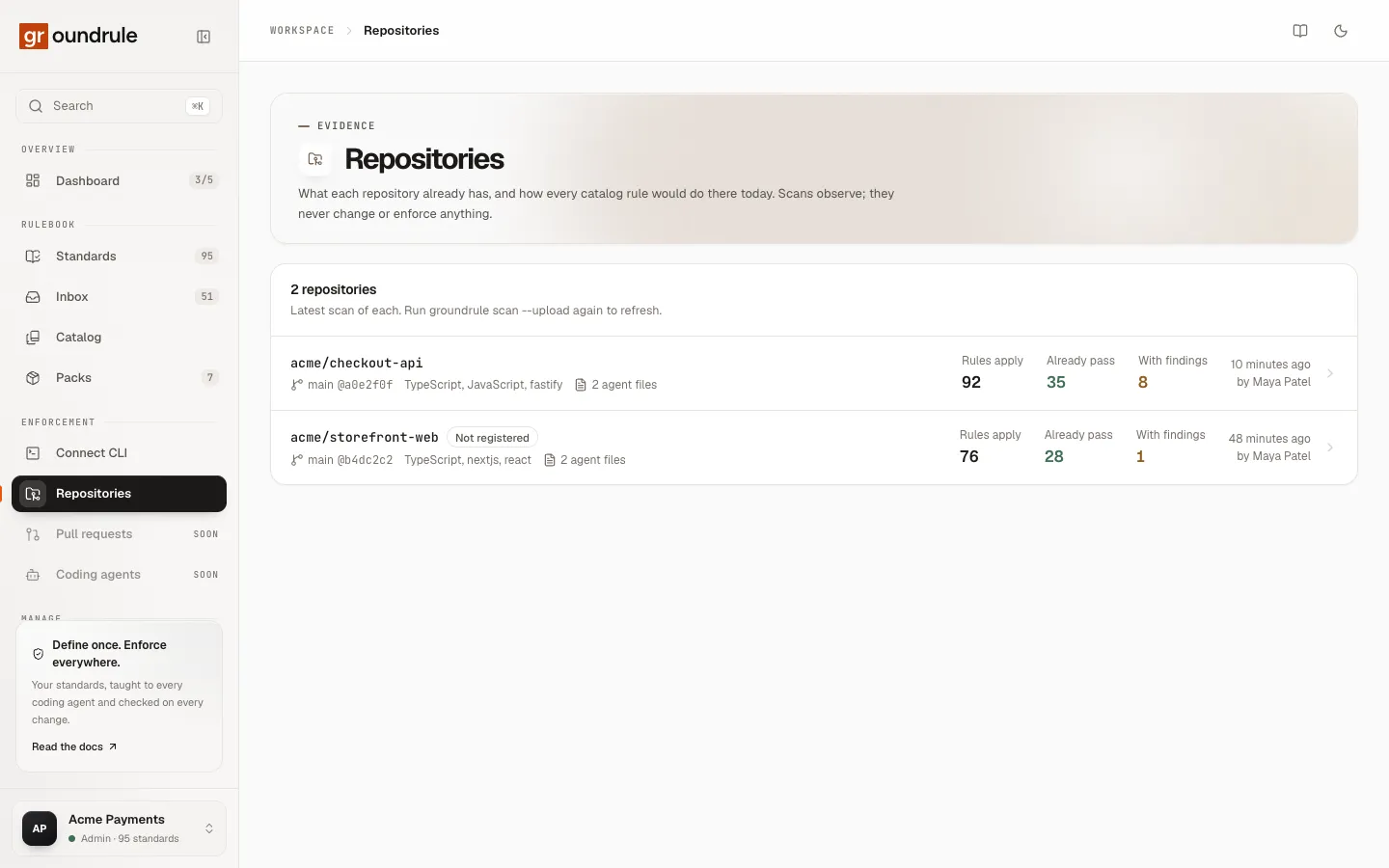
With no scans yet, the page shows the command to run. In CI, it says to set GROUNDRULE_TOKEN to a token with “Upload scans”.
A scan’s page
Section titled “A scan’s page”Open a repository to see its latest scan.
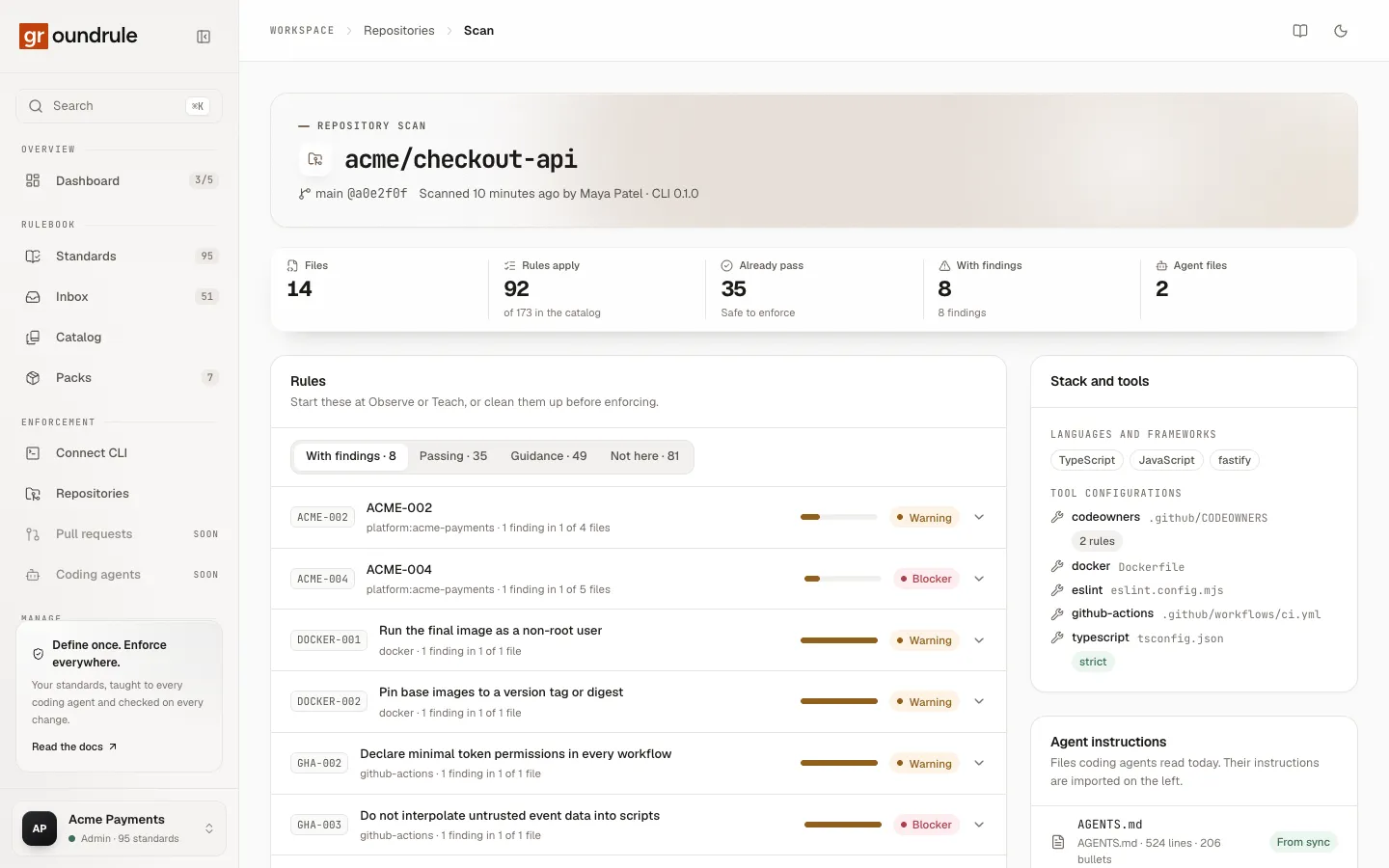
- Counters: Files, Rules apply (“of N in the catalog”), Already pass (“Safe to enforce”), With findings (“N findings”), Agent files.
- Rules: tabs With findings, Passing, Guidance, and Not here. Each rule shows its pack, its findings (“2 findings in 1 of 14 files”), a bar for the share of files affected, and its severity. Open a rule to see its examples and snippets. When there are more findings than examples, run
npx @groundrule/cli check --all --only <ID>locally to see all of them. - Imported from this repository: tabs Instructions, Tool settings, and Owners, with each item’s file and line, and Review them in the inbox.
- Stack and tools: languages, frameworks, and each tool configuration with facts such as “strict”.
- Agent instructions: each agent file with its kind, lines and bullets, and From sync when Groundrule writes part of it.
- Earlier scans: older scans, with their pass and finding counts.
If the repository isn’t registered, Register it to apply team settings links to Teams.
Groundrule keeps the latest 20 scans of each repository. Older scans are removed when a new one is uploaded.
Scan nightly in CI
Section titled “Scan nightly in CI”Evidence and promotions need scan history: at least 2 scans per repository over 7 days or more. A scheduled CI job gives you that without anyone remembering.
-
Create a token in Settings → API tokens → New token, with Upload scans. See Run Groundrule in CI.
-
Save it as a CI secret named
GROUNDRULE_TOKEN. -
Add a scheduled workflow. In GitHub Actions:
name: Groundrule scanon:schedule:- cron: "0 3 * * *"workflow_dispatch:jobs:scan:runs-on: ubuntu-lateststeps:- uses: actions/checkout@v4- uses: actions/setup-node@v4with:node-version: 22- run: npx @groundrule/cli scan --uploadenv:GROUNDRULE_TOKEN: ${{ secrets.GROUNDRULE_TOKEN }}
You should see a new scan on the repository’s page each morning. The repository needs .groundrule/config.yaml from groundrule init --org <your-workspace>, or pass --org.
Limits
Section titled “Limits”| Limit | Value |
|---|---|
| Uploads per token | 60 per hour |
| Uploads per workspace | 1,000 per day |
| Report size | 2 MB |
| Scans kept per repository | 20 |
| Agent files read per scan | 100 |
| Instructions per scan | 500 |
| Tool settings per scan | 300 |
| CODEOWNERS entries per scan | 200 |