Describe a rule with AI
Describe a rule turns one plain sentence into a complete standard: a title, the requirement, a severity, a category, where it applies, examples of what to do and not do, and a check where a pattern can find violations. AI tests the check against its own examples before you see it. You review the result and save it as a draft. Nothing is in effect until you publish it.
This page covers the dialog, how to write a description that gives a good result, what you get back, cost and limits, what is sent to the AI, and the path from draft to published rule.
Before you start
Section titled “Before you start”- Your role: admin, platform admin, or standard owner. Other roles don’t see Describe a rule.
- AI must be on for the workspace. If it’s off, the dialog says “AI is off for this workspace.” Admins see a link, Turn it on in Settings; others see “An admin can turn it on in Settings → AI.”
Write a standard from a description
Section titled “Write a standard from a description”-
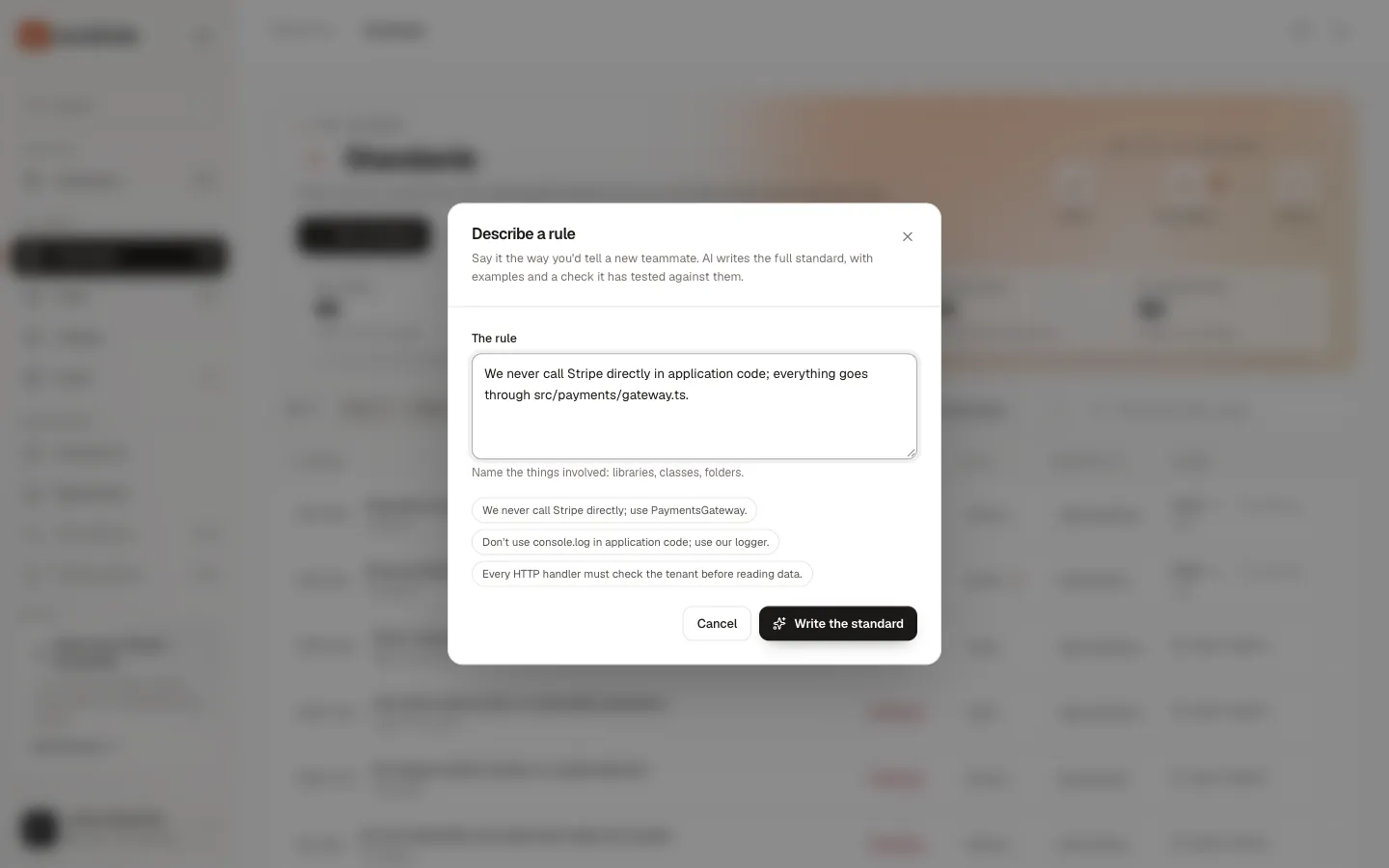
Open Standards and choose Describe a rule.
-
Type the rule in The rule, the way you’d tell a new teammate. Or choose one of the example sentences under the box to start from it.
-
Choose Write the standard. It takes about 20 seconds.
-
Review the draft. Read the requirement, the paths, the check, and how the check did on each example.
-
Choose Save as draft. Or Save and edit to open it in the editor first. Or Rewrite the description to go back and try again.
You should see “Saved ID as a draft”, and the draft’s page opens. If you chose Save and edit, the editor opens instead.
Write a good description
Section titled “Write a good description”The help text under the box says it: “Name the things involved: libraries, classes, folders.” The more specific the sentence, the more precise the standard and its check.
| Instead of | Write |
|---|---|
| “Use the gateway for payments.” | “We never call Stripe directly in application code; everything goes through src/payments/gateway.ts, which handles retries and idempotency keys.” |
| “No logging with console.” | “Don’t use console.log in application code; use our logger from src/lib/logger.ts. Tests and scripts may print.” |
| “Check tenants.” | “Every HTTP handler must check the tenant before reading data.” |
Tips:
- Name the exact library, class, function or path. “
stripe”, “PaymentsGateway”, “src/payments/gateway.ts”. AI keeps every specific you give and uses them in the check. - Say where it doesn’t apply. “Tests may print” or “except the gateway itself” becomes an exclusion in the rule and in the check.
- Say why, if there is a reason. AI uses your reason as the rule’s rationale; otherwise it states the most likely reason, modestly.
- One rule per description. Split “no console.log and no any” into two.
The description must be 10 to 2,000 characters. Write the standard stays disabled below 10.
What you get back
Section titled “What you get back”The dialog shows the draft before anything is saved:
| Part | What it is |
|---|---|
| AI draft · N% confident | How sure the AI is that the standard captures what you meant. Below 50%, the label turns amber: the description was probably vague or ambiguous. |
| Severity and category | Blocker for security, data loss, compliance or production breakage; warning for likely bugs or firm conventions; advisory or info for recommendations and preferences. The category reuses one of your existing categories when one fits. |
| ID | The next free ID, such as ACME-005, marked “draft” |
| Requirement and rationale | The rule in one to three sentences, and why it exists |
| Applies to | Languages, paths, and exclusions, such as “not src/payments/gateway.ts” |
| Check | The regular expression, with Passes its examples or Fails its examples, and Deterministic |
| Examples | Each example with its result: a Don’t example is “caught” (or “missed”), a Do example is “allowed” (or “flagged”) |
When a pattern can’t reliably find violations, for example a rule about design or naming intent, the draft has no check. It shows Guidance only, with a note on why. The rule still reaches coding agents as guidance.
The saved draft also has a remediation, a sentence written for agents, two or three examples of each kind, and, when it has a check, the cases where the check may flag correct code. It is labelled ai-drafted, and its first version’s note is “Drafted with AI from a description”.
How the check is tested
Section titled “How the check is tested”AI writes a regular expression check only when a pattern can find violations in source text: imports, calls, configuration keys, literals. Before you see the draft, Groundrule runs the check against the examples:
- every Don’t example must be caught;
- no Do example may be flagged;
- the pattern must be fast: patterns that could backtrack catastrophically are rejected.
If the first answer fails these tests, AI gets one chance to repair it. If the repair fails too, you see “The AI’s answer didn’t pass validation after one repair.” Rewrite the description, more specifically, and try again.
Testing against examples proves the check does what the examples say. It doesn’t prove the check is right for all your code. That is what scans are for.
A real example
Section titled “A real example”The Stripe sentence from the table above produced:
- a prohibition, “Route all Stripe calls through src/payments/gateway.ts”, at severity blocker;
- a regular expression check that excludes
src/payments/gateway.ts; - six examples, all passing the check.
It took about 20 seconds and cost about $0.05.
Take the draft to production
Section titled “Take the draft to production”A draft isn’t in agent files, and groundrule check doesn’t run it. Scans do test it, so you can see what it would flag before anyone is affected.
-
Open the draft’s page. The Draft panel says “Not in effect” and “Coding agents and CI don’t see drafts. Scans do: run this in any repository, and the results show under Evidence.”
-
Scan a repository with the draft’s check:
npx @groundrule/cli scan --upload. -
Read the evidence. The draft’s evidence panel says “Scans test this draft; nothing is in effect yet.” and lists each repository’s findings. See Evidence and impact.
-
Edit the draft if needed with Edit standard, then choose Test the check on its examples to re-test.
-
Choose a stage in Publish at and Publish.
You should see “ID is live at stage”. From then on, groundrule sync writes it into agent files (from Teach on), and groundrule check runs it (from Advise on).
In the real run, the Stripe draft found one finding in src/http/refunds.ts. Published at Advise, check then reported it as a warning, without failing.
If the check fails its examples after your edits, publishing is refused: “Fix the check before publishing.”
Cost and limits
Section titled “Cost and limits”| Typical cost | About $0.05 per description |
| Typical time | About 20 seconds |
| Description length | 10 to 2,000 characters |
| Requests | 60 AI requests per person per hour, and 300 per workspace per hour, shared with Draft with AI in the inbox |
| Repeats | With standard data retention, an identical request within 30 days is answered from cache, for $0 |
Every request counts against the workspace’s monthly AI budget, set in Settings → AI. When the budget is reached, the dialog shows, for example:
This workspace has used $24.98 of its $25.00 monthly AI budget. An admin can raise it in Settings → AI.
Nothing is sent when the budget would be exceeded. Costs show under Settings → AI in the usage table as Describe a rule (Standards).
Other messages you might see:
| Message | What to do |
|---|---|
| “AI features are turned off for this workspace. An admin can turn them on in Settings → AI.” | Ask an admin to turn AI on. |
| “Too many AI requests. Wait a few minutes and try again.” | You reached the hourly limit. |
| “The AI declined this request. Try rewording, or do it by hand.” | Rewrite the description, or use New standard. |
| “The AI’s answer was cut off or unreadable. Try a shorter input.” | Shorten the description. |
| “The AI provider failed. Try again.” | Try again in a moment. |
What is sent
Section titled “What is sent”To write the standard, Groundrule sends the AI model:
- your description;
- the languages seen in your workspace’s scanned repositories (for example
typescript); - the categories already in your rulebook.
No source code is sent. Secrets in the description are removed before anything is sent. The model is Claude Opus 5.5 by Anthropic. Under Zero retention in Settings → AI, the provider keeps nothing and Groundrule caches no answers. See What we store.
Everything AI writes is labelled AI, with a confidence, and nothing is in effect until a person saves and publishes it.
Related
Section titled “Related”- Write a standard: edit the draft field by field.
- Rollout stages: which stage to publish at.
- The review inbox: Draft with AI turns an imported instruction into a standard the same way.