Workspace settings
Settings → Workspace holds the workspace’s name, its URL name, what your team builds with, which email domains can be invited, and the button to leave. Pack recommendations and the agent files the CLI sets up both use these answers.
Who can change what:
| Panel | Who can change it |
|---|---|
| General (name) | Admins and platform admins |
| Your stack | Admins and platform admins |
| Who can be invited | Admins only. Other roles don’t see this panel. |
| Leave workspace | Anyone, for themselves |
Everyone else sees the General and Your stack panels read-only, with the note “Only admins and platform admins can change this.”
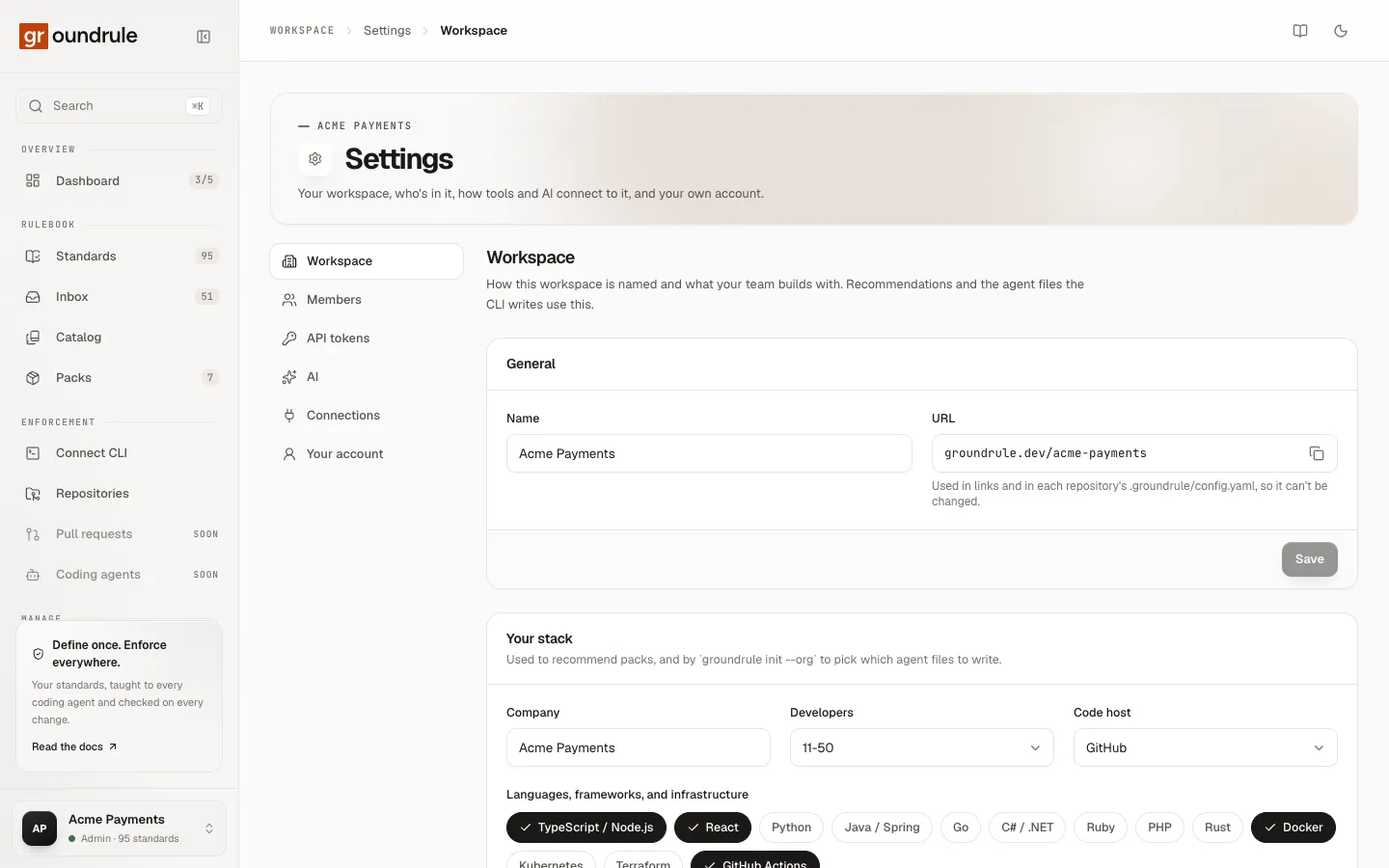
General
Section titled “General”| Field | Notes |
|---|---|
| Name | What the dashboard calls the workspace, up to 120 characters. Change it and choose Save; you should see “Workspace renamed”. |
| URL | Shown as groundrule.dev/acme-payments. It can’t be changed: “Used in links and in each repository’s .groundrule/config.yaml, so it can’t be changed.” The copy button copies the URL name alone (acme-payments), ready for npx @groundrule/cli init --org acme-payments. |
Renaming changes only the display name. Links, repository configuration and API tokens keep working, because they use the URL name.
If you need a different URL name, create a new workspace with it. There is no way to move a workspace’s rules to a new URL name yet.
Your stack
Section titled “Your stack”These are the answers you gave in onboarding step 3. “Used to recommend packs, and by groundrule init --org to pick which agent files to write.”
| Field | Choices |
|---|---|
| Company | Your company’s name, up to 120 characters |
| Developers | 1-10 · 11-50 · 51-200 · 201-1000 · 1000+ |
| Code host | GitHub · GitLab · Bitbucket · Azure DevOps · Other |
| Languages, frameworks, and infrastructure | TypeScript / Node.js · React · Python · Java / Spring · Go · C# / .NET · Ruby · PHP · Rust · Docker · Kubernetes · Terraform · GitHub Actions |
| Coding agents | Claude Code · Cursor · GitHub Copilot · OpenAI Codex · Windsurf · Gemini CLI · Another agent · None yet |
Select a chip to turn it on or off, then choose Save. You should see “Saved”. None yet can’t be combined with other agents.
What these answers change
Section titled “What these answers change”- Coding agents decide which agent files
npx @groundrule/cli init --org acme-paymentssets up in a new repository. It always writesAGENTS.md, which many agents read. It addsCLAUDE.mdfor Claude Code,.cursor/rules/for Cursor, and.github/copilot-instructions.mdfor GitHub Copilot. It also adds any of those formats the repository already has files for. The other agent choices are recorded but add no extra file. Changing this setting doesn’t touch repositories already set up; their choice lives in.groundrule/config.yamlundertargets. See Agent instruction files. - Languages and infrastructure decide which packs are marked Recommended. Changing them doesn’t turn packs on or off; do that on the Packs page.
- Company, Developers and Code host are recorded for your workspace and don’t change behavior today.
Who can be invited
Section titled “Who can be invited”Admins see this extra panel. It limits invitations to your company’s email domains. “Leave empty to allow any address.”
- Type a domain, such as
acme.com, and choose Add (or press Enter or a comma). A leading@is removed for you. - Add up to 20 domains.
- Choose Save. You should see “Invitation domains saved”.
Remove a domain with the cross next to it, then Save.
With a list in place, invitations to any other domain come back as Domain not allowed, and nothing is sent. The domain must match exactly: acme.com doesn’t allow eu.acme.com; add both if you need both. “Existing members aren’t affected.”
If a domain is refused, the panel says “Enter a domain like acme.com”. More than 20 says “Up to 20 domains”.
Leave the workspace
Section titled “Leave the workspace”At the bottom of the page, Leave workspace removes your own access. “Removes your access to Acme Payments. If you’re the only admin, make someone else an admin first.”
- Choose Leave.
- Confirm: “Leave Acme Payments? You’ll lose access until someone invites you again.”
You land on your next workspace, or on onboarding if you have none. Your API tokens for this workspace stop working.
If you’re the last admin, Groundrule refuses: “A workspace needs at least one admin. Make someone else an admin first.” Promote someone in Members, then leave.
What isn’t here yet
Section titled “What isn’t here yet”- Deleting a workspace. There’s no button for it yet.
- Changing the URL name.
- Transferring a workspace’s rules to another workspace.
Related
Section titled “Related”- Members and roles
- Packs: turning packs on and off.
- Roles and permissions