The catalog
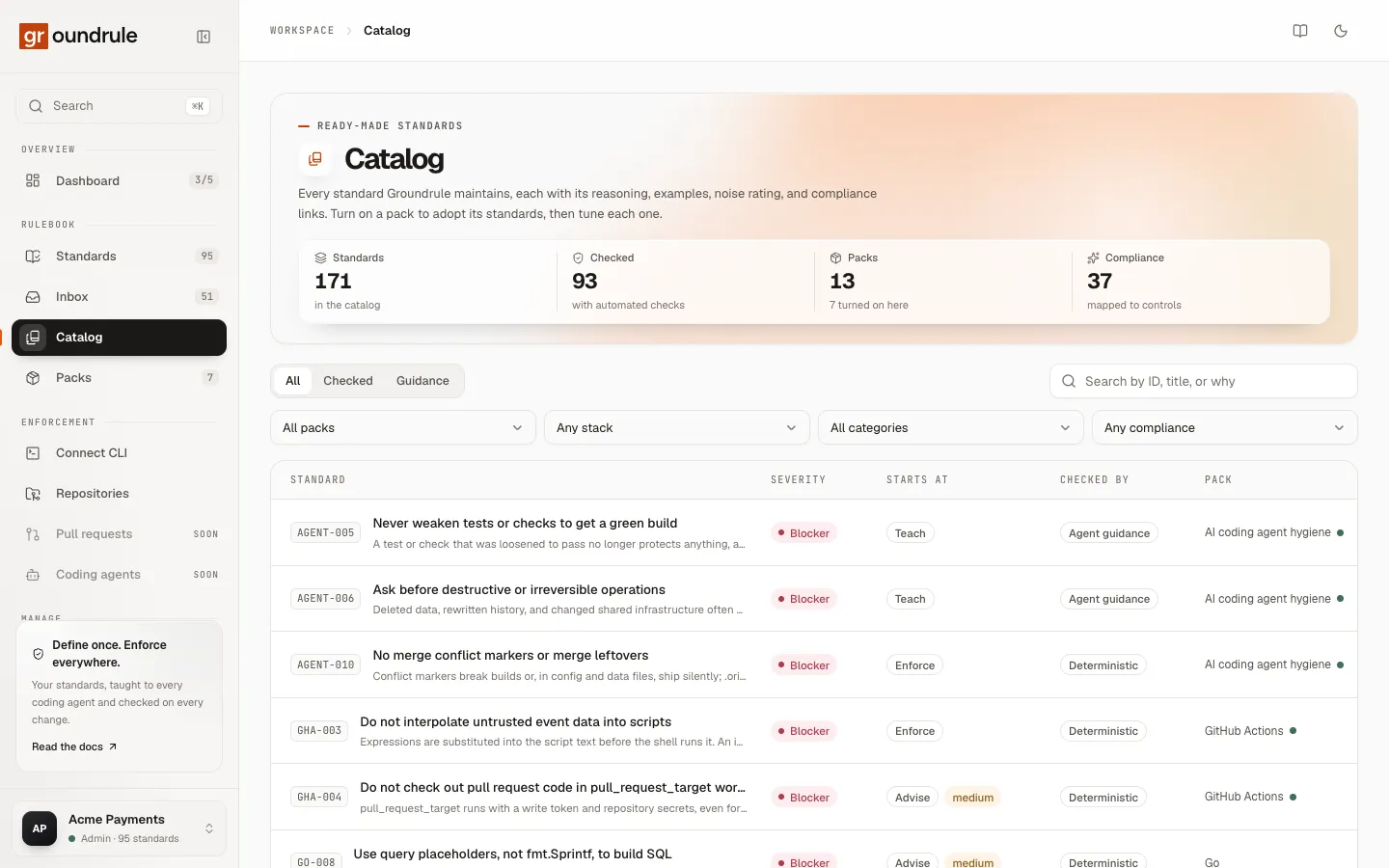
The catalog lists every standard Groundrule maintains: 171 standards across 13 packs. This page explains what the catalog shows, how to filter it, how to read a rule before you adopt it, and how to get a rule into your rulebook.
The catalog is read-only. It shows the rules as Groundrule ships them, not your settings. Your settings live on each rule’s page in Standards; see Adopting and tuning rules.
Open the catalog
Section titled “Open the catalog”Choose Catalog in the sidebar. The page starts with four numbers:
| Number | What it counts |
|---|---|
| Standards | Every standard in the catalog |
| Checked | Standards with at least one automated check |
| Packs | Packs in the catalog, and how many are turned on in your workspace |
| Compliance | Standards mapped to at least one compliance control |
The table
Section titled “The table”Each row is one standard. The table is sorted by severity (blockers first), then by ID.
| Column | What it shows |
|---|---|
| Standard | The ID, the title, and one line on why the rule exists |
| Severity | Blocker, warning, advisory, or info |
| Starts at | The stage Groundrule recommends you start the rule at. A noise label appears next to it when noise is medium or high. |
| Checked by | How the rule is checked: Deterministic, Static analysis, or Agent guidance when it has no check |
| Pack | The pack the standard belongs to. A dot means the pack is turned on in your workspace. |
On narrow screens, some columns are hidden. The count under the table reads, for example, “12 of 171”.
Filter and search
Section titled “Filter and search”You can combine every filter.
| Control | Options | What it matches |
|---|---|---|
| Kind | All, Checked, Guidance | Checked: standards with an automated check. Guidance: standards that are agent guidance only. |
| Search | Free text (“Search by ID, title, or why”) | The ID, title, why, category, and pack name |
| Pack | All packs, or one pack | The pack a standard belongs to |
| Stack | Any stack, or a language or framework | The languages and frameworks a standard applies to, such as typescript or spring-boot |
| Category | All categories, or one category | The standard’s category, such as API design, CI, Code quality, or Security |
| Compliance | Any compliance, or one framework | Standards mapped to SOC 2, ISO 27001, OWASP ASVS, PCI DSS, HIPAA, or NIST SSDF |
If nothing matches, the table says “Nothing matches those filters”. Choose Clear filters to reset every filter and the search.
Read a rule
Section titled “Read a rule”Select a row to open the rule. The window’s title is the ID and title, with the pack’s name underneath.
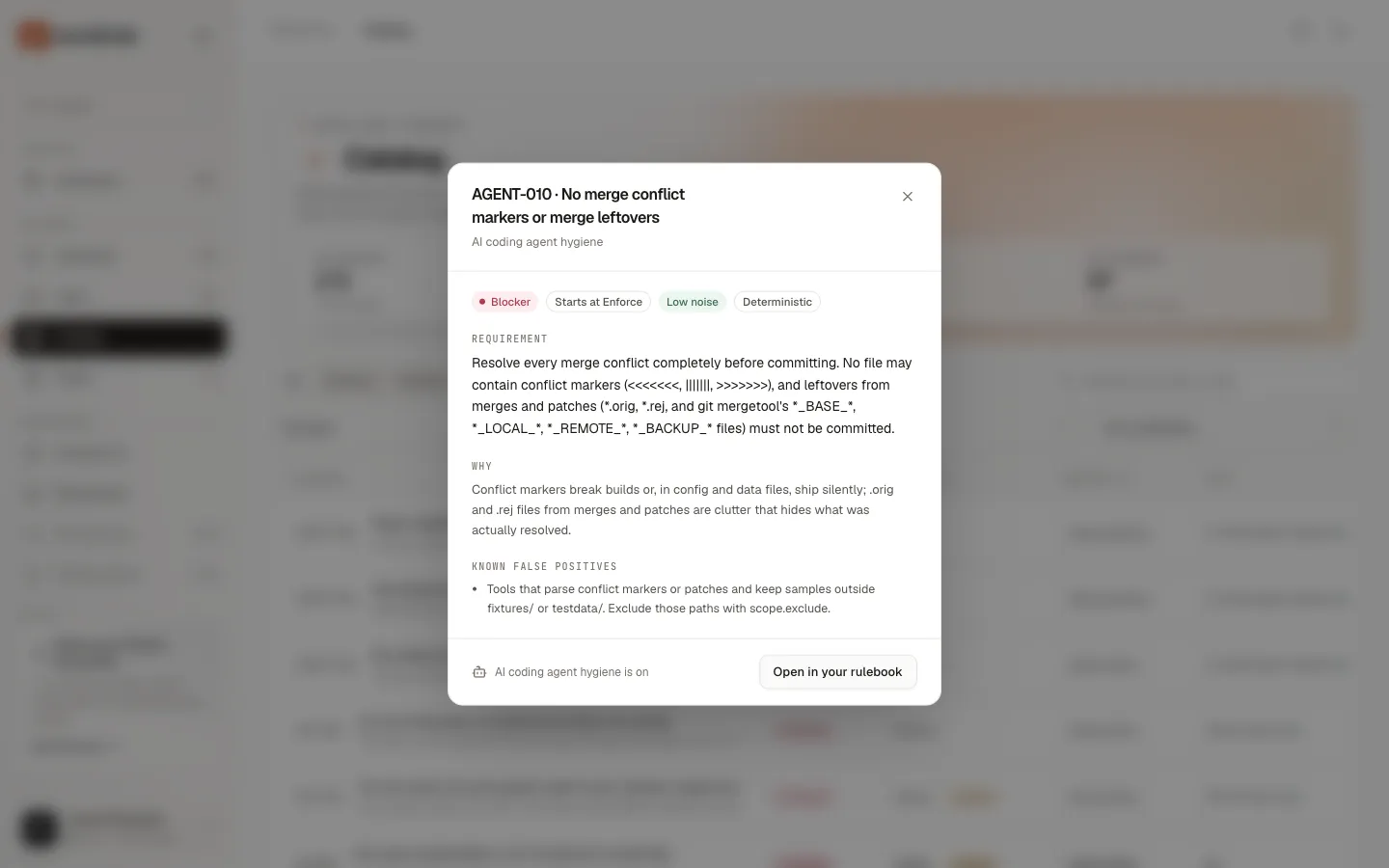
The labels across the top tell you what adopting the rule would mean:
| Label | Meaning |
|---|---|
| Severity | How serious a violation is: Blocker, Warning, Advisory, or Info. At Enforce, groundrule check fails on blockers by default. |
| Starts at stage | The stage the rule takes when you turn its pack on: Teach, Advise, or Enforce. No catalog rule starts at Observe. See Rollout stages. |
| Low noise, Medium noise, High noise | How often the check is likely to flag code that is actually fine. Low-noise rules can start at Enforce. Noisier rules start earlier, so you see their findings before they can block anyone. |
| Deterministic | The rule has a check that gives the same result every time, with no AI: a regular expression, a file check, a dependency check, or a change-set check. |
| Static analysis | The rule has a Semgrep check. |
| Agent guidance | The rule has no check. It reaches coding agents as instructions, and reviewers apply it. |
The sections below the labels:
| Section | What it holds |
|---|---|
| Requirement | The rule itself, as agents and reviewers read it |
| Why | Why the rule exists |
| Known false positives | Cases where the check flags code that is correct, and what to do about them. Shown only when the pack lists some. |
| Supports compliance | The controls the rule maps to, such as SOC 2 CC6.1 or OWASP ASVS V2.10.4. Shown only when the rule has mappings. |
| References | Links such as a CWE entry or the tool’s own documentation. Shown only when the rule has references. |
Code examples (what to do and what not to do) aren’t in this window. They are on the rule’s page in your rulebook, once its pack is on. You can also read any rule, examples included, with npx @groundrule/cli explain <ID>.
Bring a rule into your rulebook
Section titled “Bring a rule into your rulebook”You don’t adopt catalog rules one by one. You turn on the pack that contains them, and every rule in it joins your rulebook at its recommended stage. Then you tune each rule.
The footer of the rule window shows whether its pack is on, for example “AI coding agent hygiene is on”, and offers one action:
| What you see | When | What it does |
|---|---|---|
| Open in your rulebook | The pack is on | Opens the rule’s page in Standards, with its rollout panel and evidence |
| Turn on pack | The pack is off, and you are an admin or platform admin | Turns the whole pack on for the workspace |
| “Ask an admin to turn this pack on.” | The pack is off, and you have another role | Nothing; ask an admin |
-
Open Catalog and find the rule, for example by searching its ID.
-
Select the rule to open it, and read its requirement, noise, and known false positives.
-
Turn on its pack. Choose Turn on pack in the footer. Or go to Packs and turn the pack on there; see Packs.
-
Choose Open in your rulebook to see how the rule is rolled out in your workspace.
You should see a message such as “Docker turned on”, and the footer changes to Open in your rulebook. Every standard in that pack is now in Standards, each at its recommended stage.
If one of the pack’s IDs is already used by one of your own standards, the pack can’t be turned on, and you see “ID is defined both by your organization and by pack.” Your own standards’ IDs can’t change, and standards can’t be deleted yet, so avoid pack prefixes such as SEC- or TS- for your own IDs. The editor suggests IDs with a prefix taken from your workspace’s URL name, such as ACME-005 for acme-payments. Those IDs skip any ID already in your rulebook, but they can still clash with a pack you turn on later if the prefix matches one, such as GO- for a URL name that starts with go-.
Related
Section titled “Related”- Packs: turn packs on and off, and tune their rules in bulk.
- Adopting and tuning rules: change a rule’s stage, severity, or wording.
- Evidence and impact: see what a rule would flag in your repositories before it can block anyone.