AI settings and usage
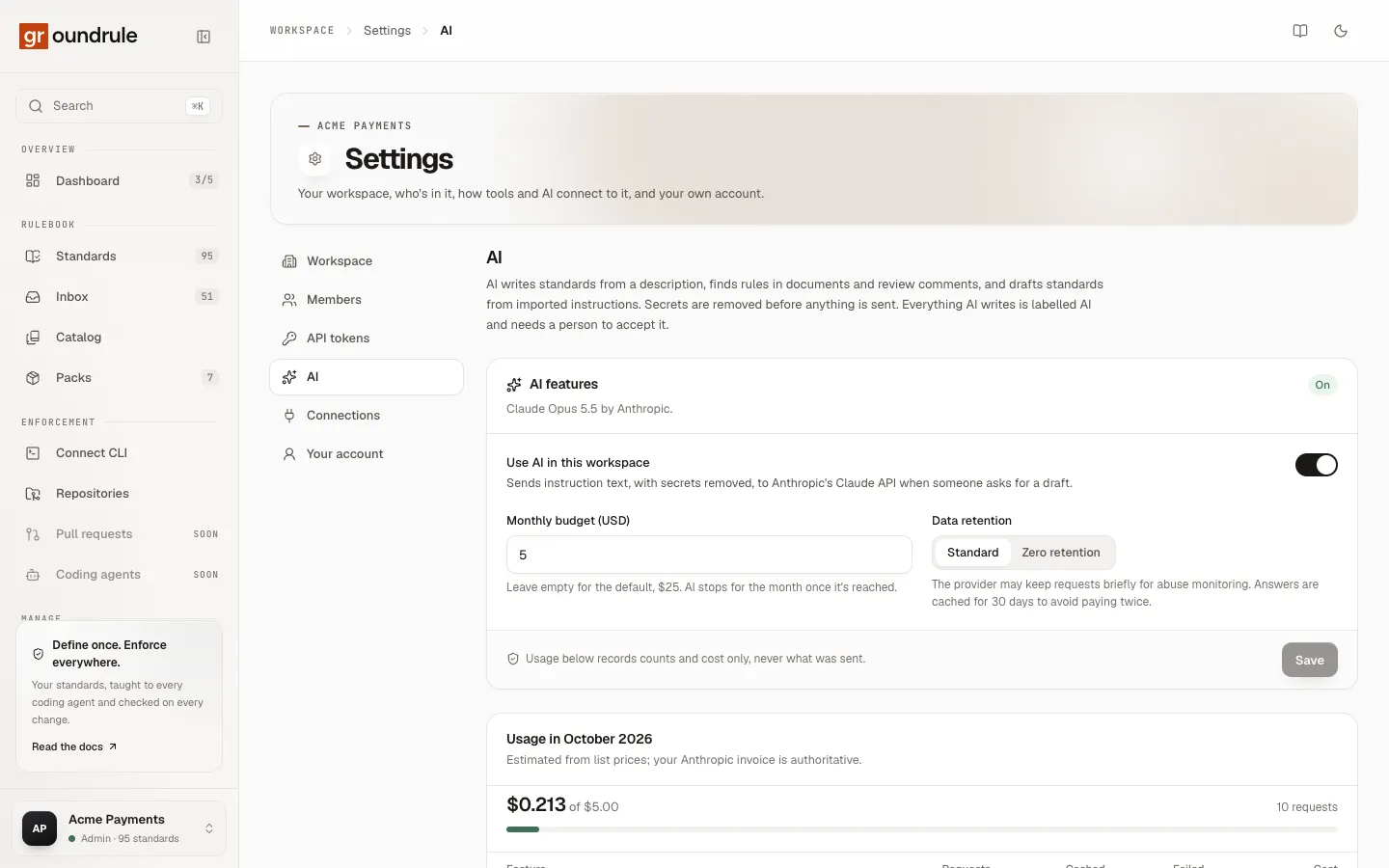
AI is off in a new workspace. An admin turns it on in Settings → AI, sets how much it may spend each month, and chooses how long the model provider may keep requests. The same page shows what AI has cost this month, feature by feature.
What AI does in Groundrule, and what it never does:
- It writes standards from a description (Standards → Describe a rule).
- It drafts standards from instructions found in agent files, and refines agent files line by line (Inbox → Draft with AI, Refine with AI).
- It finds rules in documents and review comments (Inbox → Import a document).
- Everything it writes is a proposal or a draft, labelled AI with a confidence. A person accepts it or not. AI never changes your rulebook by itself.
How data is handled, what is sent, and what is removed first, is explained in AI and your data.
Who can do what
Section titled “Who can do what”| Admin | Platform admin, Standard owner | Other roles | |
|---|---|---|---|
| See this page and the usage | ✓ | ✓ | ✓ |
| Change the settings | ✓ | ||
| Use AI features (when AI is on) | ✓ | ✓ |
Everyone except admins sees the settings read-only, with “Only admins can change AI settings.”
Turn AI on
Section titled “Turn AI on”- Open Settings → AI.
- Turn on Use AI in this workspace. “Sends instruction text, with secrets removed, to Anthropic’s Claude API when someone asks for a draft.”
- Optionally set Monthly budget (USD) and Data retention (below).
- Choose Save.
You should see “AI settings saved”, and the AI features panel shows On. The panel names the model: Claude Opus 5.5 by Anthropic.
AI features now appear for admins, platform admins and standard owners: Describe a rule on the Standards page, Draft with AI and Refine with AI in the inbox, and the AI options under Import a document.
To turn AI off, switch Use AI in this workspace off and Save. Nothing is sent from then on; requests are recorded as Turned off.
If the page shows AI isn’t available on this deployment, AI has been turned off for every workspace on the Groundrule service you use, and the switch has no effect. Ask whoever runs it.
Monthly budget
Section titled “Monthly budget”| Setting | Behavior |
|---|---|
| Empty | The default budget: $25 a month. |
| Any amount of 0 or more | Your own budget, in US dollars. Decimals are fine, such as 7.50. |
| 0 | AI is effectively paused: every request is refused as over budget. |
“AI stops for the month once it’s reached.” The month is the calendar month in UTC; spending starts again from $0 on the 1st.
Groundrule checks the budget before each request, using a deliberately high estimate of its cost. If the estimate would take the month over budget, the request is refused and nothing is sent to the model provider:
- Describing a rule or drafting a standard says “This workspace has used $X of its $Y monthly AI budget. An admin can raise it in Settings → AI.”
- Importing a document is refused before it starts: “Reading this document is estimated at $X, but only $Y of this month’s AI budget is left. An admin can raise it in Settings → AI.”
Over-budget requests appear under Recent requests as Over budget, at $0. To continue, raise the budget and Save; there’s no need to wait.
A negative or non-numeric budget keeps Save disabled, with “Enter an amount of 0 or more.”
Data retention
Section titled “Data retention”| Choice | What it means |
|---|---|
| Standard (default) | “The provider may keep requests briefly for abuse monitoring. Answers are cached for 30 days to avoid paying twice.” |
| Zero retention | “The provider keeps nothing, and Groundrule caches no answers.” |
Caching means that asking the same thing twice within 30 days, such as re-importing the same document, is answered from Groundrule’s cache for $0. With Zero retention, nothing is cached; switching to it deletes the cached answers.
Zero retention needs a zero-data-retention agreement between the Groundrule service and the model provider. Where there isn’t one, saving it fails with “Zero retention needs a zero-data-retention agreement with the model provider. Turn AI off instead to send nothing.” If your policy requires that nothing is retained, keep AI off.
The usage panel is titled Usage in followed by the month, for example Usage in October 2026. “Estimated from list prices; your Anthropic invoice is authoritative.”
-
Spent this month against the budget, for example “$0.213 of $5.00”, with a bar that turns amber at 70% and red at 90%.
-
Requests this month.
-
By feature: requests, cached answers, failures and cost for each.
Feature What it covers Draft standards (Inbox) Draft with AI on an instruction in the inbox Find rules in documents (Inbox) Imported documents, pasted text, pages from connected apps, Refine with AI on agent files, and pull-request reviews Describe a rule (Standards) Describe a rule → Write the standard -
Recent requests: the last 20, each with a status, the feature, who asked, when, the tokens used, how many secrets were redacted, and the cost.
“Usage below records counts and cost only, never what was sent.” The page never shows prompts, documents, or answers.
Request statuses
Section titled “Request statuses”| Status | Meaning |
|---|---|
| OK | The model answered and the answer passed validation. |
| Cached | Answered from the cache, at no cost. |
| Invalid answer | The answer didn’t pass validation, even after one repair attempt, or was cut off. Nothing was saved. Try a shorter input. |
| Declined | The model declined the request. Reword it, or do it by hand. |
| Provider error | The model provider failed or didn’t respond. Try again. |
| Over budget | Refused before sending, because of the monthly budget. |
| Turned off | Refused because AI is off for the workspace. |
Typical costs
Section titled “Typical costs”Measured on real requests, on Claude Opus 5.5 with standard retention:
| Action | Typical cost |
|---|---|
| Draft a standard from one instruction (Draft with AI) | about $0.01 |
| Write a standard from a description (Describe a rule) | about $0.05 |
| Refine 15 lines of an agent file into rules | about $0.05 |
| Read a 300-word handbook (17 rules found) | about $0.06 |
| Re-import the same text within 30 days | $0 (cached) |
At these prices the default $25 budget covers hundreds of drafts a month. Long documents cost more; the import dialog shows an estimate (“Estimated cost up to …”) before anything is sent. See Import documents.
Request limits
Section titled “Request limits”Separately from the budget, Groundrule limits how fast AI can be used:
| Limit | Value |
|---|---|
| AI drafts and descriptions per person | 60 an hour |
| AI drafts and descriptions per workspace | 300 an hour |
| Document imports per person | 30 an hour |
| Pull-request review imports per person | 10 an hour |
Over a limit, Groundrule says “Too many AI requests. Wait a few minutes and try again.” or “Too many imports. Wait a while and try again.” See Limits.