Coding agents
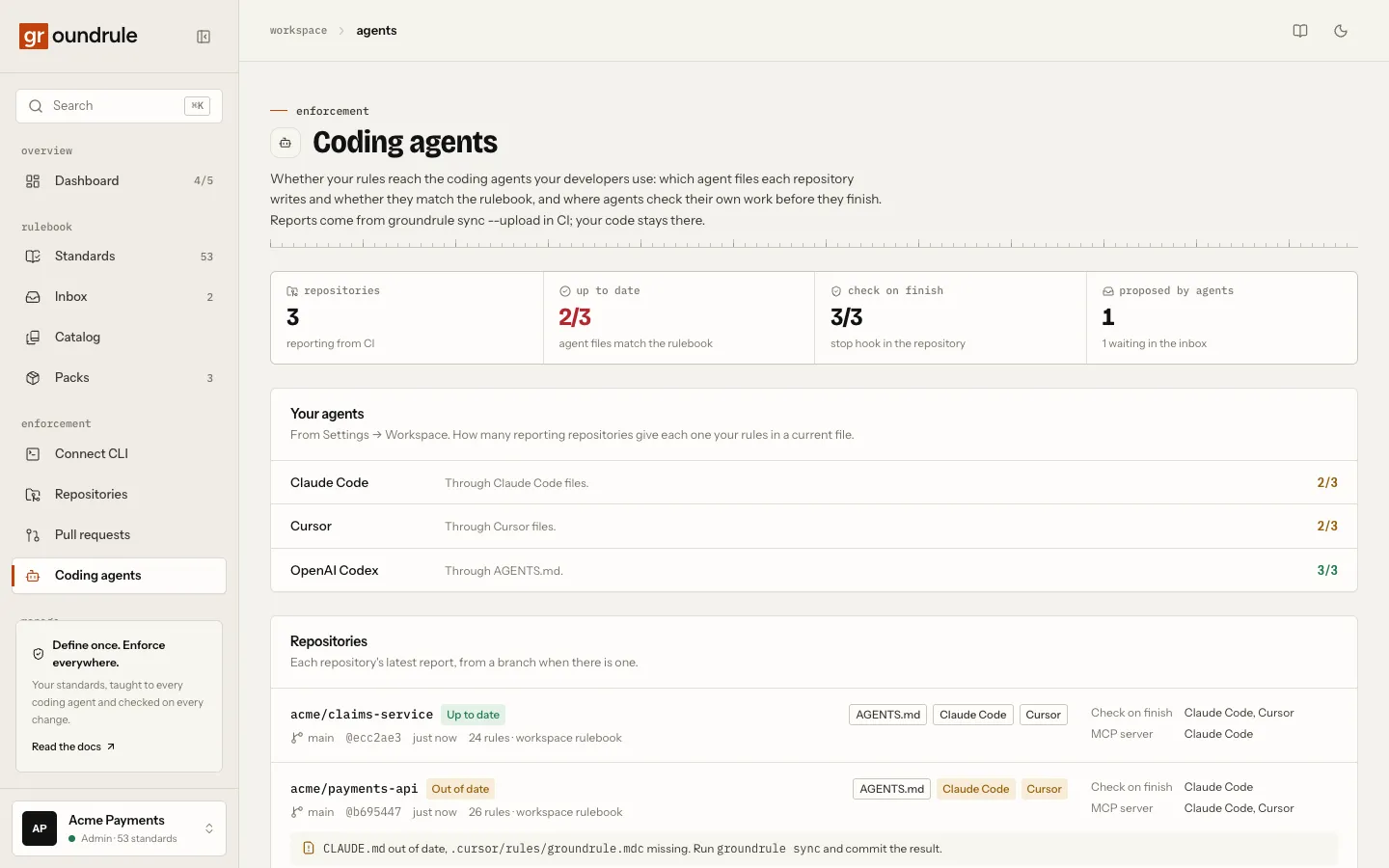
The Coding agents page shows whether your rules reach the coding agents your developers use, repository by repository. For each repository you can see:
- which agent files it writes, and whether they match the rulebook;
- how many rules they carry;
- whether agents check their own work when they finish.
It also lists the rules agents proposed. The reports come from groundrule sync --upload in your CI. Your code stays there.
Set it up
Section titled “Set it up”If the Groundrule GitHub Action already has a token (see Pull requests), there’s nothing to do. Its “agent instructions are current” step reports to this page on every run.
Elsewhere, add --upload to the step that checks the agent files:
npx @groundrule/cli sync --check --uploadThe token needs Upload scans and check results, the same as for check results. Locally, npx @groundrule/cli sync --upload writes the files and reports them as current.
You should see “✓ Reported to your workspace:” and a link to the page. A failed upload prints “! Upload failed: … The result above still stands.” and never changes the exit code.
What you see
Section titled “What you see”At the top:
- repositories reporting, and how many registered repositories aren’t reporting yet;
- up to date: how many repositories have agent files that match the rulebook;
- check on finish: how many have the stop hook (see Check when the agent finishes);
- proposed by agents: rules agents proposed, and how many wait in the inbox.
Your agents appears when Settings → Workspace lists the coding agents your team uses. For each agent it shows how many reporting repositories give it your rules in a current file:
| Agent | Through |
|---|---|
| Claude Code | CLAUDE.md |
| Cursor | .cursor/rules files |
| GitHub Copilot | .github/copilot-instructions.md and path instructions |
| CodeRabbit | Groundrule’s entries in .coderabbit.yaml (review guidance and advisory checks), when coderabbit is a target |
| OpenAI Codex | AGENTS.md |
For other agents it says “Groundrule doesn’t write a file for it yet.”
Repositories lists each repository’s latest report. A report from a branch is preferred over one from a pull request, since that’s what developers check out. Each row shows:
- Up to date or Out of date;
- the branch, commit and when it reported;
- how many rules the files carry, and whether they come from the workspace rulebook or local packs;
- each agent format the repository’s config asks for, highlighted when its files aren’t current;
- Check on finish: the agents whose stop hook is in the repository;
- MCP server: the agents whose project settings start the Groundrule MCP server (
.mcp.json,.cursor/mcp.json,.vscode/mcp.json).
When files aren’t current, the row lists them, as missing, out of date, or to remove, with “Run groundrule sync and commit the result.”
Check on finish and MCP server only see the repository’s own files. A developer who set either up in their own profile isn’t counted, so “Not set up” means not set up in the repository.
Rules proposed by agents appears once an agent has proposed a rule. It lists the latest 20 rules proposed through the MCP server’s propose_rule, with their status, the agent, who it was working for, and the repository. Decide on them in the inbox.
At the bottom of the page, two sections stay folded until you select them:
- Set up a repository has the three commands to run in a repository:
sync,hooks, and adding the MCP server for Claude Code with--scope project, so the setting is committed for everyone. - Copilot organization instructions is described below.
Every member of the workspace can see the page.
What is sent
Section titled “What is sent”sync --upload sends an AgentSync report in the open format (RFC 0006):
- the repository’s name, branch and commit, and the pull request’s details when run in CI for one;
- whether the rules come from the workspace or local packs;
- each agent format the config asks for, with its files’ paths and statuses;
- the number and IDs of the rules in the files;
- yes or no, per agent, for the stop hook and the MCP server in the repository’s settings;
- the CLI version.
Never file contents.
What is kept
Section titled “What is kept”The latest 50 reports per repository; older ones are removed when a new one arrives. Each report also records who uploaded it, with which token. See What Groundrule stores.
Limits
Section titled “Limits”| Limit | Value |
|---|---|
| Reports per token | 300 per hour |
| Reports per workspace | 10,000 per day |
| Reports kept per repository | 50 |
Copilot organization instructions
Section titled “Copilot organization instructions”GitHub lets an organization owner set custom instructions that apply to Copilot Chat, Copilot code review and the Copilot coding agent across every repository in the GitHub organization (Copilot Business or Enterprise). GitHub has no API for that setting, so the Coding agents page renders the text for you. Select Copilot organization instructions at the bottom of the page to open it; the text is generated when you do. It holds your rulebook at the organization level, at Teach or above with your customizations, in the same form groundrule sync writes into agent files.
- Open Copilot organization instructions, then choose the copy button in the corner of the text.
- On GitHub, an organization owner opens their profile picture → Organizations → Settings next to the organization → Copilot → Custom instructions.
- Paste it under Preferences and instructions and save. It applies at once.
Under the text, a line says how many rules and characters the text holds and when it was generated. GitHub keeps the pasted text until an owner replaces it, so copy it again after the rulebook changes. Personal and repository instructions take priority over organization instructions; generating both from the rulebook keeps them consistent.