Import documents
Handbooks, security policies, style guides and review checklists hold rules nobody checks. Import a document reads one with AI and proposes each rule it finds in the inbox, citing exactly where it came from. You see the estimated cost before anything is sent, and nothing changes in your rulebook until someone accepts a proposal.
You need:
- an authoring role: admin, platform admin, or standard owner;
- AI turned on for the workspace. An admin does this in Settings → AI with Use AI in this workspace. See AI and your data.
Import a document
Section titled “Import a document”-
Open Inbox and choose Import a document.
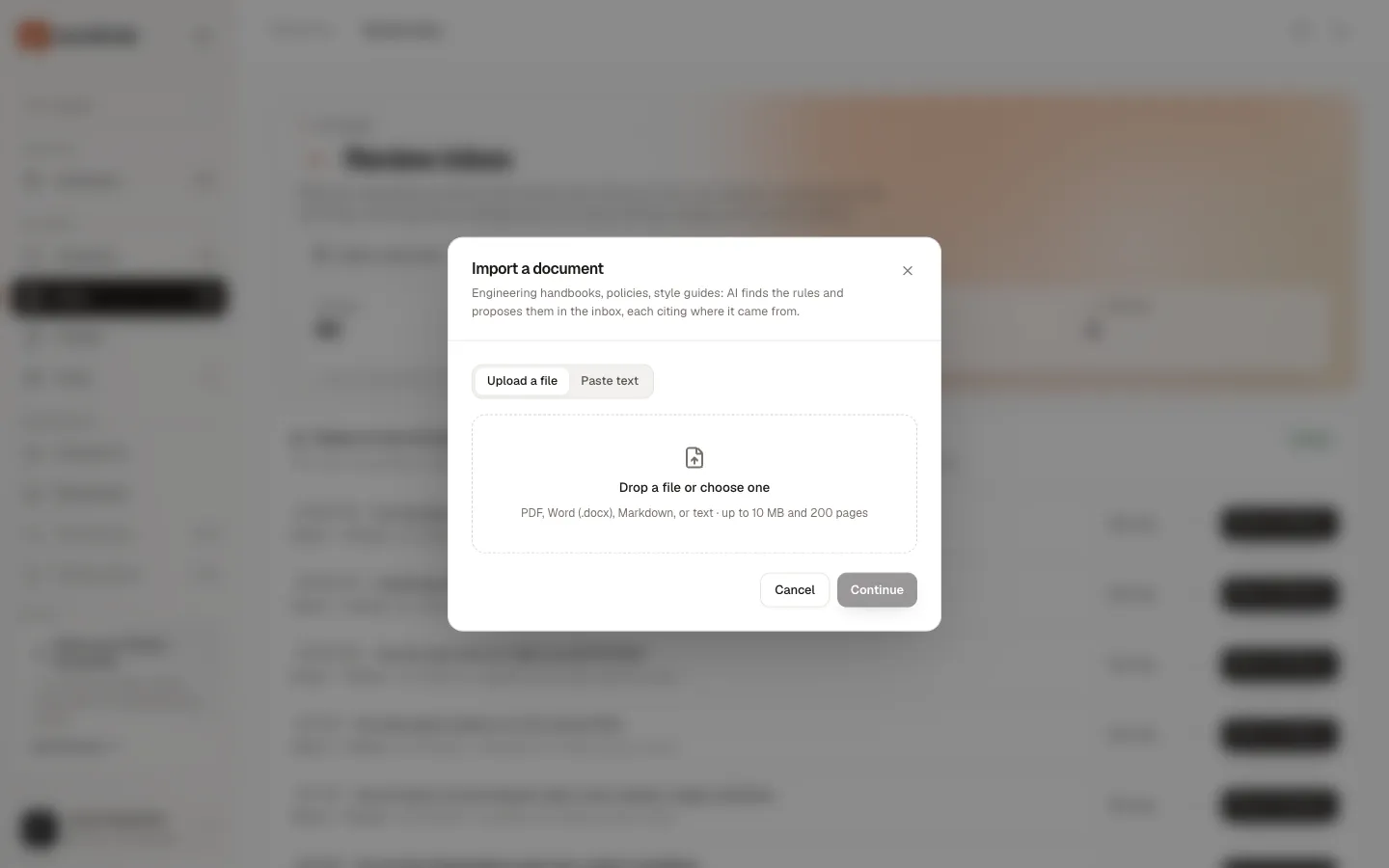
The dialog says: “Engineering handbooks, policies, style guides: AI finds the rules and proposes them in the inbox, each citing where it came from.”
-
Choose a source.
- Upload a file: drop a file on Drop a file or choose one, or click it to pick one. PDF, Word (.docx), Markdown, or text, up to 10 MB and 200 pages.
- Paste text: an optional Name (for example “Engineering handbook”) and the Text. “Markdown headings are kept as locations for citations.”
- From an app appears when an admin has connected Notion, Google Docs or Confluence. See Import from Notion, Google Docs and Confluence.
- PR reviews appears when the GitHub App is installed. See Rules from pull-request reviews.
-
Choose Continue.
Groundrule reads the file into passages and shows the estimate. No AI has run yet.
-
Review the estimate, in the dialog Read this document with AI?
What it shows Example The title, and the file name if it differs Acme engineering handbook Kind, pages (for a PDF), passages, size Markdown · N passages · N KB Estimated cost “up to $0.06”, with “$X left this month” How Right away, “1 part · about a minute” The dialog also says: “Secrets are removed before anything is sent. The file itself isn’t kept, and its text is deleted once reading finishes. Every proposal is labelled AI and needs someone to accept it.”
-
Choose Find rules, or Cancel import.
Find rules starts reading. You should see “Reading started. Proposals appear in the inbox as each part is read.” Cancel import deletes the stored text: “Import cancelled; its text was deleted.”
You should see the document in the Documents section above the inbox. While it is read, it shows Reading with a progress bar. When it finishes, it shows Done and “N proposals · $0.0X”. In one test, a 300-word Markdown handbook produced 17 proposals in about 25 seconds for about $0.06.
If you close the dialog at the estimate, the import waits as Waiting for you. Choose Review estimate to come back to it. An import nobody confirms within a day is cancelled (“Not confirmed within a day.”) and its text deleted.
Formats and limits
Section titled “Formats and limits”| Limit | |
|---|---|
| File types | PDF, Word (.docx), Markdown (.md, .markdown), text (.txt) |
| File size | 10 MB |
| PDF pages | 200 |
| Text in one document | 1,500,000 characters |
| Passages in one document | 5,000 |
| Pasted text | 1,000,000 characters |
| Imports per person | 30 per hour |
Groundrule decides the type from the file’s contents, not its name. The name only tells Markdown and plain text apart.
Passages and citations
Section titled “Passages and citations”Before anything is sent, Groundrule splits the document into passages, and records where each one is:
| Format | A passage is | Its location |
|---|---|---|
| Markdown and pasted text | A paragraph, a list item, a code block, or a table | The heading path, such as “Security › Secrets”, and the paragraph number |
| Word (.docx) | A paragraph, list item, table cell, or code block | The heading path (Word heading styles keep their levels) and the paragraph number |
| A paragraph on a page | The page, a heading where a short title line was detected, and the paragraph number |
Passages longer than 4,000 characters are split at sentence ends. YAML front matter, images, and fragments under 3 characters are left out.
Each proposal cites the passage it came from: the document’s title, its place (for example p. 4 · Security › Secrets · ¶ 12), and the exact words that state the rule. AI must copy the quote word for word from a passage it cites; Groundrule checks this, and rejects an answer whose quote isn’t in the document.
The title of a document is its first heading. Without one, it is the file name without its extension. A pasted text is titled by its Name, then its first heading, then “Pasted text”.
What AI keeps and skips
Section titled “What AI keeps and skips”AI looks for statements that tell engineers, or their tools, what they must, should, or must not do. It skips everything else: introductions, background, org charts, schedules, contact details, glossaries, tables of contents, and processes that aren’t engineering work. In one test, a handbook’s team and on-call sections produced no proposals.
When several passages state the same rule, AI returns it once and cites all of them (“+N more places”). When one passage holds several rules, AI splits them.
The proposals you get
Section titled “The proposals you get”Each proposal arrives in the inbox already drafted:
- a title, a requirement in plain sentences, a severity, a category, a rationale, and paths when the document names files;
- Must, Should or Note: Must for blocker and warning severities, Should for advisory, Note for info;
- AI draft · N% confident. Below 50% means the statement was vague or aspirational.
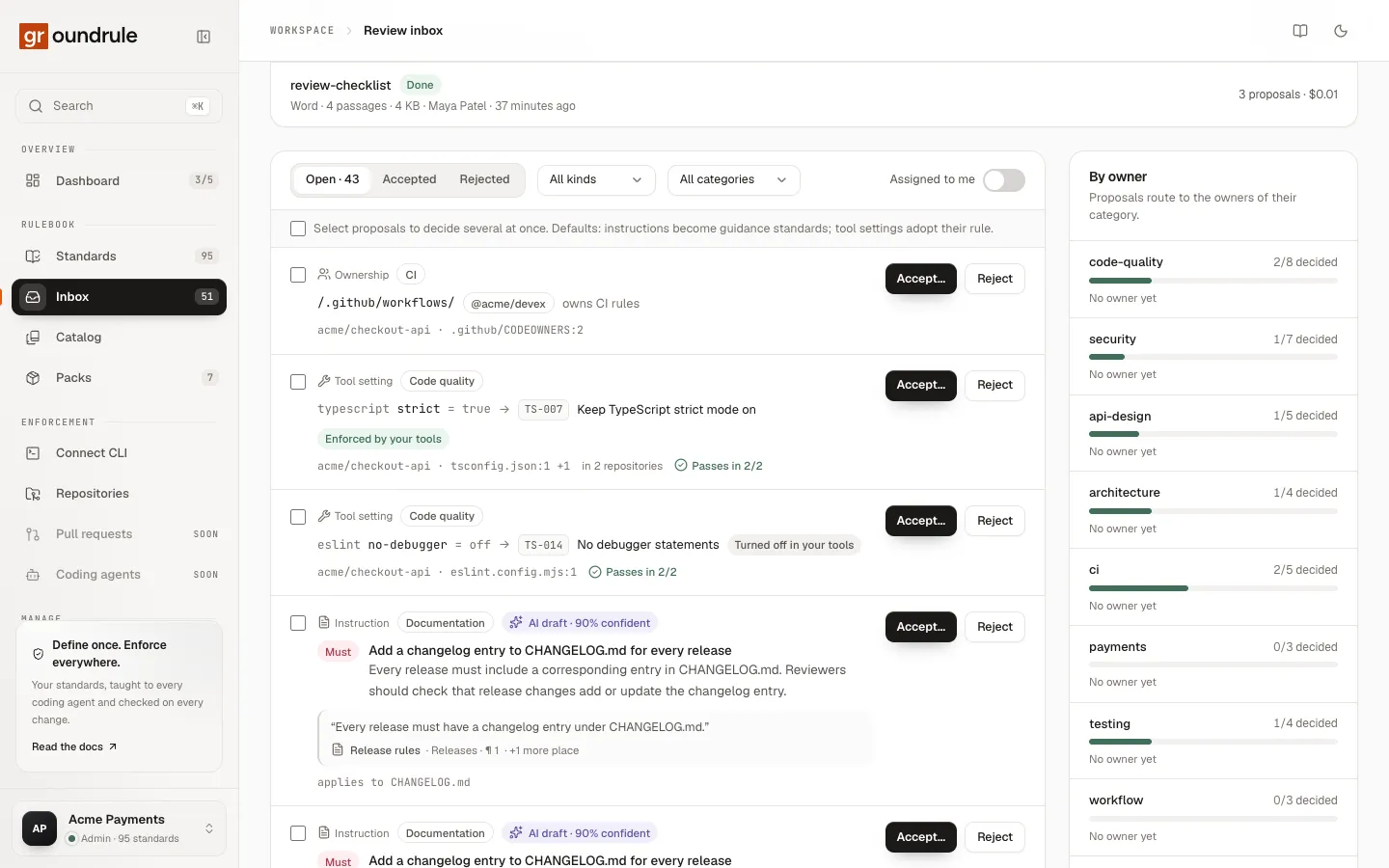
Review and accept them like any instruction. See The review inbox.
Import the same document again
Section titled “Import the same document again”Re-importing text Groundrule has already read is served from the AI answer cache, for $0, as long as the workspace uses Standard data retention and the earlier answer is under 30 days old. Its proposals merge with the ones already in the inbox, adding the new citation, instead of duplicating them. The first wording of a proposal stays, so it doesn’t change under its reviewers.
Large documents
Section titled “Large documents”Groundrule sends a document to AI in parts of about 12,000 characters of passages each. The estimate dialog’s How says how it will run:
| How | When | What happens |
|---|---|---|
| Right away | Up to 8 parts, or any size when the workspace uses Zero retention | Parts are read three at a time. “about a minute”. Proposals appear as each part finishes |
| Batch, half price | More than 8 parts | All parts go to the provider’s batch service, at half the price. “usually within an hour”. The Documents section shows “Batch · checks every few minutes” |
Batch results are collected while someone who can import has the inbox open. If one part fails, the rest still count, and the import says “N of M parts couldn’t be read by the AI.” If every part fails, the import is Failed.
Errors
Section titled “Errors”| Message | What to do |
|---|---|
| “This file type isn’t supported. Use PDF, DOCX, Markdown, or text.” | Convert the file. Images and binary files can’t be read |
| “This file isn’t valid UTF-8 text. Use PDF, DOCX, Markdown, or text.” | Save the text file as UTF-8 |
| “Only .docx files are supported from zip-based formats.” | Save the file as .docx |
| “Files can be up to 10 MB.” | Split the document |
| “This PDF has N pages; the limit is 200. Split it into smaller documents.” | Split the PDF |
| “This document has more than 1,500,000 characters of text. Split it into smaller documents.” | Split the document |
| “This document has too many paragraphs. Split it into smaller documents.” | Split the document |
| “No text found in this PDF. Scanned PDFs need OCR first.” | Run text recognition (OCR) on the PDF, then import it again |
| “No text found in this document.” / “This document is empty.” | Check the file |
| “This PDF couldn’t be read. It may be damaged or password-protected.” | Remove the password, or export the PDF again |
| “This DOCX file is damaged.” / “This DOCX file couldn’t be read.” | Save the document again from Word |
| “This DOCX file expands to too much data. Split it into smaller documents.” | Split the document |
| “Paste up to a million characters.” | Paste less, or upload a file |
| “Reading this document is estimated at $X, but only $Y of this month’s AI budget is left. An admin can raise it in Settings → AI.” | Ask an admin to raise the budget, or import a smaller part. Nothing was sent |
| “AI is off for this workspace.” (and Find rules is disabled) | An admin turns AI on in Settings → AI |
| “Too many imports. Wait a while and try again.” | Wait; the limit is 30 imports per person per hour |
| “Interrupted. Import the document again.” | Reading stopped partway; import it again |
What happens to the document
Section titled “What happens to the document”- The uploaded file is never stored. Groundrule keeps only the extracted text, as passages.
- Secrets are removed from passages before they are stored, and again before anything is sent to AI.
- The text is deleted when reading ends, whether it succeeded, failed or was cancelled.
- What stays: the import’s record (name, title, kind, size, page and passage counts, cost, who imported it), and each proposal’s citation, which holds a quote of up to 600 characters.
See What we store and AI and your data.