Connections
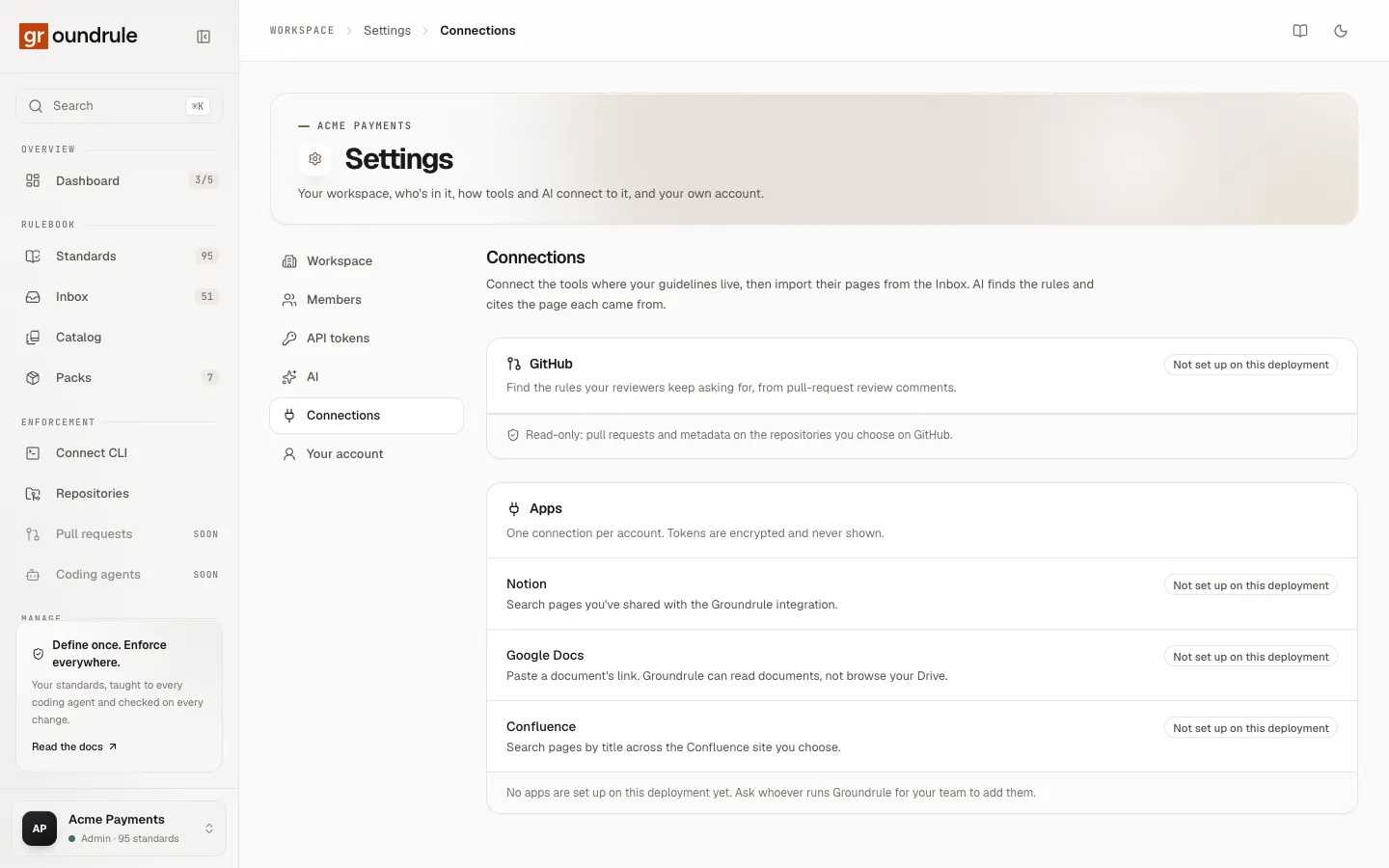
Settings → Connections links your workspace to the tools where your guidelines already live. Once an app is connected, people who write rules can import its pages into the inbox, and AI finds the rules in them and cites where each came from. Connecting GitHub also lets Groundrule read pull-request review comments.
Every connection is read-only. Groundrule reads a page only when someone imports it.
This page covers connecting and disconnecting. Importing is covered in Import from connected apps and Rules from pull-request reviews.
Who can do what
Section titled “Who can do what”| Admin, Platform admin | Standard owner | Other roles | |
|---|---|---|---|
| Connect and disconnect apps; install the GitHub App | ✓ | ||
| See connections and import from them | ✓ | ✓ |
People in other roles see “Connections are managed by admins and used by standard owners. Ask an admin if you need to import from Notion, Google Docs, or Confluence.”
What each app does
Section titled “What each app does”| App | What Groundrule can do with it | Access it asks for |
|---|---|---|
| GitHub | “Find the rules your reviewers keep asking for, from pull-request review comments.” Also turns /groundrule rule … review comments into proposals. |
A GitHub App with read-only access to pull requests and metadata, on the repositories you choose on GitHub. |
| Notion | “Search pages you’ve shared with the Groundrule integration.” | Notion’s integration access, limited to the pages you share with it during approval. |
| Google Docs | “Paste a document’s link. Groundrule can read documents, not browse your Drive.” | Read-only access to Google Docs documents, plus your Google email. No Drive access. |
| Confluence | “Search pages by title across the Confluence site you choose.” | Read Confluence pages and their content details on one site, with offline access so imports work later. |
“One connection per account. Tokens are encrypted and never shown.” The tokens an app gives Groundrule are stored encrypted, used only by the Groundrule service, and never displayed to anyone, including admins.
“Not set up on this deployment”
Section titled ““Not set up on this deployment””An app shows Not set up on this deployment when the Groundrule service you use hasn’t been registered with that app. There’s no Connect button for it. If no app is set up, the panel says “No apps are set up on this deployment yet. Ask whoever runs Groundrule for your team to add them.”
Connect Notion, Google Docs or Confluence
Section titled “Connect Notion, Google Docs or Confluence”- Open Settings → Connections.
- Next to the app, choose Connect Notion, Connect Google Docs or Connect Confluence.
- Sign in to the app if it asks, and approve the access on its consent screen:
- Notion: choose the pages Groundrule may read. Only pages shared with the integration can be found later.
- Google Docs: approve read-only access to documents.
- Confluence: choose the site. Groundrule uses one site per connection.
- You come back to Settings → Connections.
You should see “Connected. You can import its pages from the Inbox.” The app now lists the connected account by name, marked Connected, with who connected it and when it was last used.
To connect a second account of the same app, choose Connect another account. Connecting the same account again updates its access instead of adding a duplicate.
If it goes wrong, the page says why:
| Message | What happened |
|---|---|
| “Access wasn’t granted, so nothing was connected.” | You cancelled or declined on the consent screen. |
| “The connection didn’t complete (the request expired or came from elsewhere). Try again.” | More than 10 minutes passed, or the approval was started in another browser. |
| “Sign in again, then connect.” | Your Groundrule session ended during approval. |
| “The app didn’t accept the connection. Try again, or check its OAuth settings.” | The app refused the exchange, or your role changed. |
Needs reconnecting
Section titled “Needs reconnecting”A connection is marked Needs reconnecting when the app stops accepting its access, for example after someone revokes it in the app or it expires. Imports from it fail with a message such as “Notion needs to be reconnected.” Connect the same account again to fix it.
Install the GitHub App
Section titled “Install the GitHub App”- Open Settings → Connections.
- In the GitHub panel, choose Install the GitHub App.
- On GitHub, choose the account or organization, then All repositories or Only select repositories, and install.
- You come back to Settings → Connections.
You should see “GitHub connected. Import review comments from the Inbox → Import a document.” The panel lists the GitHub account, marked Connected, with All repositories or Selected repositories, who installed it, and when.
The footer says what Groundrule can access: “Read-only: pull requests and metadata on the repositories you choose on GitHub.” Use Change repositories on GitHub to add or remove repositories later; the change applies on GitHub’s side.
When reviewer commands are available, the panel also explains them: reviewers can write /groundrule rule … in a pull-request review comment, or reply to a comment with only /groundrule rule, to send that rule to the inbox. See Rules from pull-request reviews.
To connect a second GitHub account or organization, choose Add another account.
If it goes wrong:
| Message | What happened |
|---|---|
| “That GitHub installation is already connected to another Groundrule workspace.” | One installation can serve one workspace. Uninstall it there, or install the app again on a different account. |
| “That GitHub installation is suspended. Unsuspend it on GitHub, then connect again.” | Unsuspend it in GitHub’s settings. |
| “The connection didn’t complete (the request expired or came from elsewhere). Try again.” | More than 30 minutes passed, or you started in another browser. |
| “The app didn’t accept the connection. Try again, or check its OAuth settings.” | GitHub couldn’t confirm that you can see that installation. |
Disconnect
Section titled “Disconnect”An app: choose the bin icon next to the account, then Disconnect in the dialog. “Groundrule will stop reading from this … account and delete its access. Proposals and standards already imported stay, with their citations.” Where the app supports it, Groundrule also revokes the access on the app’s side. You should see “Disconnected” followed by the account name.
GitHub: choose the bin icon next to the GitHub account. It’s disconnected at once: “Disconnected. Uninstall the app on GitHub too if you no longer need it.” Disconnecting removes it from Groundrule but leaves the app installed on GitHub, so uninstall it there as well. Uninstalling the app on GitHub also removes it from Connections.