Teams and owners
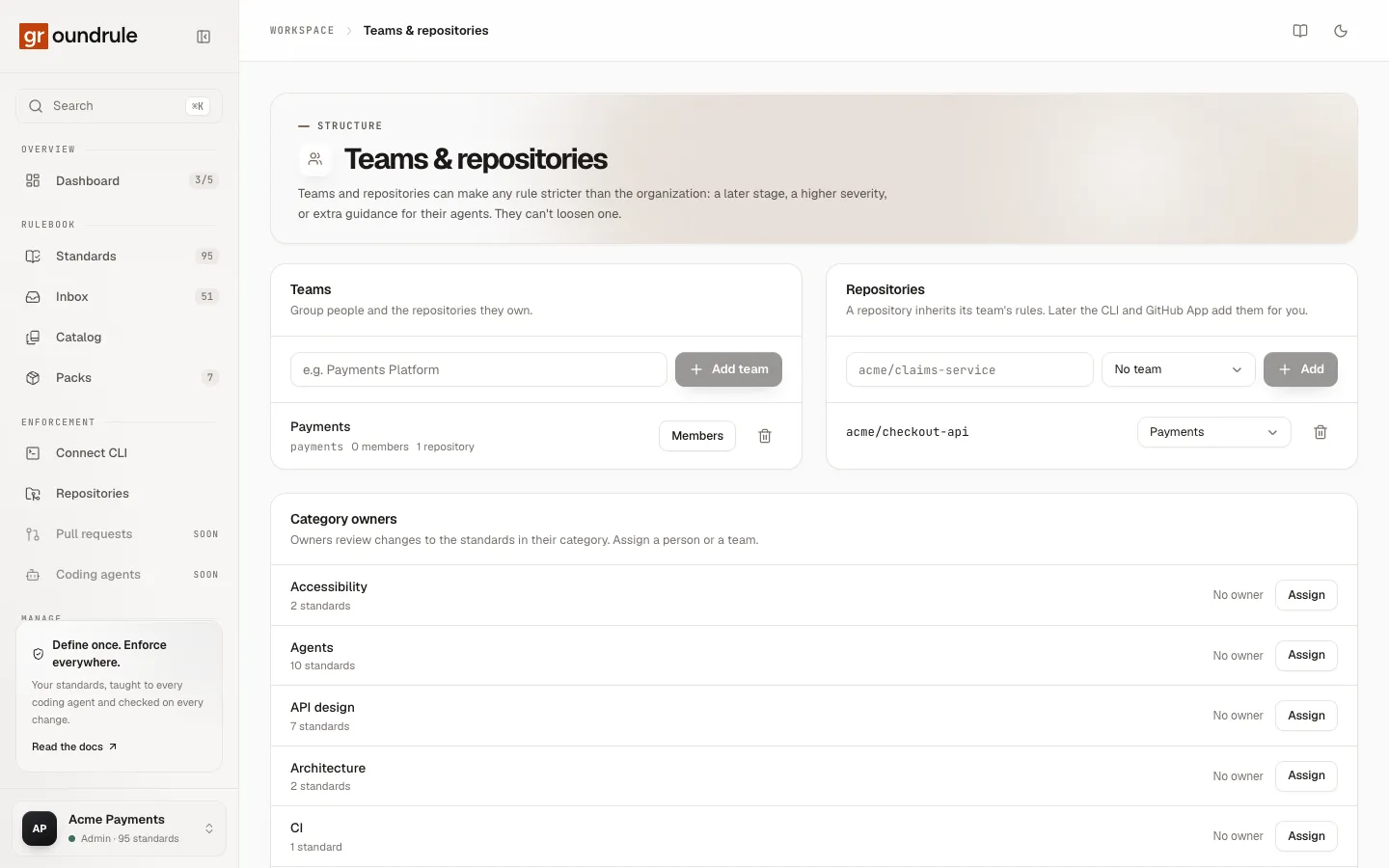
Teams and repositories are the levels below the organization. A team can make any rule stricter for the repositories it owns, and each category of rules can have owners, so proposals in the inbox reach the people who know that area. This page covers creating teams, registering repositories, team-level rules, category owners, and owner suggestions from CODEOWNERS.
Who can change this: admins and platform admins. Everyone else can see teams, repositories and owners; the page says “Only admins can change teams and repositories.”
Everything here is on one page: Teams in the sidebar, titled Teams & repositories.
Create a team
Section titled “Create a team”-
Open Teams.
-
Type the team’s name in the Teams panel, for example “Payments Platform”.
-
Choose Add team.
-
Choose Members on the team’s row, select the people in the team, and choose Save members.
You should see “Team added”, and the team appears with its URL name, for example payments-platform, and “0 members · 0 repositories”. After step 4 you see “Members updated”.
| Detail | Value |
|---|---|
| Name | 1 to 80 characters |
| URL name | Made from the name: lowercase letters, digits and dashes, 2 to 48 characters. It can’t change. |
| Members | Only members of the workspace can join a team: “Only members of this organization can join its teams.” |
If a team with the same URL name exists, you see “A team called name already exists.”
Team membership matters for routing: when a team owns a category, every member of the team sees that category’s proposals as assigned to them.
To delete a team, choose the bin icon on its row. Groundrule asks “Delete team? Its rule settings are removed too.” The team’s rule settings and its category ownerships are removed. Its repositories stay registered, with no team.
Register a repository
Section titled “Register a repository”A repository must be registered in your workspace for team settings to apply to it. Scanning a repository doesn’t register it.
-
Type the repository’s name in the Repositories panel, as
owner/name, for exampleacme/checkout-api. -
Choose its team in the menu next to it, or leave No team.
-
Choose Add.
You should see “Repository added”. To move a repository to another team later, change the menu on its row (“Team updated”). To remove it, choose the bin icon; Groundrule asks “Remove repository? Its rule settings are removed too.”
Use the same name the CLI sees. The CLI takes the repository’s name from its git remote: git@github.com:acme/checkout-api.git becomes acme/checkout-api. If the remote differs, or there is none, set the name in .groundrule/config.yaml:
platform: org: acme-payments repository: acme/checkout-apiErrors you might see:
| Message | Why |
|---|---|
| “Use owner/name, e.g. acme/claims-service” | The name has characters other than letters, digits, ., _, -, and one /. |
| “name is already registered.” | The repository is already in the list. |
When a repository isn’t registered
Section titled “When a repository isn’t registered”If the CLI runs in a repository the workspace doesn’t know, it uses the organization’s settings and warns on every sync, check and standards:
! .groundrule/config.yaml acme/checkout-api isn't registered in acme-payments, so the organization's rules apply. Add it under Teams → Repositories to use its team's settings.The dashboard flags it too:
- Repositories shows “Not registered” next to the repository.
- A scan’s page shows Register it to apply team settings, which opens Teams.
Register the repository, and the warning goes away on the next run.
Give a team stricter rules
Section titled “Give a team stricter rules”A team’s settings apply in every repository registered under it. A repository can then be stricter still.
-
Open the rule in Standards.
-
Choose the team in the scope menu at the top of Your rollout. The menu lists Whole organization, then your teams, then your registered repositories.
-
Change the stage, the severity, or turn the rule on. For example, set severity Blocker and stage Enforce for Payments.
You should see “Rollout updated”. In a Payments repository, npx @groundrule/cli standards now shows the rule at its new severity and stage.
A team or repository can only make a rule stricter: a later stage, a higher severity, or turning on a rule the organization turned off. Looser changes are refused with an explanation, for example “The organization uses advise. A team can only keep it or move it further (observe → teach → advise → enforce).” Adopting and tuning rules lists every message.
Category owners
Section titled “Category owners”Every standard has a category, such as security, api-design or payments. Each category can have owners: people, teams, or both. Owners are the people who decide on proposals in their area.
The Category owners panel lists every category in your rulebook, with its number of standards and its owners, or “No owner”.
-
Choose Assign next to the category.
-
Select teams, people, or both. The window lists your teams under Teams and your members under People.
-
Choose Save owners.
You should see “Owners updated”. The owners also show on each rule’s page, under Details → Owners.
A category can have up to 50 people and 50 teams as owners. Clearing every box removes the category’s owners.
How owners route proposals
Section titled “How owners route proposals”Each proposal in the inbox has a category. When you own that category, directly or through a team you belong to, the proposal is assigned to you:
- The inbox’s Assigned to you count (“Through your categories”) includes it.
- The proposal shows an Assigned to you label.
- The Assigned to me switch shows only proposals assigned to you.
- The Category filter lists each category, and Unrouted for proposals with no category.
Owning a category doesn’t change what you can do. Roles decide that: admins, platform admins and standard owners can accept or reject proposals, whatever they own. Review workflows that require an owner’s approval aren’t available yet. See The review inbox.
Owners from CODEOWNERS
Section titled “Owners from CODEOWNERS”When npx @groundrule/cli scan --upload finds a CODEOWNERS file (at the root, in .github/, or in docs/), each entry becomes an owner proposal in the inbox. Groundrule guesses a category from the entry’s path:
| Path in CODEOWNERS looks like | Category |
|---|---|
.github/workflows, .gitlab-ci, ci/ |
CI |
terraform/, infra/, k8s/, helm/, deploy/, charts/, *.tf, Dockerfile, docker-compose |
Infrastructure |
security/, auth/, crypto/, secrets/ |
Security |
tests/, spec/, __tests__/, e2e/, *.test.*, *.spec.* |
Testing |
package.json, lock files, requirements, go.mod, pom.xml, build.gradle, Dependabot, Renovate |
Supply chain |
api/, openapi/, proto/, graphql/ |
API design |
migrations/, db/, database/, schema/ |
Data |
An entry for the whole repository (*, /* or **) becomes a suggestion for the repository’s team instead.
-
Open Inbox and find the ownership proposal. The Kind filter’s Ownership option shows only these.
-
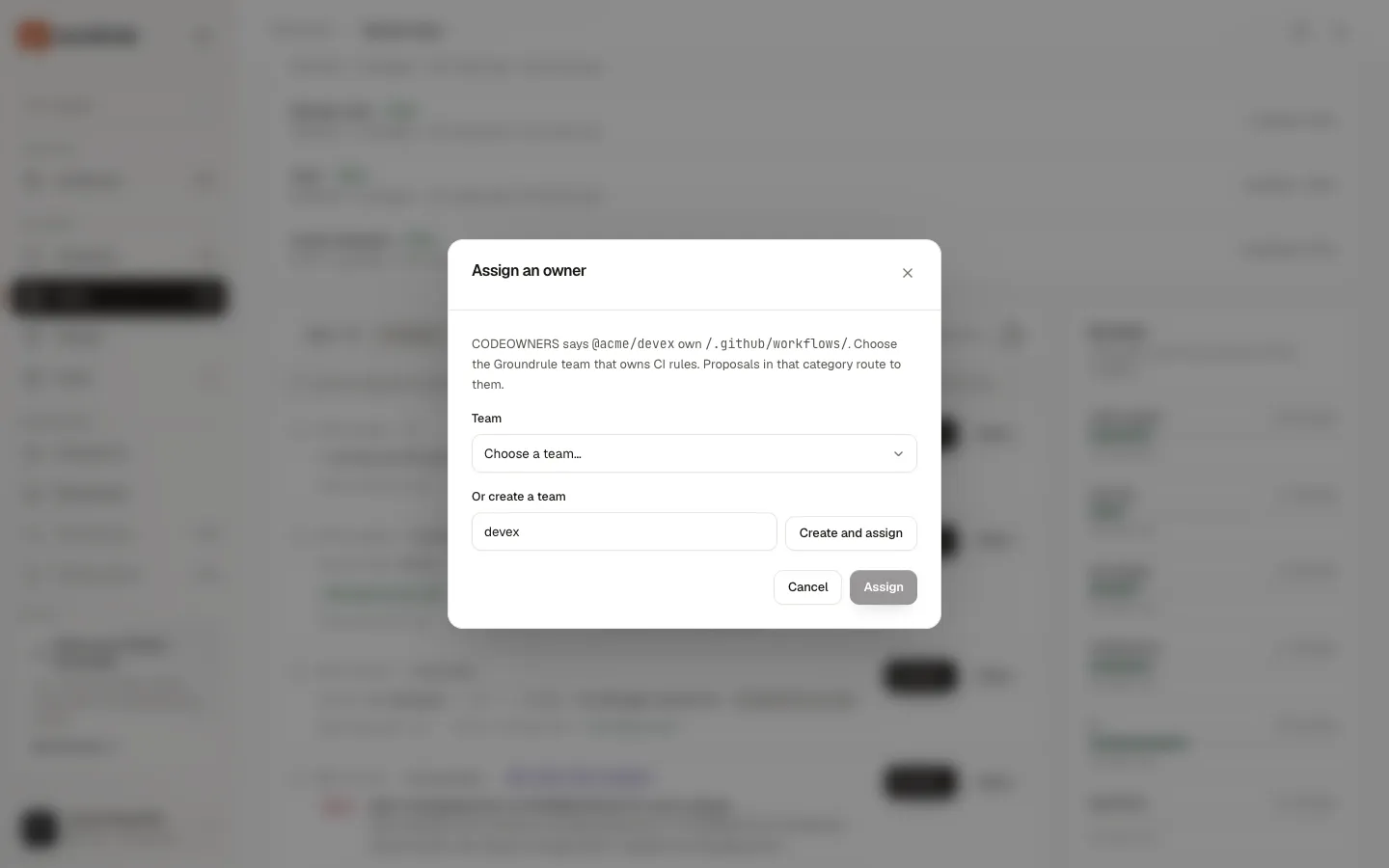
Choose Assign an owner. The window says, for example, “CODEOWNERS says @acme/devex own /.github/workflows/. Choose the Groundrule team that owns CI rules. Proposals in that category route to them.”
-
Choose a team in Team and choose Assign. Or type a name in Or create a team and choose Create and assign.
You should see “Owner assigned” (or “team assigned” for a new team). What happens depends on the entry:
- A category entry: the team becomes an owner of that category. “Proposals in that category route to them.”
- A whole-repository entry: the repository is registered under that team, and created if it wasn’t registered. “The repository is registered under that team, so its team settings apply.”
An entry with neither a category nor a whole-repository pattern can’t be assigned: “This ownership entry has no category or repository to assign. Reject it instead.”
Only admins and platform admins can decide ownership proposals.
Related
Section titled “Related”- Adopting and tuning rules: the rollout panel and its scope menu.
- The review inbox: every kind of proposal and how to decide it.
- Scan repositories: where CODEOWNERS suggestions come from.