Packs
A pack is a set of standards for one topic, maintained by Groundrule. You turn a pack on, and its standards join your rulebook, each at a sensible starting stage. This page lists every pack, explains what turning one on does, and shows how to tune a pack’s rules one at a time or in bulk.
The packs
Section titled “The packs”There are 13 packs with 171 standards in total. The Pack column is the name used in .groundrule/config.yaml and on the command line, as groundrule:packs/<pack>.
| Pack | Title | What it covers | Standards | IDs |
|---|---|---|---|---|
agent-hygiene |
AI coding agent hygiene | How AI coding agents should work in a repository: scoped changes, honest verification, no weakened tests, and no surprises | 10 | AGENT- |
docker |
Docker | Secure, reproducible, and lean container images built from Dockerfiles | 12 | DOCKER- |
github-actions |
GitHub Actions | Supply-chain pinning, token permissions, and injection safety for GitHub Actions workflows | 10 | GHA- |
go |
Go | Error handling, concurrency, HTTP, and security conventions for Go services and libraries | 13 | GO- |
http-api |
HTTP API design | Error handling, status codes, pagination, idempotency, versioning, and access control for HTTP APIs, in any language | 12 | HTTP- |
java-spring |
Java and Spring Boot | Conventions for Spring Boot services | 16 | JAVA- |
kubernetes |
Kubernetes | Secure and reliable Kubernetes manifests, aligned with the Pod Security Standards | 12 | K8S- |
python |
Python | Low-noise correctness, security, and maintainability conventions for Python codebases | 16 | PY- |
react |
React | Security, accessibility, and correctness conventions for React applications | 12 | REACT- |
security-baseline |
Security baseline | Secrets, credentials, TLS, and supply-chain basics every repository should follow | 20 | SEC- |
terraform |
Terraform | Credentials, state, supply-chain pinning, and network exposure rules for Terraform code | 12 | TF- |
testing |
Testing | Keeping test suites trustworthy, deterministic, and honest, across JavaScript, Python, Java, Go, and Ruby | 11 | TEST- |
typescript-node |
TypeScript and Node.js | Low-noise conventions for TypeScript and JavaScript codebases | 15 | TS- |
Every standard in every pack is listed, with its severity and checks, in the packs reference. To browse them in the dashboard, use the catalog.
Which packs to start with
Section titled “Which packs to start with”During onboarding, Groundrule preselects packs from your answers about your stack. You can use the same logic later:
| Pack | Recommended when |
|---|---|
| Security baseline | Always |
| AI coding agent hygiene | Your team uses any coding agent |
| TypeScript and Node.js, React, Python, Java and Spring Boot, Go | You build with that language or framework |
| Docker, Kubernetes, Terraform, GitHub Actions | You use that tool |
| HTTP API design | You write server code in any language: TypeScript, Python, Java, Go, C#, Ruby, PHP, or Rust |
| Testing | Not preselected. Turn it on when you want rules about test suites. |
For example, a team that builds with TypeScript, React, Docker and GitHub Actions, and uses Claude Code and Cursor, starts with seven packs and 91 standards.
The Packs page
Section titled “The Packs page”Choose Packs in the sidebar. The page shows four numbers:
| Number | What it counts |
|---|---|
| Active | Packs turned on, out of all packs |
| Inherited | Standards in effect from the packs that are on |
| Blocking | Inherited standards with severity blocker |
| Updates | Auto: packs update with every Groundrule release |
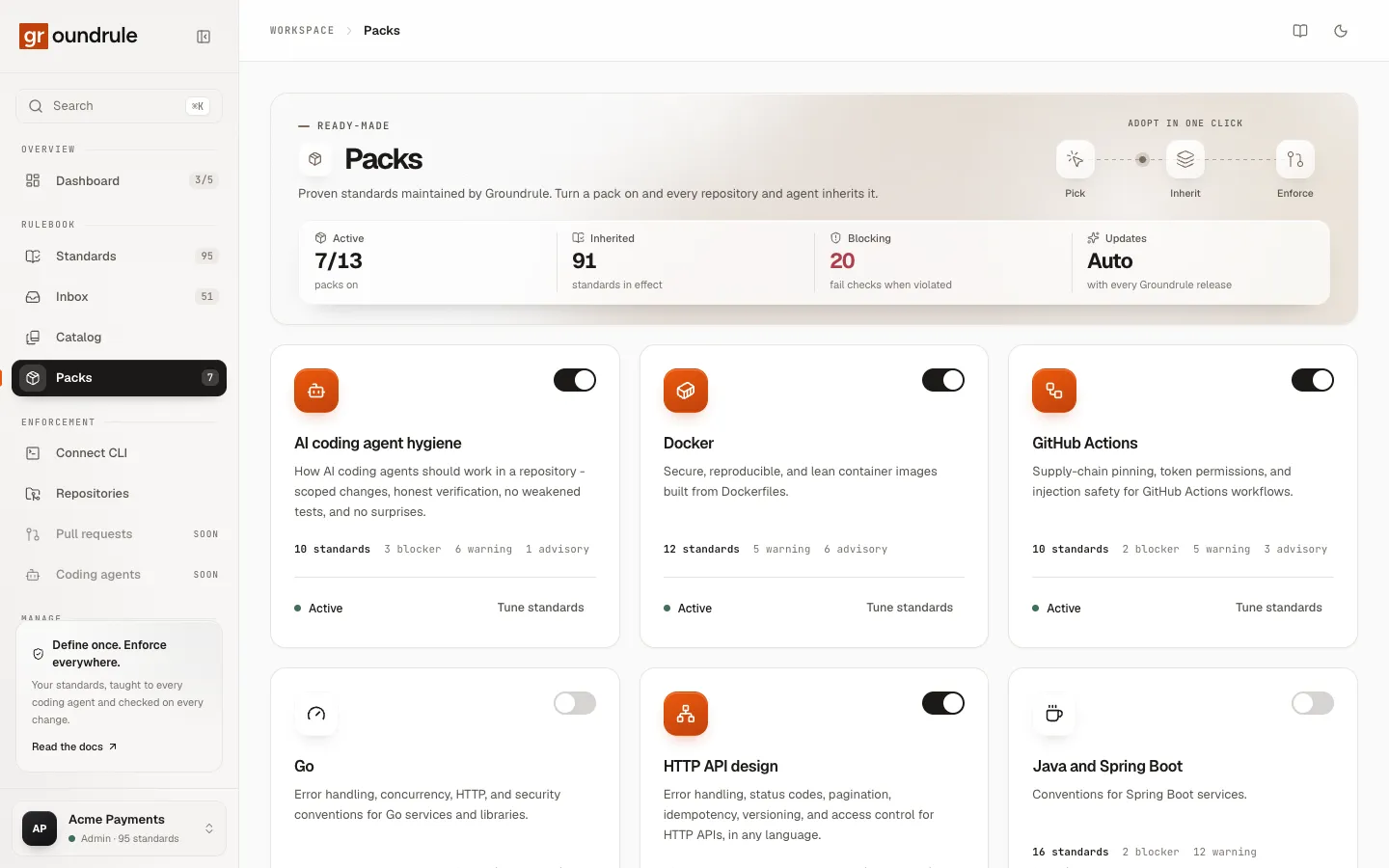
Each pack has a card with:
- an on/off switch;
- its title and description;
- its number of standards, and how many are blockers, warnings, and advisories;
- Active or Off;
- Tune standards (when the pack is on) or View standards (when it is off), which opens the pack’s page.
Turn a pack on or off
Section titled “Turn a pack on or off”Only admins and platform admins can turn packs on or off. Everyone else sees the page with “Ask an admin to change which packs are on.”
-
Open Packs.
-
Turn on the switch on the pack’s card. To turn a pack off, turn the switch off.
-
Run sync in each repository to update the agent files:
npx @groundrule/cli sync. Then commit the changed files.
You should see a message such as “8 packs active”, and the Active and Inherited counts change.
If you see “ID is defined both by your organization and by pack”, one of your own standards uses an ID from that pack. The pack can’t be turned on while that standard exists.
What turning a pack on does
Section titled “What turning a pack on does”- Every standard in the pack joins your rulebook, in Standards, at the stage shown as Starts at in the catalog. Nothing starts at Observe. Low-noise checks can start at Enforce; rules that might flag existing code start at Teach or Advise.
- The next
groundrule syncwrites the pack’s rules at Teach and later into each repository’s agent files. - The next
groundrule checkruns the pack’s checks at Advise and Enforce. - Rules that start at Enforce can fail a check right away if they are blockers. Before you turn a pack on, look at its evidence: scans already run every catalog rule, whether its pack is on or not. See Evidence and impact.
What turning a pack off does
Section titled “What turning a pack off does”- The pack’s standards leave your rulebook. The next
syncremoves them from the agent files, andcheckstops running them. - Your settings for its rules (stage, severity, on or off, wording) are kept. If you turn the pack on again, they apply again.
Tune a pack’s rules
Section titled “Tune a pack’s rules”Choose Tune standards on a pack’s card to open the pack’s page. It shows the pack’s version (for example “Pack · v1.1.0”), its description, and these numbers:
| Number | What it counts |
|---|---|
| Standards | Standards in this pack |
| Teach, Advise, Enforce | How many of the pack’s rules are on and at each stage |
| Customized | How many rules you changed, and whether the pack was reviewed at its current version |
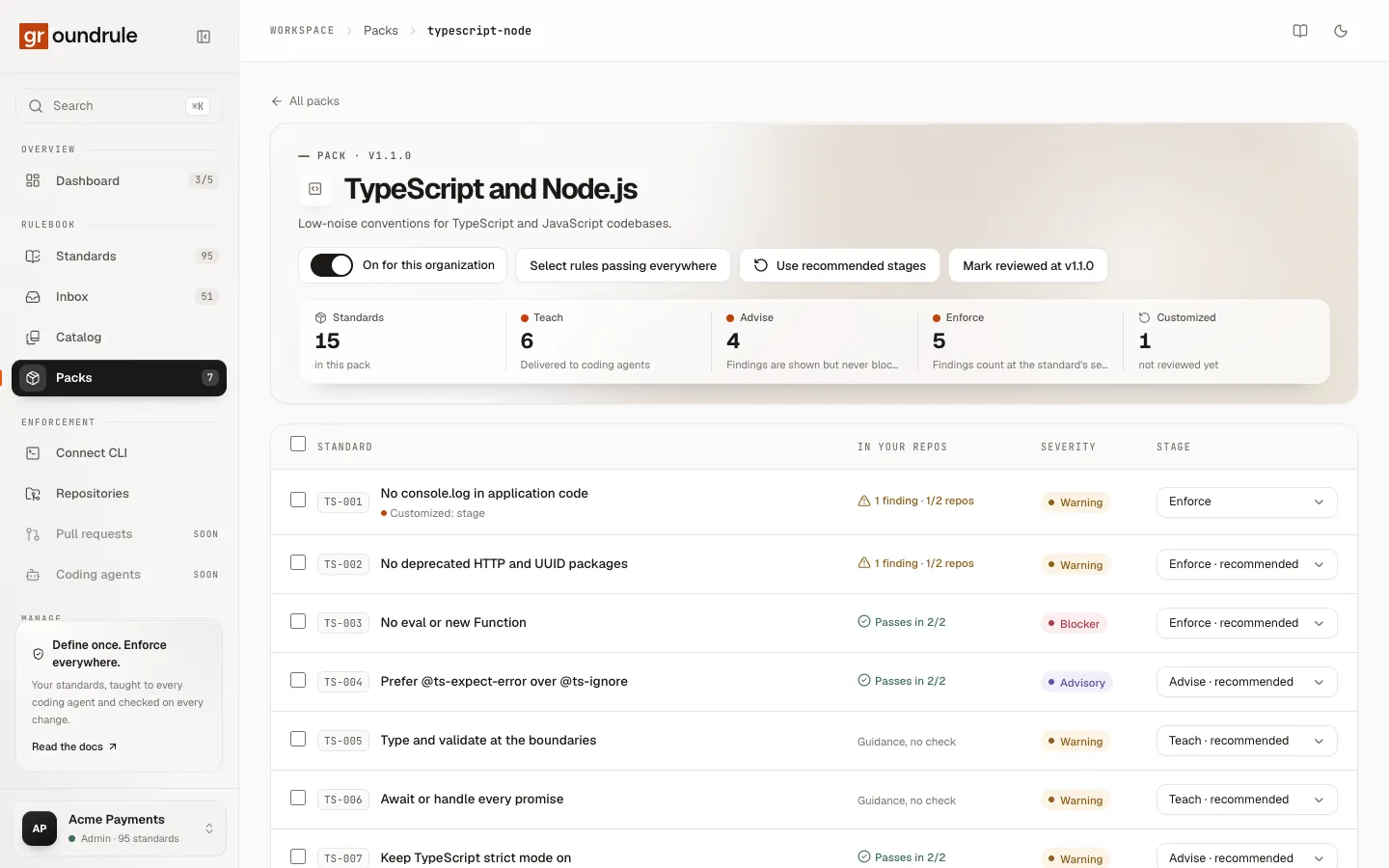
The table lists every rule in the pack:
| Column | What it shows |
|---|---|
| Standard | The ID and title. Underneath: “Off · reason” when the rule is turned off, “Customized: fields” when you changed it, and Upstream changed when Groundrule updated the rule after you changed it. |
| In your repos | Evidence from your latest scans, such as “Passes in 2/2”, “1 finding · 1/2 repos”, or “Guidance, no check”. Shown once you have scanned a repository. |
| Severity | The rule’s severity in your workspace |
| Stage | A menu to change the stage. The recommended stage is marked “· recommended”. |
Select a rule’s title to open its page, where you can change everything about it. See Adopting and tuning rules.
Admins, platform admins and standard owners can change stages and use bulk actions. Other roles see each rule’s stage as a label.
Change many rules at once
Section titled “Change many rules at once”-
Select the rules. Use the checkboxes, or the checkbox in the header to select all. A bar appears with “N selected”.
-
Choose an action in the bar:
Action What it does Move to stage… Sets the stage of every selected rule Turn on Turns the selected rules back on Turn off… Asks “Why are these off?” (at least 3 characters), then Turn off N Reset stage and severity Puts stage and severity back to the pack’s recommendation Clear Clears the selection
You should see “N standards updated”. If any selected rule can’t take the change, nothing is changed, and the message reads “Nothing was changed. Fix these first.”
Three shortcuts sit at the top of the page:
- Select rules passing everywhere selects every rule that is on, isn’t at Enforce yet, and has no findings in any scanned repository. Then choose a stage in Move to stage…. If there are none, the message reads “Every rule that passes everywhere is already at Enforce.” This button appears once you have scanned a repository.
- Use recommended stages puts every rule whose stage you changed back to its recommended stage. It appears only when at least one stage differs.
- Mark reviewed at vversion records that an admin reviewed the pack at its current version. It appears for admins and platform admins when the pack has a newer version than the one last reviewed.
How pack updates reach you
Section titled “How pack updates reach you”Groundrule updates packs with its releases: better wording, new examples, fewer false positives, sometimes new rules. Each pack has a version, shown on its page.
- You don’t fork a pack. Your changes are stored on top of it. When the pack is updated, everything you didn’t change follows the update, and everything you did change stays as you set it.
- Rules you changed show “Upstream changed” when Groundrule updates them after your change. Open the rule to compare your version with the new one. The label clears the next time someone saves that rule’s settings.
- Mark reviewed at vversion is a record for your team that someone looked at the update. It doesn’t change any rule.
For how to change a pack rule’s wording and see yours vs upstream, see Adopting and tuning rules.
Packs without the platform
Section titled “Packs without the platform”The CLI can use packs without an account. In .groundrule/config.yaml, list them under extends:
extends: - groundrule:packs/security-baseline - groundrule:packs/reactWhen a repository is connected to your workspace, extends is ignored: the workspace’s packs apply. See Use Groundrule without the platform.