Check pull requests without CI
For a repository an admin turns on, Groundrule checks each pull request itself, with no CI step. It downloads the code at the pull request’s latest commit, checks it in a sealed sandbox with no internet access, and deletes the sandbox and the code when the check ends. The result is posted on the pull request as the Groundrule check, the same as a result uploaded from CI. In the dashboard it is called Check pull requests without CI; these pages also call it hosted checks.
Turning a repository on also scans its default branch once, so you see what the rules find in it today without a terminal. See The first scan.
The two ways to check pull requests
Section titled “The two ways to check pull requests”Your code stays where you choose. Checking in your CI remains the default, and it is available to everyone.
| In your CI (default) | Groundrule checks it | |
|---|---|---|
| Setup | Add a npx @groundrule/cli check --upload step to CI |
An admin installs Groundrule Code Checks and turns the repository on; no CI step |
| Where the code is read | On your CI runner. Groundrule never receives the code | In a sealed sandbox Groundrule creates for each check, deleted when the check ends |
| What Groundrule receives and keeps | The result, and one-line snippets unless you turn them off | The result; one-line snippets only if you turn them on (off by default) |
| GitHub App | Groundrule for GitHub, which has no access to code. Groundrule Code Checks isn’t installed | Groundrule Code Checks, a separate app with Contents (read), installed only on the repositories you want checked |
| On the pull request | The Groundrule check, posted by Groundrule for GitHub | The same Groundrule check, posted by Groundrule Code Checks |
If a repository uploads results from CI, CI wins: a repository with a CI upload in the last 30 days isn’t checked by Groundrule. To set up CI instead, see Run Groundrule in CI.
Turn a repository on
Section titled “Turn a repository on”Every repository is off by default. Only admins and platform admins can turn one on. Authors (admins, platform admins and standard owners) can see the list of repositories; other roles, such as developers, don’t see this section. Every member sees how each result was checked. See Roles and permissions.
Checks without CI use their own GitHub App, Groundrule Code Checks: the only Groundrule app that reads code. Teams that only use CI never install it, and never grant code access.
-
Open Settings → Connections. Find the Check pull requests without CI panel. Until the app is installed, it says “Off until you need it. Install the app only on the repositories you want checked, then turn each one on here. Repositories that upload results from CI keep using CI.”
-
Install Groundrule Code Checks on the repositories you want checked. Choose Install Groundrule Code Checks (Add another account once one account is connected), choose the account and the repositories on GitHub, and approve its permissions, including Contents (read). GitHub sends you back with “Groundrule Code Checks connected. Turn on the repositories it should check.” The panel then lists each connected account’s repositories: “Off for every repository unless you turn it on. Repositories that upload results from CI keep using CI.”
-
Turn on the repository’s switch. A dialog opens: “Check owner/repo on Groundrule?” and “Groundrule will check each pull request in this repository without a CI step, and scan it once now.”
-
Read the dialog. It says exactly what turning it on means:
What happens at each pull request
- “We download the code at the pull request’s latest commit, using read-only access to this repository only.”
- “We check it in a sealed sandbox with no internet access. Nothing in your code is run.”
- “When the check ends (usually seconds, at most 2 minutes), the sandbox and the code in it are deleted.”
What happens right now
- “We scan the default branch once, the same way, so you can see what the rules find in this repository today. It runs again only when an admin asks.”
What we keep
- “The result: which rules passed or failed, and for each problem the file, line and message.”
- A checkbox, unticked: Also keep a one-line code snippet with each problem. “Passwords and keys are blanked out; never for security rules. Off: no code is kept at all.”
What we never do
- “Keep your code, put it in logs or backups, or use it to train anything.”
- “Read repositories you haven’t turned on.”
And: “If this repository uploads results from CI, CI’s result is used and Groundrule doesn’t download anything.”
-
Choose Turn on checks, or Cancel to leave it off.
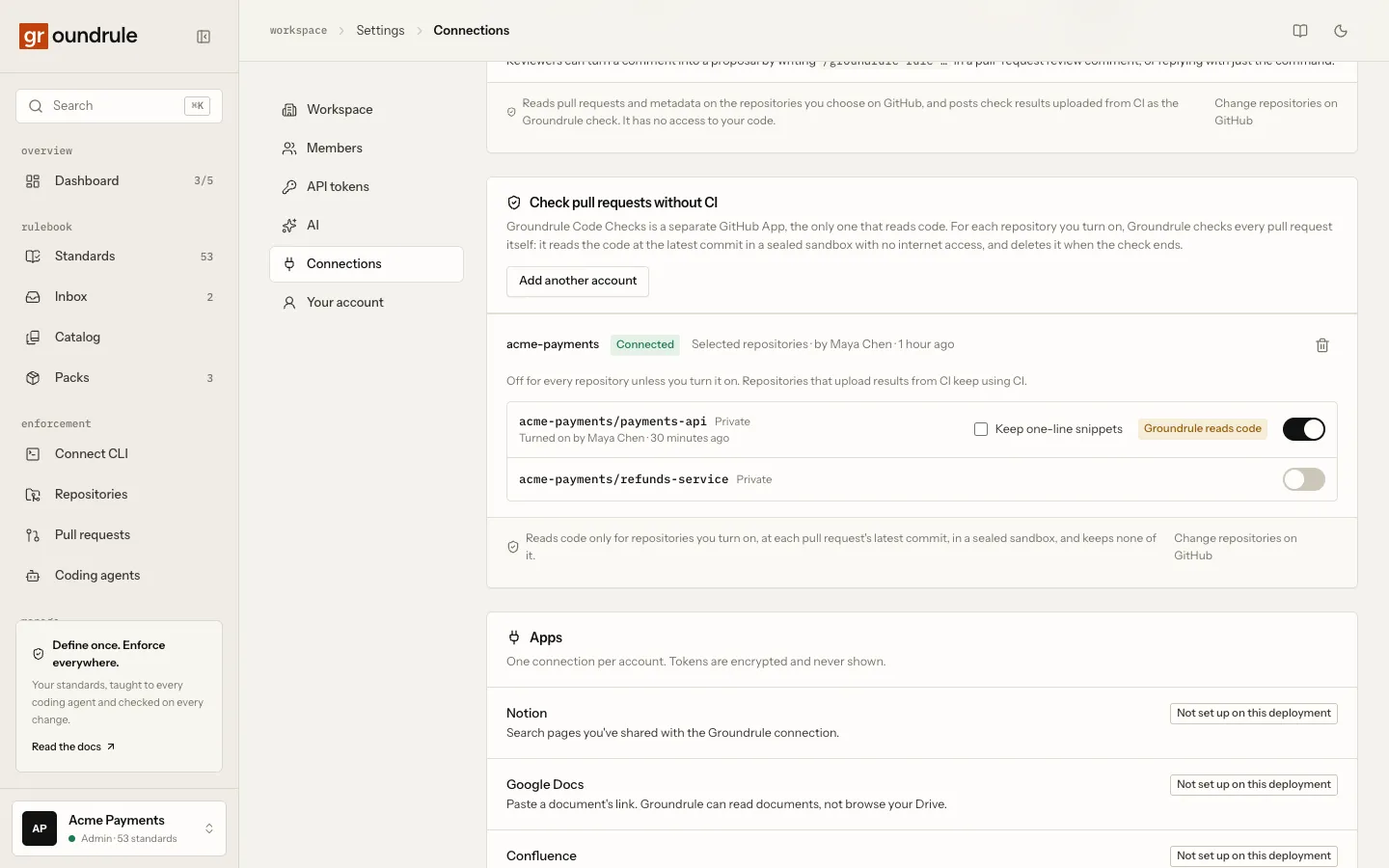
You should see the repository marked Groundrule reads code, with “Turned on by name · time”, and a Keep one-line snippets checkbox you can change later. Under it, “Scanning the default branch…” shows while the first scan runs. The next pull request, or the next push to one, is checked by Groundrule.
If it goes wrong:
- The switch can’t be turned on: you aren’t an admin (“Only admins can turn repositories on or off.”), or the installation lacks Contents (read). Then the panel says “To read code, Groundrule Code Checks needs the Contents (read) permission, approved by the account’s owner on GitHub. Until then, nothing can be turned on.” Choose Review on GitHub.
- “The GitHub App can no longer see this repository, so nothing is read. Turn it off, or add it back on GitHub.”: the repository was removed from Groundrule Code Checks’ selection on GitHub. Use Change repositories on GitHub in the panel.
Each change is recorded in the audit log: github.hosted_enabled, github.hosted_changed and github.hosted_disabled.
The first scan
Section titled “The first scan”When you turn a repository on, Groundrule scans its default branch once. It needs nothing in the repository and no terminal.
- What it reads. The default branch at its latest commit, with the same read-only access, in the same sealed sandbox, under the same limits as a pull request check.
- What it runs. The same observation as
groundrule scan: every rule in the catalog, to show which already pass and what the others find. It doesn’t include your workspace’s own rules; a scan uploaded from the CLI does. - Where the result is. Under Repositories, marked “by Groundrule on GitHub”. The repository’s row in Settings → Connections says “Scanned time” with a link, See what the rules found. Nothing is posted on GitHub, and nothing blocks anyone.
- What is kept. Each rule’s outcome and counts, the stack, and which agent files exist. One-line snippets only if Keep one-line snippets is on for the repository, and never for security rules. Unlike a scan uploaded from the CLI, the text of your agent files, your tool settings and your code owners are not kept.
- When it runs again. Only when an admin chooses Scan again on the repository’s row, at most five times a day per repository (the first scan included). Never on a schedule. It is recorded in the audit log as
github.hosted_scan_requested.
If the scan can’t finish, the row says why. The usual reason is size: “The repository is larger than 100 MB compressed. Scan this repository with the CLI instead.”
Add the configuration
Section titled “Add the configuration”Pull requests are checked without any file in the repository. To make the CLI and coding agents on your team’s machines follow the same workspace, choose Add the configuration on GitHub on the repository’s row. It opens GitHub’s own “new file” page with .groundrule/config.yaml filled in. You review it there and commit it, or open a pull request. Groundrule doesn’t write to your repository.
The agent files (AGENTS.md, CLAUDE.md, Cursor rules) still come from groundrule sync on someone’s machine.
What happens to the code at each pull request
Section titled “What happens to the code at each pull request”A check starts when a pull request is opened, gets new commits, is reopened, or is marked ready for review. Re-run on the Groundrule check in GitHub checks it again. A newer push replaces a check still waiting for the older commit.
-
A token for one repository. Groundrule asks GitHub for a token that can only read this one repository (its code and pull requests), valid for at most an hour. It is used only for this check and never enters the sandbox.
-
The change and the rules. Groundrule reads the pull request’s changed files and lines, its commits’ authors and messages (only to count the coding agents they declare; nothing of them is kept), and the base branch’s
.groundrule/folder (plus any local pack the base configuration extends from elsewhere in the repository). -
The code. It downloads the code at the pull request’s latest commit as one archive, of at most 100 MB.
-
A sealed sandbox. It creates a separate microVM (Vercel Sandbox, Firecracker) in Vercel’s iad1 region (Washington, D.C., USA), with no network at all, DNS included, 2 vCPUs, a 2-minute limit, and no disk snapshots.
-
Unpacking. Inside the sandbox, the archive is unpacked: regular files and folders only. Links and special files are skipped, and so are files over 1 MB. The base branch’s
.groundrule/replaces the pull request’s copy, so a pull request can’t loosen its own check. A repository with no Groundrule configuration on its base branch is checked against the workspace’s rulebook. -
The check. The open-source CLI (
groundrule check, the same engine as in CI) checks the changed lines. Nothing in the repository is run. -
Deletion. The result is read out, and the sandbox, with the code in it, is deleted. Only then is the deletion time recorded.
-
The result. Groundrule signs it with its own key (RFC 0008), so it can be verified offline against the public key at
https://api.groundrule.dev/.well-known/groundrule-keys.json. It is stored like a CI upload, and posted on the pull request by Groundrule Code Checks as the Groundrule check, with blocking findings marked inline. To make it a required check, see Block merges on a failing check.
In production a check takes about 10 seconds end to end, and the code exists in the sandbox for about 6 seconds. Each result shows when the code was read and when it was deleted.
What Groundrule keeps, and never keeps
Section titled “What Groundrule keeps, and never keeps”| What | What is in it |
|---|---|
| The check result | The same as a CI upload: the repository’s name, the commit, the pull request’s number, title, link, branches and author; each standard’s outcome; at most 500 findings with file, line and message; snippets only when Keep one-line snippets is on (redacted, at most 200 characters, never for security rules). Also that Groundrule checked it, when the code was read and deleted, its signature by Groundrule’s key, and the compliance record: the rules in effect as a digest, the exceptions used, and how many commits declare each coding agent (names and counts only) |
| The switch | Which repositories are on, who turned each on and when, and whether snippets are kept |
| A job record per check | The repository’s ID and name, the pull request’s number, the commits, the status and a short reason. No code, no file names |
| Logs | Identifiers and outcomes only. Never code, file names or tokens |
Groundrule never keeps the code, archives, diffs or whole files: not in logs, not in backups, not anywhere else. It never uses them to train anything. No AI feature reads them. See What we store and How Groundrule protects your code.
What each result says
Section titled “What each result says”Each run in the dashboard has a How it was checked panel. See Pull requests.
| How it was checked | What the panel says |
|---|---|
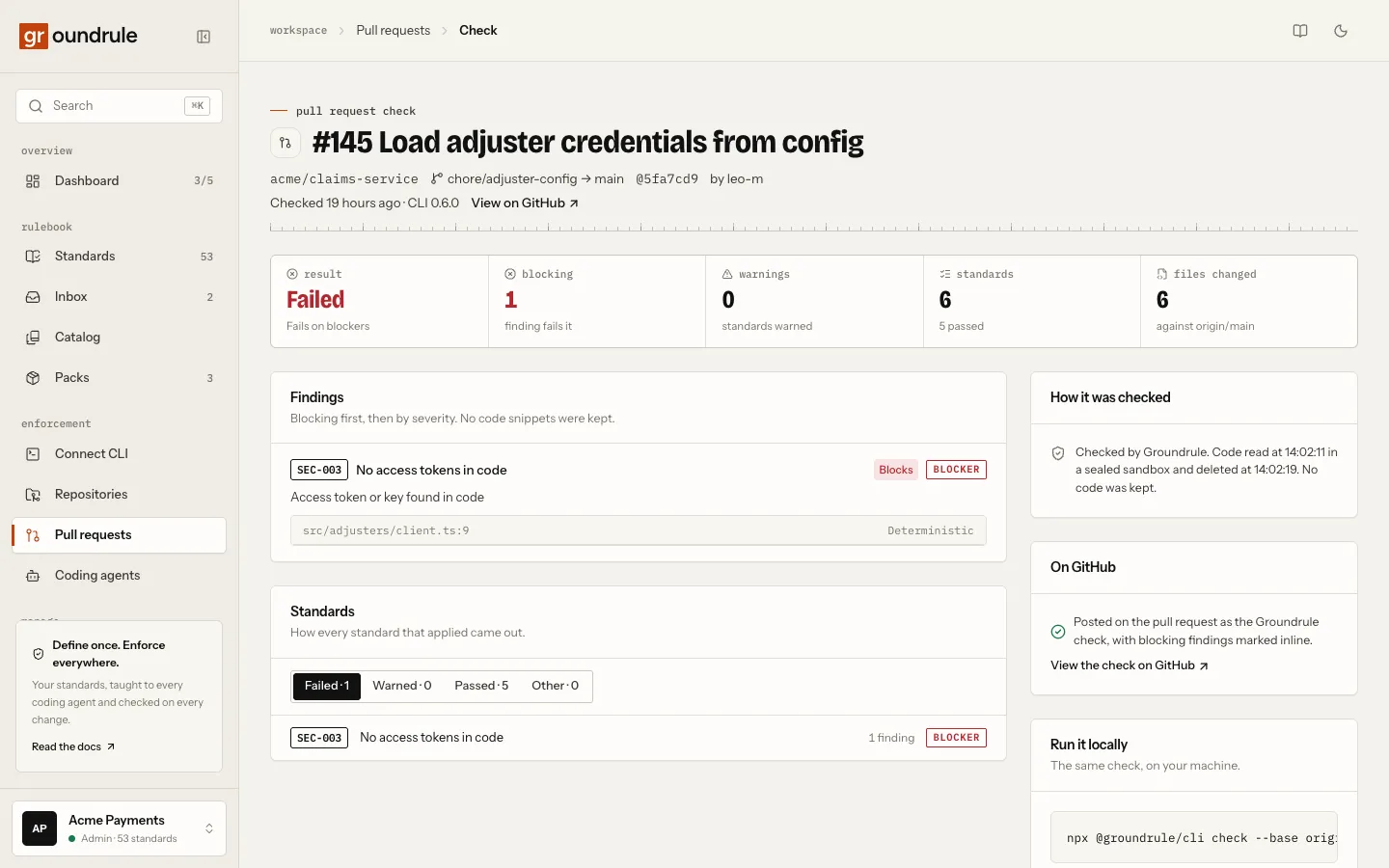
| By Groundrule | “Checked by Groundrule. Code read at 18:30:44 in a sealed sandbox and deleted at 18:30:50. No code was kept.” With snippets on, the last sentence is “Only one-line snippets were kept.” |
| In your CI | “Checked in your CI. Groundrule received only the results, not your code.” When the upload included snippets: “Checked in your CI. Groundrule received only the results, with one-line snippets.” |
When snippets are off, the Findings panel of a run checked by Groundrule also says “No code snippets were kept.”
When it can’t check
Section titled “When it can’t check”The pull request gets a neutral Groundrule check titled “Couldn’t check this pull request”. It says why, and “No code was kept.” This happens when:
- the repository is too large (see Limits);
- its Groundrule configuration can’t be used;
- the check took too long.
When GitHub is unavailable or rate-limiting, the check is retried, up to 3 attempts.
Limits
Section titled “Limits”| Limit | Value |
|---|---|
| Download | 100 MB compressed |
| Unpacked | 500 MB, 50,000 files |
| Files read | 1 MB each; larger files are skipped |
| Changed files listed | 3,000; beyond that, every file is checked |
| Check | 90 seconds (sandbox: 2 minutes) |
| At a time | 2 checks per workspace |
| Per day | 500 checks per workspace, and 5,000 across all workspaces |
When a daily limit is reached, new pull requests aren’t checked until the next day.
Semgrep checks
Section titled “Semgrep checks”Rules with a semgrep check run in the sandbox too: it has Semgrep installed, with its version check and usage reporting turned off. The rule file must be in the repository, as rules: ../semgrep/no-eval.yaml points to a file next to the standard. A registry config such as p/owasp-top-ten is downloaded from the internet, which the sandbox doesn’t have, so that check is reported as not evaluable. See Checks → semgrep.
AI checks
Section titled “AI checks”Rules with an llm check are answered here, and only here, when an admin turns on AI checks on hosted pull requests in Settings → AI (with AI itself on). After the sandbox has checked the code and decided pass or fail, the changed lines of the files each such rule names, with three lines of context and secrets removed, go to the model outside the sandbox, one question per rule and file. What comes back is a finding labelled AI, never blocking: a violation at a confidence of 0.8 or more, a concern below, and the rule’s outcome becomes warned. The run’s pass or fail never changes. A run spends at most $0.50 and stops there; every call is in the AI ledger as checks.ai-review. With the switch off, the rules are reported as not run. See AI and your data.
Not yet
Section titled “Not yet”groundrule sync --check. With no CI step, nothing checks that agent files are up to date. A CI step that runs onlysync --checkdoesn’t upload check results, so it doesn’t stop Groundrule from checking the repository. See Run Groundrule in CI.
Turn it off
Section titled “Turn it off”Turn off the repository’s switch in Settings → Connections. It stops at once: nothing more is read, and checks still queued are skipped. Results already stored stay.
Uninstalling Groundrule Code Checks on GitHub, or disconnecting it in Groundrule (the bin icon next to the account), turns every repository under it off. You should see “Disconnected: nothing more is read. Uninstall Groundrule Code Checks on GitHub too.”
Related
Section titled “Related”- Rules from pull-request reviews: the two GitHub Apps and what each can access
- Pull requests: every checked pull request in one place
- Run Groundrule in CI
- How Groundrule protects your code